8. Opencv application--Target tracking
Locating objects in consecutive frames of a video is called tracking. In OpenCV, you can use traditional target tracking algorithms (such as mean tracking, Kalman filter, etc.) or deep learning-based target trackers (such as MOSSE, CSRT, etc.) Perform target tracking. Deep learning object trackers generally perform better in accuracy and robustness
8.1. Use
Source code launch file path:/opt/ros/noetic/share/opencv_apps/launch
Step 1: Start the camera
xxxxxxxxxxroslaunch astra_visual opencv_apps.launch img_flip:=false
- img_flip parameter: whether the image needs to be flipped horizontally, the default is false.
The [usb_cam-test.launch] file opens the [web_video_server] node by default, and you can directly use the [IP:8080] web page to view images in real time.
Step 2: Start the corner detection function of Opencv_apps
xxxxxxxxxxroslaunch opencv_apps camshift.launch # Target tracking algorithmEach functional case will have a parameter [debug_view], Boolean type, whether to use Opencv to display images, which is displayed by default.
If no display is required, set it to [False], for example
xxxxxxxxxxroslaunch opencv_apps contour_moments.launch debug_view:=FalseHowever, after starting in this way, some cases cannot be displayed in other ways, because in the source code, some [debug_view] is set to [False], which will turn off image processing.
8.2. Display method
- rqt_image_view
Enter the following command to select the corresponding topic
xxxxxxxxxxrqt_image_view
- opencv
The system displays it by default, no need to do anything.
- Web viewing
(Same as under LAN) Enter IP+port in the browser, for example:
xxxxxxxxxx192.168.2.116:8080
For specific IP, use your current virtual machine IP.
8.3. Effect display
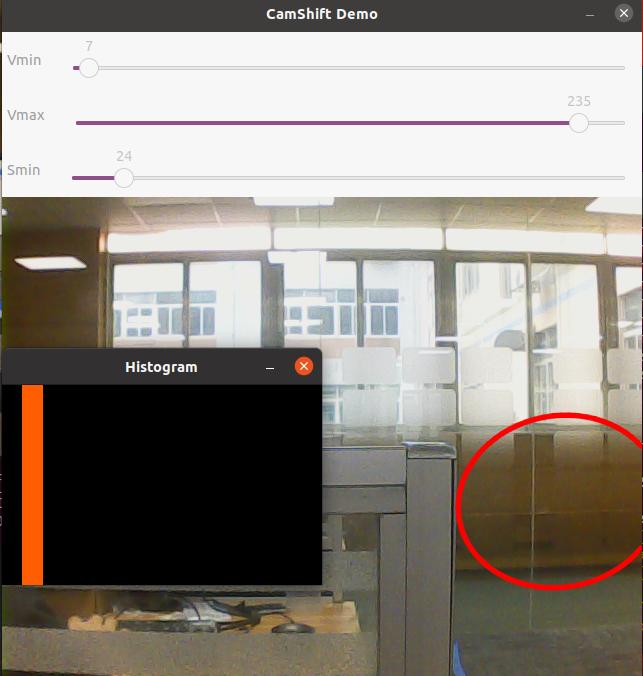
You can see an adjustable window appear on the screen, followed by a red frame.