2. Voice control module port binding
Foreword: Because the ID device numbers of the HUB board and the voice control module are the same, the ID device numbers cannot be bound to them according to the method in the previous tutorial. Not binding ports may cause port conflicts or device identification errors, and the bound ports cannot be changed at will, otherwise the binding will be invalid. This section uses Raspberry Pi as an example to demonstrate.
2.1. Bind HUB board device number
xxxxxxxxxxll /dev/ttyUSB*ll /dev/myserialll /dev/rplidar
First, without connecting to the voice control board, the radar and PCB boards available are ttyUSB0 and ttyUSB1
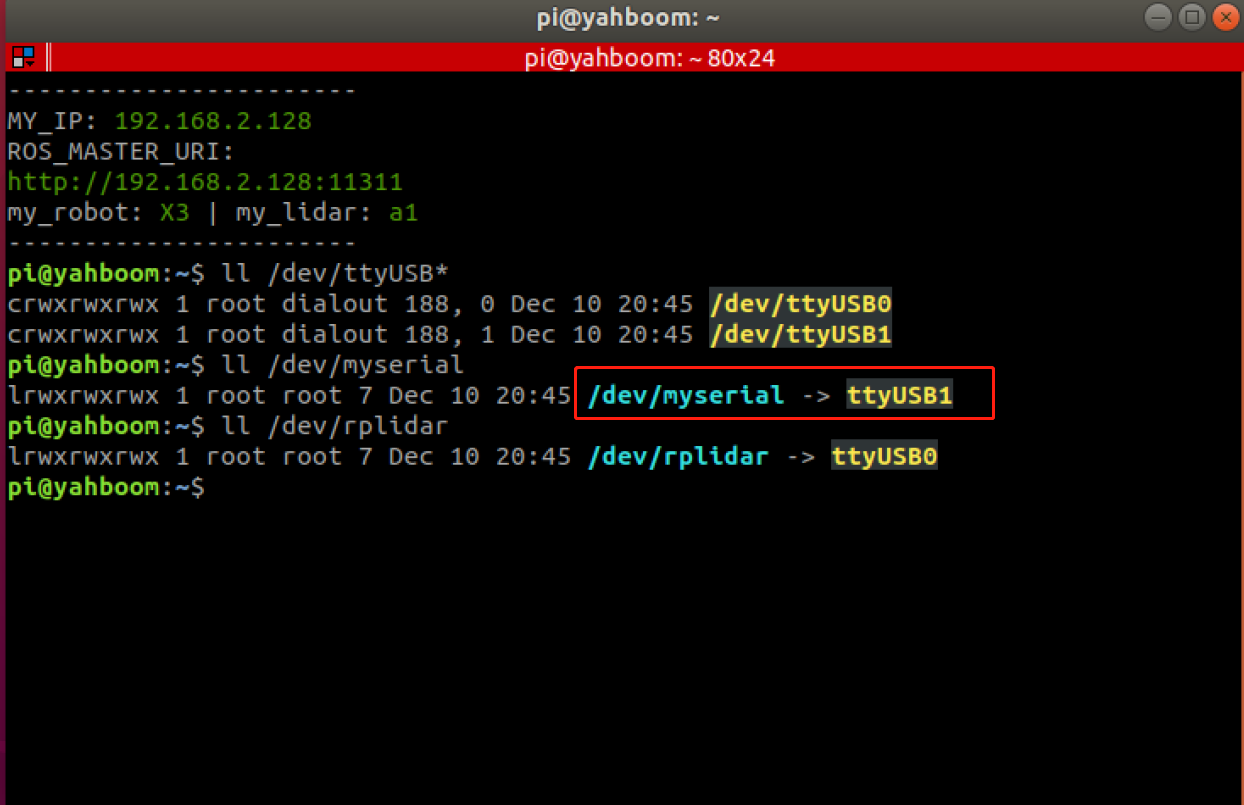
Then, we first check the port information of the HUB board, mainly to check the device path information and enter the terminal
xxxxxxxxxxudevadm info --attribute-walk --name=/dev/ttyUSB1 |grep devpath
Get the following information, the red box shows the path information of the device,

Then, we modify the /etc/udev/rules.d/usb.rules file, first bind the port number of the HUB board, and enter it in the terminal.
xxxxxxxxxxsudo gedit /etc/udev/rules.d/usb.rulesFind the myseial column in the file, as shown in the picture below, and add the content.
xxxxxxxxxxATTRS{devpath}=="1.4"
Exit after saving, enter the following three commands in the terminal to reload the device
xxxxxxxxxxsudo udevadm triggersudo service udev reloadsudo service udev restart
2.2. Bind the speech recognition board port number
Enter the following command in the terminal to view the device number,
xxxxxxxxxxll /dev/ttyUSB*
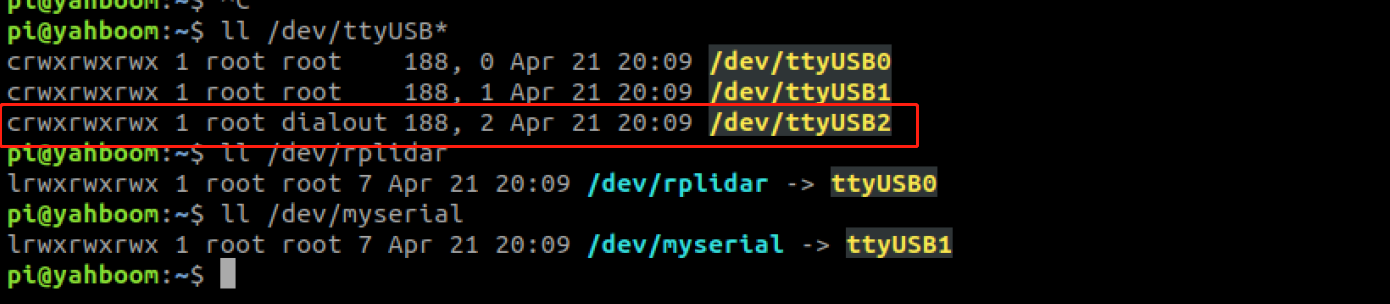
Here we find that the system recognizes the voice board as /dev/ttyUSB2, then we enter the following command to view the device path information
xxxxxxxxxxudevadm info --attribute-walk --name=/dev/ttyUSB2 |grep devpath
Get the following picture,

Then, we modify the /etc/udev/rules.d/myspeech.rules file, bind the port number of the voice board, and enter it in the terminal,
xxxxxxxxxxsudo gedit /etc/udev/rules.d/myspeech.rules
Add content as shown below,
xxxxxxxxxxKERNEL=="ttyUSB*",ATTRS{devpath}=="1.3",ATTRS{idVendor}=="1a86",ATTRS{idProduct}=="7523",MODE:="0777",SYMLINK+="myspeech"Exit after saving, enter the following statement in the terminal to reload the system device
xxxxxxxxxxsudo udevadm triggersudo service udev reloadsudo service udev restart
2.3. Testing
Finally, the physical connection diagram of the port after binding is shown in the figure below,
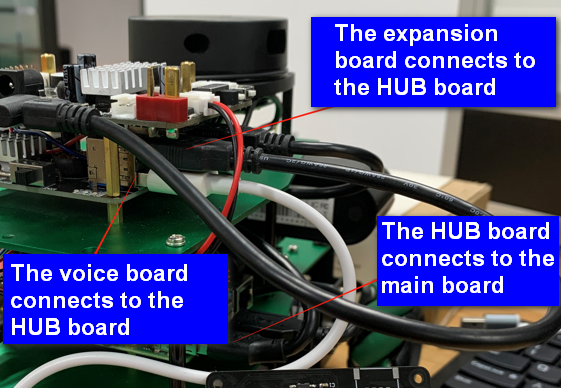
Note where they are wired. This is fixed after binding. Do not change the position at will later, otherwise the system will not be able to recognize the device.
xxxxxxxxxxpython3 voice_ctrl_test.py
After successfully connecting the voice module. "Speech Serial Opened! Baudrate=115200" will be displayed on the terminal.
After saying "Hello, Xiaoya" to the module, the voice reply is "Yes".
Unplugging the voice control module will cause the program to exit with an error.
If the actual running result is consistent with the above three points, it means the device is successfully bound.
Note: The bound HUB and voice board cannot be plugged into other ports, otherwise the device number will not be recognized.