Serial port configuration WiFi instructions(ROS)
Serial port configuration WiFi instructions(ROS)The module needs to be connected to the USB TTL moduleSerial port configuration1.Configure wifi instructions in STA mode(The mode of connecting to the local area network)2.Configure WiFi instructions in AP mode(Module spontaneous hotspot mode)3.Configure WiFi mode4.Other instructions5.Instructions for configuring ROS IP
The module needs to be connected to the USB TTL module
| usbttl | camera |
|---|---|
| RX | TX |
| TX | RX |
| GND | GND |
| VCC | VCC |
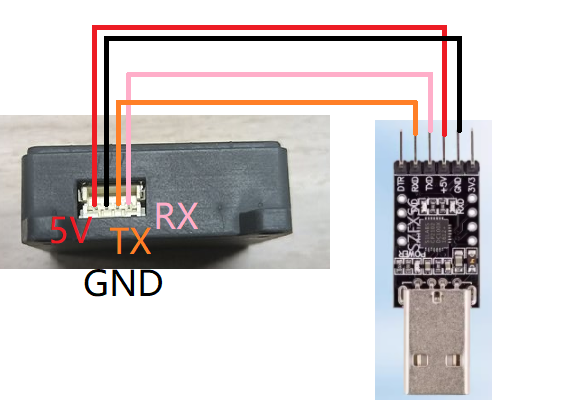 |
Serial port configuration
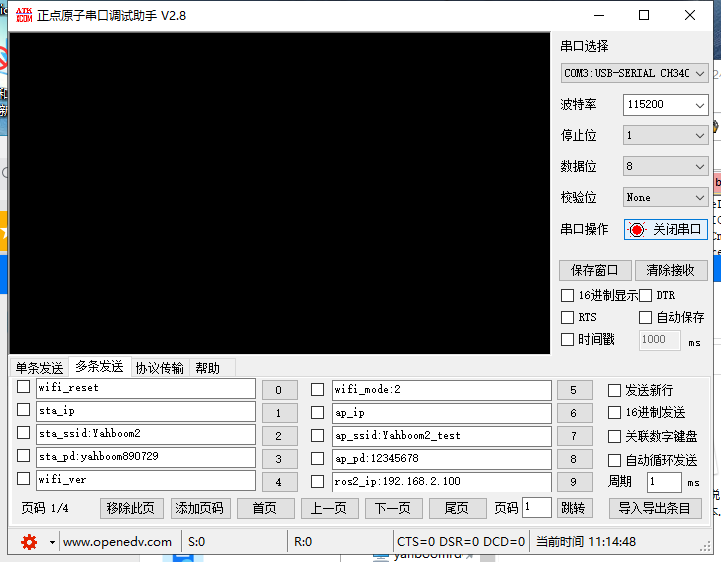
Baud rate:115200、No Parity 、No hardware flow control、1 stop bit
If using a serial port assistant configuration,When sending instructions, it is necessary to Remove automatically send new lines(Additional bit)
As shown in the figure:
1.Configure wifi instructions in STA mode(The mode of connecting to the local area network)
| Command | explain | example | notes |
|---|---|---|---|
| sta_ssid: | The name of the connected WiFi | sta_ssid:yahboom | yahboom:Connected WiFi |
| sta_pd: | WiFi password for connection | sta_pd:12345678 | 12345678:WiFi password for connection |
matters needing attention
- Both sta_ssid and sta_pd must be followed by an English character punctuation mark.
- When the wifi to be connected does not have a password, send sta_pd: once in this way.
- If the above command is successful, it will return OK information. If there is no information, check the serial port wiring.
- When sending the sta_ssid: command like this,There will be fail, ssid is null Characters of, indicating that the connection wifi name cannot be empty.
- The sending of instructions can be all uppercase or all lowercase
- The name and password of the WiFi cannot exceed 30 characters in length, otherwise the configuration will fail
- WiFi names and passwords cannot have Chinese characters
- The wifi password will automatically reset every time a new change occurs. If only the wifi name is changed, manual power-off reset is required.
2.Configure WiFi instructions in AP mode(Module spontaneous hotspot mode)
| Command | explain | example | notes |
|---|---|---|---|
| ap_ssid: | Set WiFi name | ap_ssid:my_wifi | my_wifi:Set WiFi name |
| ap_pd: | Set WiFi password | sta_pd:12345678 | 12345678:Set WiFi password |
matters needing attention
- Both ap_ssid and ap_pd must be followed by an English character punctuation mark
- When the wifi to be set does not have a password, simply send ap_pd: once.
- If the above command is successful, it will return OK information. If there is no information, check the serial port wiring
- When the ap_ssid: command is sent in this way, it will return fail, AP_Name is null The character indicates that the WiFi name cannot be empty when set
- The sending of instructions can be all uppercase or all lowercase
- The name and password of the WiFi cannot exceed 30 characters in length, otherwise the configuration will fail
- WiFi names and passwords cannot have Chinese characters
- The wifi password will automatically reset every time a new change occurs. If only the wifi name is changed, manual power-off reset is required
3.Configure WiFi mode
| Command | explain | example | notes |
|---|---|---|---|
| wifi_mode: | Configure WiFi mode | wifi_mode:2 | 0:AP 1:STA 2:AP+STA |
matters needing attention
- wifi_mode Be sure to add an English character punctuation mark after it.
- wifi_mode: Only 3 modes can be set in total. If a negative number is passed in, it defaults to AP mode. If a number is greater than 2, it defaults to AP+STA mode
4.Other instructions
| Command | explain | example | return |
|---|---|---|---|
| sta_ip | Obtain the IP address of the sta mode | sta_ip | Return the IP address connected to the local area network(eg:sta_ip:192.168.2.199) |
| ap_ip | Obtain the IP address of the ap mode | ap_ip | Return the IP address of the self enabled WiFi mode(eg:ap_ip:192.168.4.1) |
| wifi_reset | Restore factory settings | wifi_reset | Reset_OK |
| wifi_ver | Obtain the version of WiFi firmware | wifi_ver | YAHBOOM VerSion:2.0.5 |
matters needing attention
- The sending of instructions can be all uppercase or all lowercase
- If the above command is successful, there will be corresponding information for the return value. If there is no information, check the serial port wiring
- wifi_reset:Configure WiFi mode to AP+STA mode,The wifi name of AP is Yahboom_ESP32_WIFI,no password,Automatic reset.
5.Instructions for configuring ROS IP
| Command | explain | example | notes |
|---|---|---|---|
| ros2_ip: | Host proxy to connect to | ros2_ip:192.168.2.105 | 192.168.2.105:It is the IP address of the proxy host |
matters needing attention
- A proxy host is a system with an ROS2 (humble) environment that is unbuttoned.
- The sending of instructions can be all uppercase or all lowercase.
- ros2_ip:It must be followed by an English character punctuation mark.
- The connected host IP must be in the same network segment as the wifi connected to ESP32
- The startup of ROS2 can only be achieved through STA mode or dual mode coexistence mode, and cannot only use AP hotspot mode, otherwise the ROS system will not be implemented
- The port of the proxy is 9999 , The command to start on the host terminal is as follows:
docker run -it --rm -v /dev:/dev -v /dev/shm:/dev/shm --privileged --net=host microros/micro-ros-agent:humble udp4 --port 9999 -v4
- domainid:20 The default domain ID of ROS2 is 0. To communicate with the host using ROS2 system, the domain ID needs to be changed to 20