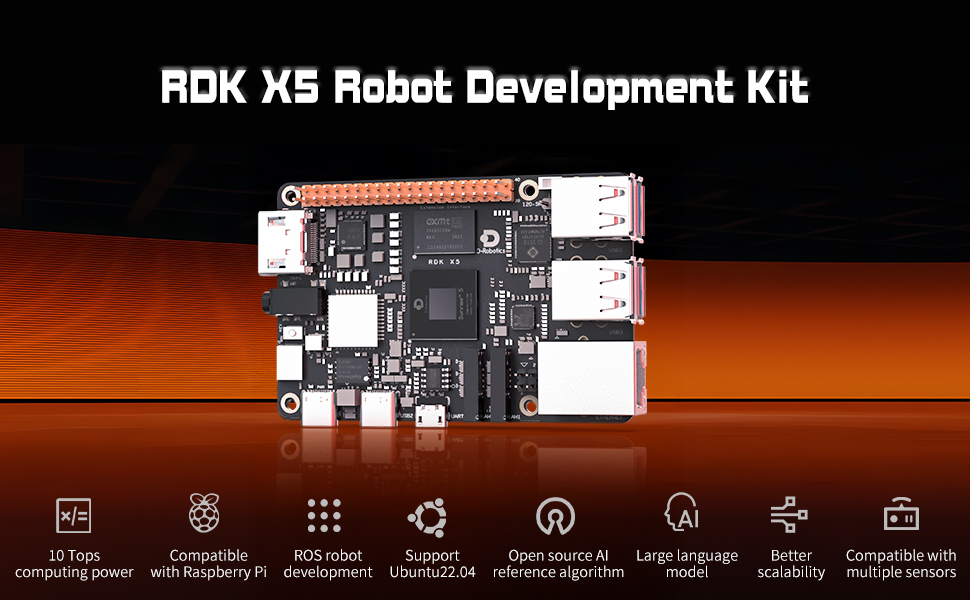
1.Introduction to RDK X5 board
2.Basic settings course
- 1.Network configuration
- 2.Remote login
- 3.Update system
- 4.srpi-config user guide
- 5.config. txt configuration file
- 6.Self-startup setting
- 7.RDK exclusive command usage
- 8.Linux command usage
- 9.GPIO readwrite operation
- 10.Image classification algorithm
- 11.Use USB camera
- 12.Use MIPI camera
- 13.Binocular camera depth algorithm
3.Basic development course
- 1.Camera image display
- 2.Local save camera images
- 3.Camera image encoding
- 4.Video file decoding
- 5.RTSP streaming decoding
- 6.VPS scaling example
- 7.Target detection algorithm-fcos
- 8.Target detection algorithm-YOLOv5s
- 9.Using CAN
- 0.ReadMe
- 1.Using GPIO
- 2.Using PWM
- 3.Using Serial port
- 4.Using I2C
- 5.Using SPI
C language
Python
4.ROS expansion board
- 0.Bind PCB port devices
- 1.Install the Rosmaster driver library
- 2.Buzzer whistle
- 3.Control PWM servo
- 4.RGB colorful light bar special effects display
- 5.Control the forward and reverse rotation of the motor
- 6.Control the movement of the robot
- 7.Control Serial Servo
- 8.Update firmware of expansion board
- 9.Drive OLED
- 1.Function package usage process
- 2.Robot information release
- 3.Robot keyboard control
- 4.Robot state estimation
- 5.Robot calibration
- 6.URDF model
Python basic control
ROS2 robot control
5.T-MINI PLUS Lidar
6.AI VIEW Depth camera
- 1.AI VIEW Depth camera use
- 2.Camera internal parameter calibration
- 3.Color tracking
- 4.KCF object tracking
- 1.Hand detection
- 2.Attitude detection
- 3.Overall inspection
- 4.Facial detection
- 5.Facial recognition
- 1.ROS+opencv application
- 2.QR code creation and recognition
- 3.AR vision
AI VIEW Depth camera use
Mediapipe functions
OpenCV series courses
7.Offline AI model course
- 0.AI-Large-Model-Image-Description
- 1.AI-Large-Model-Environment-Deployment
- 2.LLM-Conversation-Platform-Installation
- 3.Meta-AI-Llama3.2-Model
- 4.Alibaba-Cloud-Qwen3-Model
- 5.Microsoft-Phi-4-mini-Model
- 6.DeepSeek-DeepSeek-R1-Model
- 7.Alibaba-Cloud-Qwen2.5vl-Vision-Multimodal-Model
- 8.Google-Gemma3-Vision-Multimodal-Model
- 9.Llava-Vision-Multimodal-Model
- 10.MiniCPM-V-Vision-Multimodal-Model
- 11.Multimodal-Text-to-Image-Application
- 12.Multimodal-Video-Analysis-Application
- 13.Multimodal-Visual-Understanding-Application
- 14.Multimodal-Visual-Localization-Application
- 15.Multimodal-Table-Scanning-Application
- 16.Multimodal-Autonomous-Agent-Application
- 0.Voice-Interaction-Hardware-Connection-Must-Read
- 1.Offline-Speech-to-Text-ASR
- 2.Offline-Text-to-Speech-TTS
- 3.AI-Large-Model-Voice-Interaction
- 4.Multimodal-Visual-Understanding-Voice-Interaction
- 5.Multimodal-Text-to-Image-Application
- 6.Multimodal-Video-Analysis-Application
- 7.Multimodal-Visual-Localization-Application
- 8.Multimodal-Table-Scanning-Application
- 9.Multimodal-Autonomous-Agent-Application
- 10.AI-Large-Model-Offline-Voice-Assistant
Offline-LLM-Text-Interaction
Offline-LLM-Voice-Interaction
8.Online AI model course
- 1.OpenRouter-Large-Model-API-Aggregation-Platform
- 2.Multimodal-Visual-Understanding-Application
- 3.Multimodal-Visual-Localization-Application
- 4.Multimodal-Table-Scanning-Application
- 5.Multimodal-Autonomous-Agent-Application
- 0.Voice-Interaction-Hardware-Connection-Must-Read
- 1.Online-Speech-to-Text-ASR
- 2.Online-Text-to-Speech-TTS
- 3.AI-Large-Model-Voice-Interaction
- 4.Multimodal-Visual-Voice-Interaction
- 5.Multimodal-Visual-Localization-Application
- 6.Multimodal-Table-Scanning-Application
- 7.Multimodal-Autonomous-Agent-Application
- 8.AI-Large-Model-Online-Voice-Assistant
Online-LLM-Text-Interaction
Online-LLM-Voice-Interaction
9.YOLO26 tutorials
10.OpenClaw Deployment and Basic Usage
- 01.OpenClaw Quick Start
- 02.OpenClaw Deployment
- 03.OpenClaw WhatsApp Plugin Application
- 04.OpenClaw WebChat Interaction
- 05.OpenClaw TUI Interaction
- 06.OpenClaw Tools Introduction
- 07.OpenClawGate Gateway User Manual
- 08.OpenClaw Features Overview
- 09.OpenClawClawHub Introduction (Skill Installation)
- 10.OpenClaw Application - File Management
- 11.OpenClaw Application - Camera
- 12.OpenClaw Application - Browser Control
- 13.OpenClaw Application - Script Execution
- 14.OpenClaw Application - AI Programming (Peripheral & GPIO Control)
- 15.OpenClaw Application - Dedicated AI Assistant
- 16.OpenClaw Web Search Capability Configuration
11.OpenClaw Advanced Development
- 01. Peripheral Hardware Configuration
- 02. OpenClaw API-KEY Configuration
- 03. OpenClaw Model Switching
- 04. OpenClaw Prompts
- 05. AI Voice Interaction Configuration
- 06. Three Dialogue Configuration Tests
- 1. Servo Control
- 2. RGB Strip
- 3. OLED Display
- 4. Temperature and Humidity Sensor
- 5. Camera Application
- 6. AI Script Peripheral Control
- 1. Plant Care Assistant
- 2. AI Calorie Estimation
- 3. AI Rock Paper Scissors Game
- 4. AI Pet
- 5. AI Weather Station
- 6. Temperature and Humidity Dashboard
- 7. Scheduled Tasks
1.Preparation Before Use
2.OpenClaw AI Programming Peripheral Control
3.OpenClaw Peripheral Integration Applications
12.ROS2 basic course
- 1.Introduction to ROS2
- 2.ROS2 install Humble
- 3.ROS2 development environment
- 4.ROS2 workspace
- 5.ROS2 function package
- 6.ROS2 node
- 7.ROS2 topic communication
- 8.ROS2 service communication
- 9.ROS2 action communication
- 10.ROS2 custom interface message
- 11.ROS2 parameter service case
- 12.ROS2 meta-function package
- 13.ROS2 distributed communication
- 14.ROS2 DDS
- 15.ROS2 time related API
- 16.ROS2 common command tools
- 17.ROS2 rviz2 use
- 18.ROS2 rqt toolbox
- 19.ROS2 Launch startup file configuration
- 20.ROS2 recording and playback tool
- 21.ROS2 URDF model
- 22.ROS2 Gazebo simulation platform
- 23.ROS2 TF2 coordinate transformation
Download
