5. Voice control color tracking
5. Voice control color tracking5.1. Function description 5.2. Steps5.2.1. Function package path 5.2.2. Start 5.2.3. Topic graph5.3. Code analysis5.3.1. colorHSV5.3.2. colorTracker5.4. Voice module communication protocol
Before running this program, it is necessary to bind the port number of the voice board and the port number of the ROS extension board on the host computer; When entering the docker, you need to mount the voice board to recognize the voice board in the docker.
5.1. Function description
Voice control robot open and close tracking red/blue/green/yellow color function. The R2 button on the handle can cancel/enable this function at any time.
5.2. Steps
5.2.1. Function package path
Enter the docker, The location of the function source code is located
xxxxxxxxxx/root/yahboomcar_ros2_ws/yahboomcar_ws/src/yahboomcar_voice_ctrl/yahboomcar_voice_ctrl/Voice_Ctrl_colorTracker.py/root/yahboomcar_ros2_ws/yahboomcar_ws/src/yahboomcar_voice_ctrl/yahboomcar_voice_ctrl/Voice_Ctrl_colorHSV.py5.2.2. Start
Enter the docker, according to the actual vehicle type and radar type, terminal input
x
#Start handle controlsros2 run yahboomcar_ctrl yahboom_joy_X3ros2 run joy joy_node#Start voice-controlled color trackingros2 run yahboomcar_voice_ctrl Voice_Ctrl_colorHSV ros2 run yahboomcar_voice_ctrl Voice_Ctrl_colorTracker#Start rosmasterros2 run yahboomcar_voice_ctrl Voice_Ctrl_Mcnamu_driver_X3#Start depth camera,get depth imageros2 launch astra_camera astra.launch.xml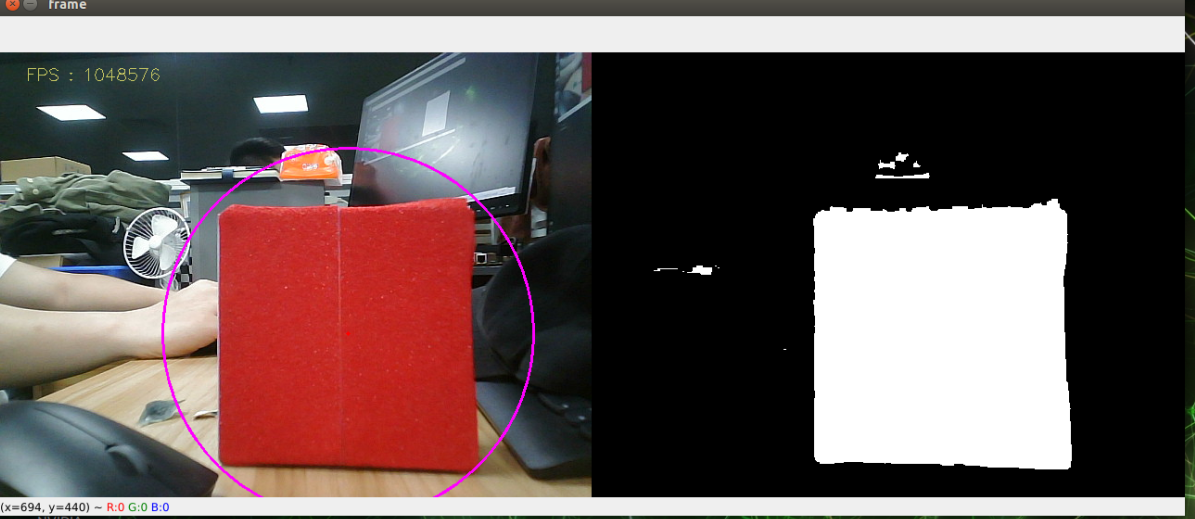
(Take tracking red for example)
After the above program is run, we say "Hi Yahboom" to wake up the voice module, until it replies "Hi, i'm here", indicating that the module has been woken up.
We can say "red following" and it will reply "OK, I found the red ".
Next, we press the R2 key on handle, then ROSMASTER starts following red object.
If you want to cancel this color tracking function, say "stop following", it replies "OK, it has been stoped". ROSMASTER will cancel this function.
When the robot is moving, you can pause the robot by pressing the R2 key on handle again.
5.2.3. Topic graph
Docker terminal input
xxxxxxxxxxros2 run rqt_graph rqt_graph
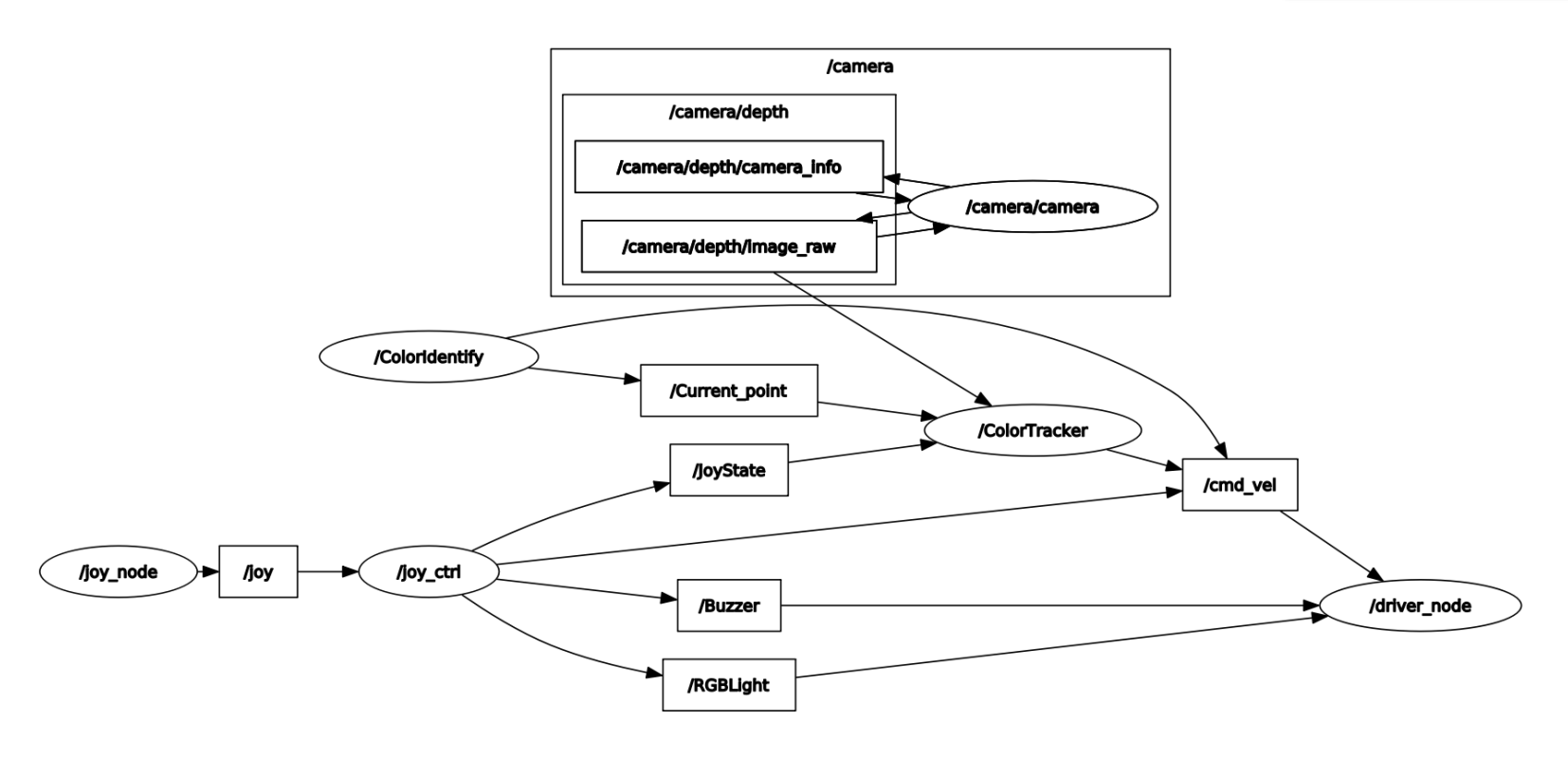
Dynamic parameter adjusters are also available
xxxxxxxxxxros2 run rqt_reconfigure rqt_reconfigure
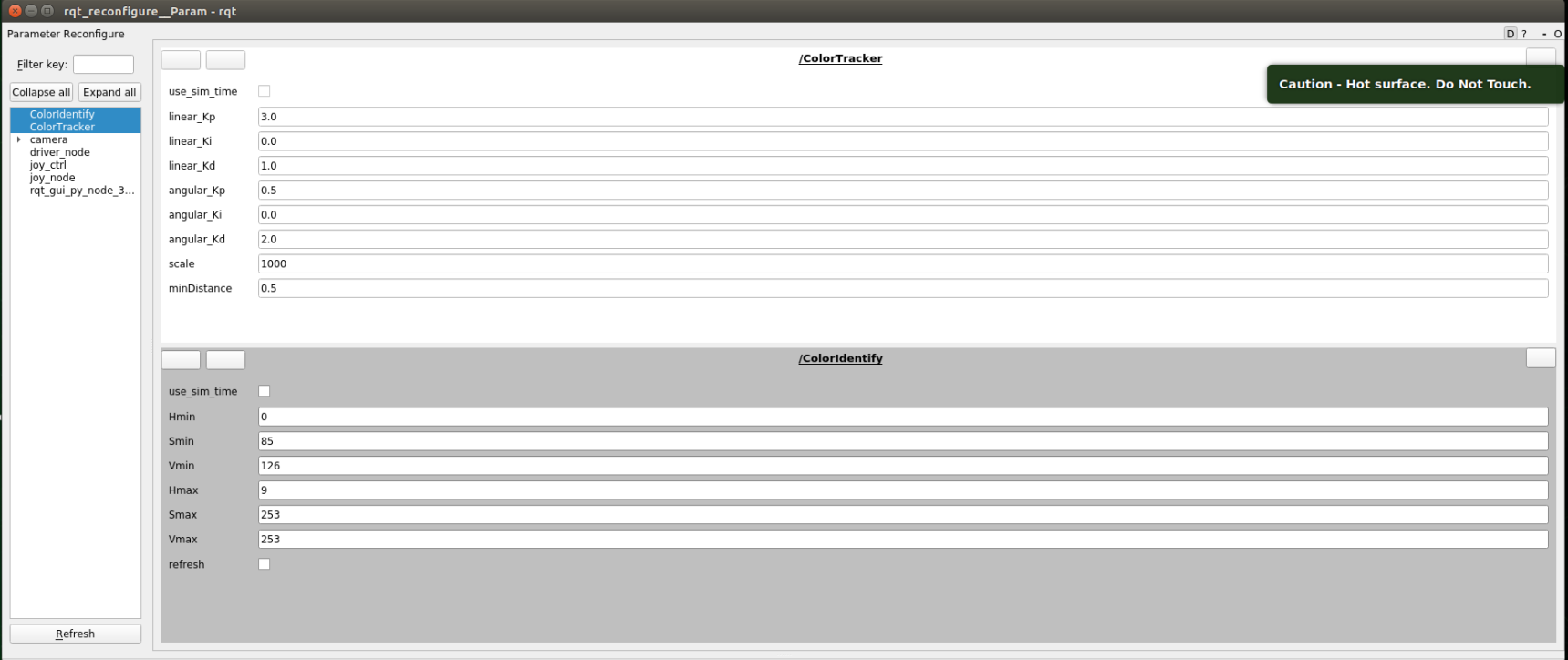
Modified parameter:
colorHSV is mainly responsible for image processing and can adjust the value of HSV
colorTracker is mainly responsible for calculating speed, adjustable speed and distance related parameters
| colorHSV | colorTraker |
|---|---|
| Hmin | linear_Kp |
| Smin | linear_Ki |
| Vmin | linear_Kd |
| Hmax | angular_Kp |
| Smax | angular_Ki |
| Vmax | angular_Kd |
| refresh | minDistance |
Notes: The camera is very sensitive to light, and if it is in a different lighting environment, it will cause inaccurate color recognition. So we need to re-calibrate the colors for red, green, yellow, and blue according to the current lighting environment.
5.3. Code analysis
5.3.1. colorHSV
This part mainly analyzes voice instructions, as well as image processing, and finally publishes the center coordinates
x
#Define a publisher,Publish the center coordinates of the detected objectself.pub_position = self.create_publisher(Position,"/Current_point", 10)#Import the voice driver libraryfrom Speech_Lib import Speech#Create a voice control objectself.spe = Speech()#The following is to obtain instructions to judge the recognition results,load the corresponding HSV valuecommand_result = self.spe.speech_read()self.spe.void_write(command_result)if command_result == 73 :self.model = "color_follow_line"print("tracker red")self.hsv_range = [(0, 175, 149), (180, 253, 255)]#process image,calculate the center coordinates of the detected object,enter execute function,publishing center coordinatergb_img, binary, self.circle = self.color.object_follow(rgb_img, self.hsv_range)if self.circle[2] != 0: threading.Thread( target=self.execute, args=(self.circle[0], self.circle[1], self.circle[2])).start()if self.point_pose[0] != 0 and self.point_pose[1] != 0: threading.Thread( target=self.execute, args=(self.point_pose[0], self.point_pose[1], self.point_pose[2])).start()5.3.2. colorTracker
This part receives the topic data and depth data of the center coordinates, then calculate the speed and publish it to the rosmaster
x
#Define a subscriber,subscribe to depth informationself.sub_depth = self.create_subscription(Image,"/camera/depth/image_raw", self.depth_img_Callback, 1)#Define a subscriber,subscribe to center coordinate informationself.sub_position = self.create_subscription(Position,"/Current_point",self.positionCallback,1)#callback functiondef positionCallback(self, msg)#Gets the center coordinate valuedef depth_img_Callback(self, msg) #Get depth information#Pass in the X-value of the center coordinate and the depth information,then calculated speed publish to the rosmasterdef execute(self, point_x, dist)5.4. Voice module communication protocol
| function word | Speech Recognition Module Results | Voice broadcast content |
|---|---|---|
| yellow following | 72 | OK, I found the yellow |
| red following | 73 | OK, I found the red |
| green following | 74 | OK, I found the green |
| follow this color | 75 | OK, I found this color |
| stop following | 76 | OK, it has been stoped |