9 External interface experimental
9 External interface experimental9.1 the experimental goals 9.2 experimental procedure 9.3 experimental results 9.4 the experiments are summarized 9.5、Send and receive data using UART module
9.1 the experimental goals
This lesson mainly learns the function of microPython using external serial port communication.
The reference code path for this experiment is: CanMV\03-Hardware\serial.py
Since the current built-in ybserial module only supports sending data and does not support reading data, if you need the function of reading data, please refer to 9.5 to use the uart module to send and receive data.
9.2 experimental procedure
The factory firmware of the module has been integrated with the external serial port control module. If you have downloaded other firmware, please burn it back to the factory firmware before doing the experiment.
After using the matching wire connection, the corresponding color of the external pin is:
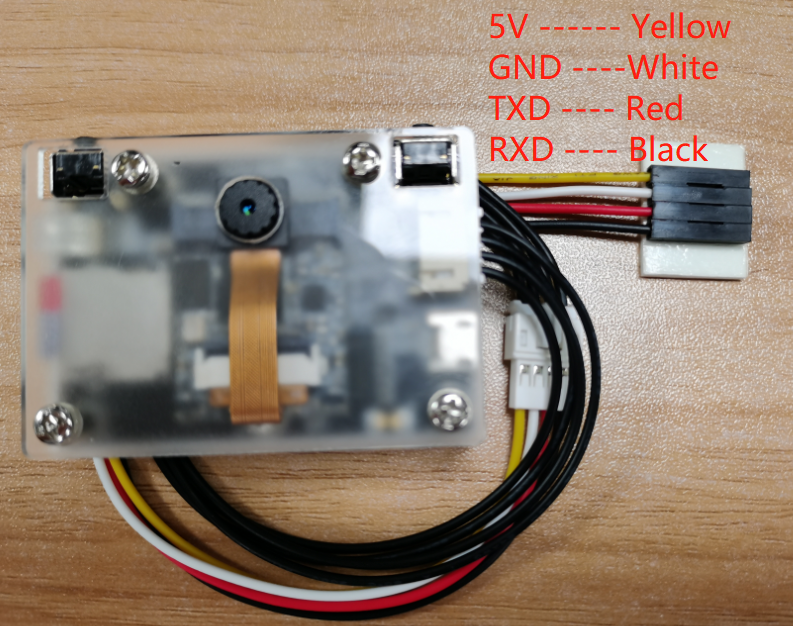
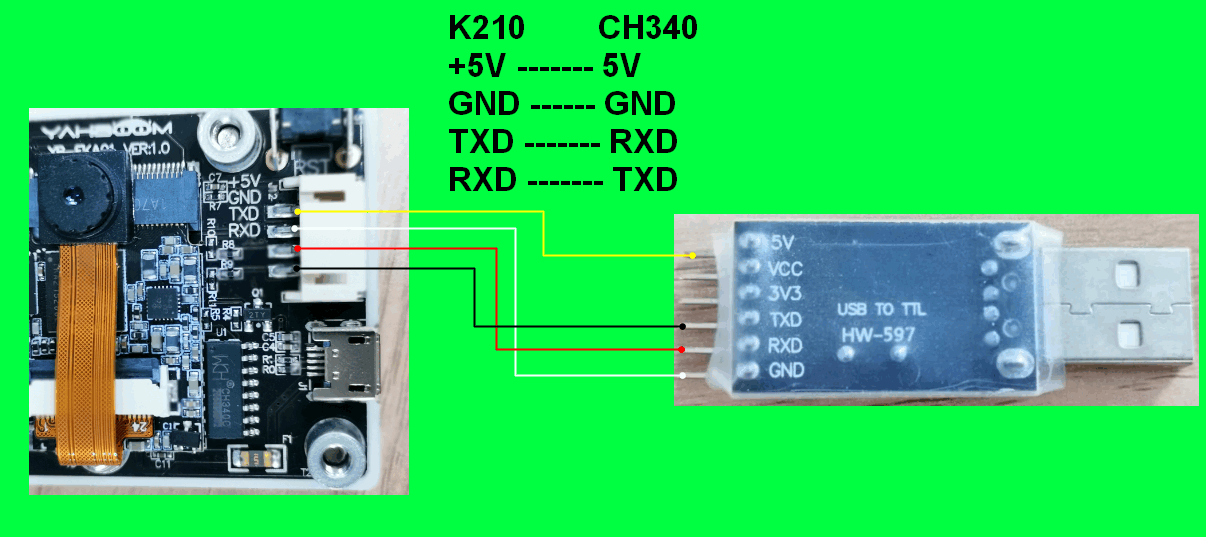
The CH340 module needs to be used to connect the external interface of the module, and the pin connection is shown in the following figure.
Import ybserial from modules.
from modules import ybserialimport time
Create an object of ybserial and call it serial
xxxxxxxxxxserial = ybserial()
Through the external serial port character 1 and newline character.
xxxxxxxxxxserial.send_byte(0x31)serial.send_byte(0x0D)array = [0x30, 0x31, 0x32, 0x33, 0x0D]serial.send_bytearray(array)
Wherein, serial.send_byte(data):Means to send one byte of data through the external serial port. The 'data' parameter ranges from 0-255.
serial.send_bytearray(array):Send a byte array through the external serial port. The argument 'array' is an array of bytes.
Send the "Hello Yahboom" string through the external serial port.
xxxxxxxxxxtext = 'Hello Yahboom'num = serial.send(text)print("num:", num)
Wherein, num = serial.send(string):Indicates sending a string through an external serial port, and the return value is the length of the string
Create two command strings to send alternately, with count representing the number of times to send.
xxxxxxxxxxnum = 0count = 0CMD_1 = "$A#"CMD_2 = "$BB#"
Create a new while loop, the count is automatically added and the data is sent once every second. When the count is odd, the command CMD_1 is sent, and when the count is even, the command CMD_2 is sent.
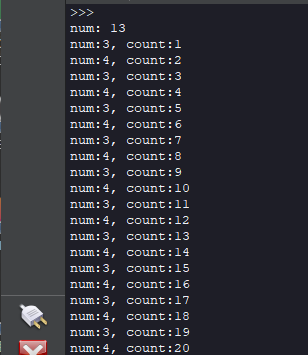
xxxxxxxxxxwhile True:time.sleep_ms(1000)count = count + 1if count % 2 == 1:num = serial. send(CMD_1)else:num = serial. send(CMD_2)print("num:%d, count:%d" % (num, count))
9.3 experimental results
Connect the K210 module to the computer through the microUSB data cable, CanMV IDE click the connect button, after the connection is completed click the Run button to run the routine code. You can also download the code as main.py and run it in the K210 module.
Open the IDE at the bottom of the Serial TerminalThat you can see every second print data once.
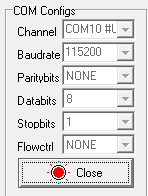
Open the CH340 is connected to the serial port assistant, serial assistant configured as follows: baud rate 115000, no parity bit, 8 bits data, 1 bit stop, no flow control.
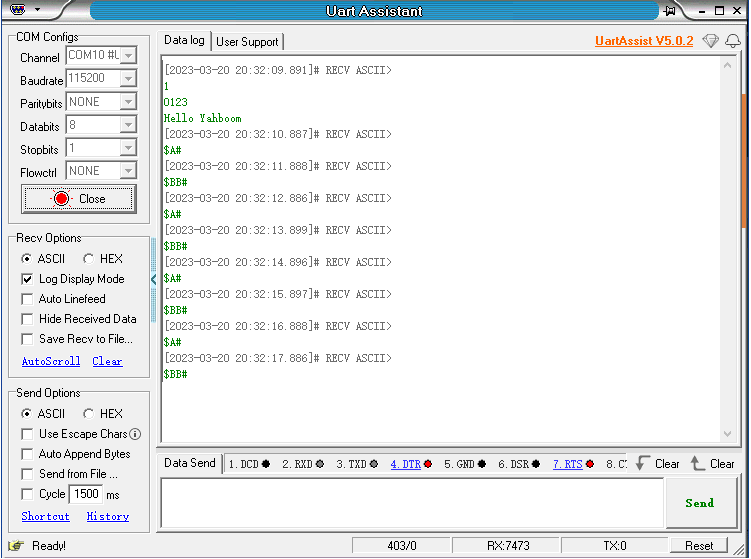
You can see the serial port assistant every 1 second received sentence of command.
9.4 the experiments are summarized
Use CanMV IDE, with the factory firmware write a good MicroPython syntax, the default already configured an external serial port, you'll need to initialize the serial port object can be used.
CH340 module needs to be manually connected to the line, insert the computer will produce another port, you need to and K210 port distinguish.
9.5、Send and receive data using UART module
The reference code path is: CanMV\03-Hardware\yb_uart.py
The ybserial module also calls the function of the UART module. To avoid conflicts, please do not use these two modules in the same program at the same time.
Code example:
from fpioa_manager import fmfrom machine import UARTimport time# binding UART2 IO:6->RX, 8->TXfm.register(6, fm.fpioa.UART2_RX)fm.register(8, fm.fpioa.UART2_TX)yb_uart = UART(UART.UART2, 115200, 8, 0, 0, timeout=1000, read_buf_len=4096)write_bytes = b'$hello yahboom#\n'last_time = time.ticks_ms()try:while True:# send data per 500msif time.ticks_ms() - last_time > 500:last_time = time.ticks_ms()yb_uart.write(write_bytes)# read and print dataif yb_uart.any():read_data = yb_uart.read()if read_data:print("read_data = ", read_data)except:passyb_uart.deinit()del yb_uart
Among them, the external interface pins of the K210 module have been fixed as IO6 and IO8, IO6 corresponds to the receiving pin, and IO8 corresponds to the sending pin; the baud rate is set to 115200, and the serial port sends a string of $hello yahboom# characters every 500 milliseconds.
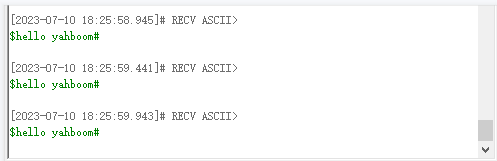
Monitor the incoming data from the serial port in real time, and print out the read data. If yb_uart.read() does not pass in parameters, it means to read all the buffered data of the serial port. If the parameter is 1, yb_uart.read(1) means to read a byte of data from the buffer area. If the parameter 2 is passed in, then Indicates reading two bytes of data from the buffer, and so on.