4.Color sorting and stacking
1. 1 Gameplay introduction
xHow to play:
1) First, run it without running a large program.
2) Start a command line window as the anti-decryption server and keep running.
cd ~/dofbot_ws/ # Enter workspace
catkin_make # compile
source devel/setup.bash # Update system environment
roslaunch dofbot_info dofbot_server.launch # Start server node
3)Color sorting gameplay path:dofbot_ws/src/dofbot_color_identify/scripts/Color sorting gameplay.ipynb
4)Color stacking gameplay path:dofbot_ws/src/dofbot_color_stacking/scripts/Color stacking gameplay.ipynb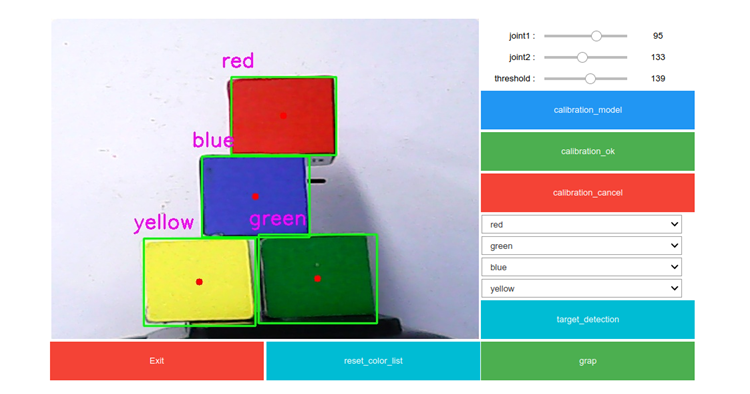
(1) HSV calibration: Since color recognition is different in different environments, it is best to perform HSV calibration before playing with color sorting. For specific methods, please refer to [Color Calibration].
(2) Box calibration: After color calibration is completed, box calibration is required to obtain the position information of the box within the box. For specific calibration methods, please refer to [Visual Positioning].
(3) Select color: Players can choose the color to grab according to their needs, and the robotic arm will sort according to the color selected by the player.
(4) Grabbing and sorting: After the camera recognizes the square, click the grab button.
(5) Clear color: If the player wants to change the selected color, just clear the selected color, and then select again for identification.
(6) Exit the program: To close this gameplay, please click the exit button to release resources.
1.2 Color recognition
Note: It is only valid after completing the box calibration.
- Operation process
(1) After the calibration is completed, select a color in the color option box on the right (the color is not selected by default), as shown in the picture above.
(2) After the color selection is completed, click the [target_detection] button to call the color recognition function and mark the recognized squares.
(3) Click the [grap] button to sort out the identified blocks.
(4) Click the [reset_color_list] button to clear the selected color sequence. The color selection column still displays the last selection sequence, just replace it. Repeat steps (2) and (3).
- Code design
Color selection sequence, the color sequence is generated after the selection is completed
xxxxxxxxxxdef color_list_one_Callback(value):    pass
def color_list_two_Callback(value):    pass
def color_list_three_Callback(value):    pass
def color_list_four_Callback(value):    pass
color_list_one.observe(color_list_one_Callback)color_list_two.observe(color_list_two_Callback)color_list_three.observe(color_list_three_Callback)color_list_four.observe(color_list_four_Callback)
Click the [target_detection] button to call the color recognition function select_color()
xxxxxxxxxxdef select_color(self, image, color_hsv, color_list): ''' Select recognition color :param image:Input Image :param color_hsv: Example{color_name:((lowerb),(upperb))} :param color_list: Color Sequence:['0':none '1':Red '2':Green '3':Blue '4':Yellow] :return:Output the processed image, (color, position) ''' passAnalyze the incoming color sequence and color information. Detect the squares in the color sequence respectively. Return the square coordinates.
xxxxxxxxxxdef get_Sqaure(self, color_hsv):'''Color recognition, obtaining the coordinates of the block'''passFor detailed code introduction, see dofbot_ws/src/dofbot_color_identify/scripts/color sorting gameplay.ipynb
1.3 Get the inverse solution result
- Operation process
After detecting the block, click the [grap] button to grab it
- Code design
Send the obtained block coordinate information through ROS server communication, and solve the angle at which each joint should rotate through inverse kinematics. Obtain the joint angle.
xxxxxxxxxxdef server_joint(self, posxy): ''' Issue a position request and obtain the joint rotation angle :param posxy:Location point x, y coordinates :return: Rotation angle of each joint ''' # Wait for the server to start self.client.wait_for_service() # Create message package request = kinemaricsRequest() request.tar_x = posxy[0] request.tar_y = posxy[1] request.kin_name = "ik" try: # Obtain the back solution response result response = self.client.call(request) pass except Exception: rospy.loginfo("arg error")For detailed codes, see identify_target.py and identify_grap.py under the path dofbot_ws/src/dofbot_color_identify/scripts/
- Capture the design process
Lift the robotic arm -> release the clamping jaw -> move to the block position -> tighten the clamping claw -> lift -> move to the target position -> release the clamping jaw -> reset the robotic arm.
1.4 Color stacking
The color stacking gameplay is similar to the color sorting, except that the robot arm stacks the blocks vertically according to the selected color at the end.
Note: It is effective only after the box calibration is completed. Color stacking requires not only the ability to clamp the box, but also the clamping position as consistent as possible, which requires high positioning. The user can adjust the clamping position and attitude according to the actual situation. Specific adjustment methods please see the section [Visual Positioning].
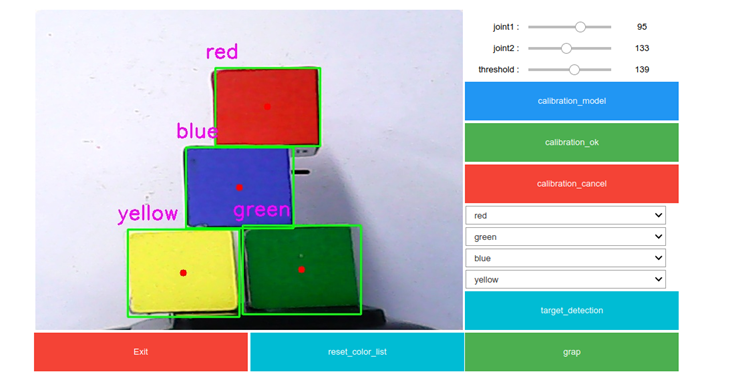
- Example images
- Operation process
(1) After the calibration is completed, select a color in the color option box on the right (the color is not selected by default), as shown in the picture above.
(2) After the color selection is completed, click the [target_detection] button to call the color recognition function and mark the recognized squares.
(3) Click the [grap] button to sort out the identified blocks, and then stack them into gray boxes. The stacking order is the same as the color selection order in the above picture.
(4) Click the [reset_color_list] button to clear the selected color sequence. The last selection sequence is still displayed in the color selection column. Just replace it. Repeat steps (2) and (3). For detailed code introduction, see dofbot_ws/src/dofbot_color_stacking/ scripts/color stacking gameplay.ipynb