Serial Parse Data
Serial Parse DataDevice connectionHardware connectionSoftware connectionSerial port parsing dataControl principleControl pinData format (communication protocol)Code analysisExperimental results
Parse data in a specified data format through the serial port.
xxxxxxxxxxThe format of the serial port parsed data refers to the communication protocol of the WiFi camera module. The serial port control tutorial below also refers to the communication protocol of the WiFi camera module!Do not install the WiFi camera module here, otherwise it will occupy the serial port and cause abnormal information.
Device connection
Hardware connection
Use Type-B data cable to connect Arduino Uno and computer.
Software connection
Open the "Arduino IDE" software and select the model and serial port number corresponding to the development board.
Serial port parsing data
Control principle
Receive data through the serial port and determine whether the data is in the specified format, parse and store the specified data.
Control pin
Use the serial port on the Arduino IDE to send and parse data.
| Serial port | Arduino Uno |
|---|---|
| RX | 0 |
| TX | 1 |
Data format (communication protocol)
We only parse data in two data formats.
| Data format | Description | Example |
|---|---|---|
| $ | Data header | |
| # | Data tail | |
| Data,Data,Data | Data type 1 | Data represents only numbers: 1,0,0,0 |
| Alphabet+Data | Data type 2 | Alphabet+Data represents a letter plus the following three digits: A100 |
Example:
Data format 1: $1,0,0,0#, $1,2,0,0#, $1,2,0,1#
Data format 2: $A100#, $A090#, $B120#
Note:
Data format 1 is mainly used to control the car status, RGB, and buzzer in the later stage
Data format 2 is mainly used to control the servo angle in the later stage
Data needs to be sent strictly in the above format.
Code analysis
Here is only a brief introduction to the code content. For detailed code, please refer to the corresponding code file, which is provided in the download area!
Define data such as arrays, flag bits, etc
x// 定义数据,如数组,标志位等 Define data such as arrays, flag bits, etc#define BUFFER_SIZE 20volatile uint8_t Rx_Index = 0;volatile uint8_t Data_Flag = 0;char* Data_Array[BUFFER_SIZE];char Data_Servo[BUFFER_SIZE];int DataArraySize = 0;
Receive data
Note: Receive data between $ and #
xxxxxxxxxx/*** @brief 接收指定格式的数据 Receives data in the specified format* @param 无 None* @retval 接收指定数据 Received specified data*/char* recData() {static char Data_Buffer[BUFFER_SIZE];static char Rx_Buffer[BUFFER_SIZE];if (Serial.available() > 0) {char SerialData = Serial.read();if (SerialData == '$') {memset(Rx_Buffer, 0, sizeof(Rx_Buffer));memset(Data_Buffer, 0, sizeof(Data_Buffer));Data_Flag = 1;Rx_Index = 0;} else if (Data_Flag == 1 && SerialData == '#') {if (Rx_Index < BUFFER_SIZE) {memcpy(Data_Buffer, Rx_Buffer, Rx_Index);memset(Rx_Buffer, 0, sizeof(Rx_Buffer));Rx_Index = 0;Data_Flag = 0;// Serial.println(Data_Buffer);return Data_Buffer;} else {// Serial.println("Rx_Buffer is full!");memset(Rx_Buffer, 0, sizeof(Rx_Buffer));Rx_Index = 0;Data_Flag = 0;}} else {if (Rx_Index < BUFFER_SIZE) {Rx_Buffer[Rx_Index++] = SerialData;} else {// Serial.println("Rx_Buffer is full!");memset(Rx_Buffer, 0, sizeof(Rx_Buffer));Rx_Index = 0;Data_Flag = 0;}}}return nullptr;}
Separate the data into a new array
x/*** @brief 将数据分离到一个新的数组中 Separate the data into a new array* @param dataBuffer: 要分离的数据 The data to be separated* @param dataArray: 分离后的数据 The data after separation* @param dataArraySize: 分离数据的大小 The size of the separated data* @retval 无 None*/void splitDataAndSave(char* dataBuffer, char** dataArray, int& dataArraySize) {char* token = strtok(dataBuffer, ",");int index = 0;while (token != NULL) {dataArray[index] = token;token = strtok(NULL, ",");index++;}dataArraySize = index;}
Parse the serial port data after processing
xDump format 2 data and print format 1/2 data
x/*** @brief 处理后解析串口数据 Parse the serial port data after processing* @param dataBuffer: 分离后的数据 The data after separation* @retval 无 None*/void parseSerialData(char* dataBuffer) {if (dataBuffer != nullptr) {// Serial.println(dataBuffer);if (isalpha(dataBuffer[0])) {memcpy(Data_Servo, dataBuffer + 1, 3);Serial.print("Servo angle:");Serial.println(strtol(Data_Servo, NULL, 10));} else {splitDataAndSave(dataBuffer, Data_Array, DataArraySize);Serial.print("Car state:");Serial.println(strtol(Data_Array[0], NULL, 10));Serial.print("RGB state:");Serial.println(strtol(Data_Array[1], NULL, 10));Serial.print("Buzzer state:");Serial.println(strtol(Data_Array[2], NULL, 10));Serial.print("No define:");Serial.println(strtol(Data_Array[3], NULL, 10));}memset(Data_Servo, 0, sizeof(Data_Servo));memset(Data_Array, 0, sizeof(Data_Array));}}
Initialization Code
xxxxxxxxxxvoid setup() {Serial.begin(115200); // 初始化串口波特率115200 Initialize serial communication at 115200 bps}
Looping code
xxxxxxxxxxvoid loop() {parseSerialData(recData()); // 处理后解析串口数据 Parse the serial port data after processing}
Experimental results
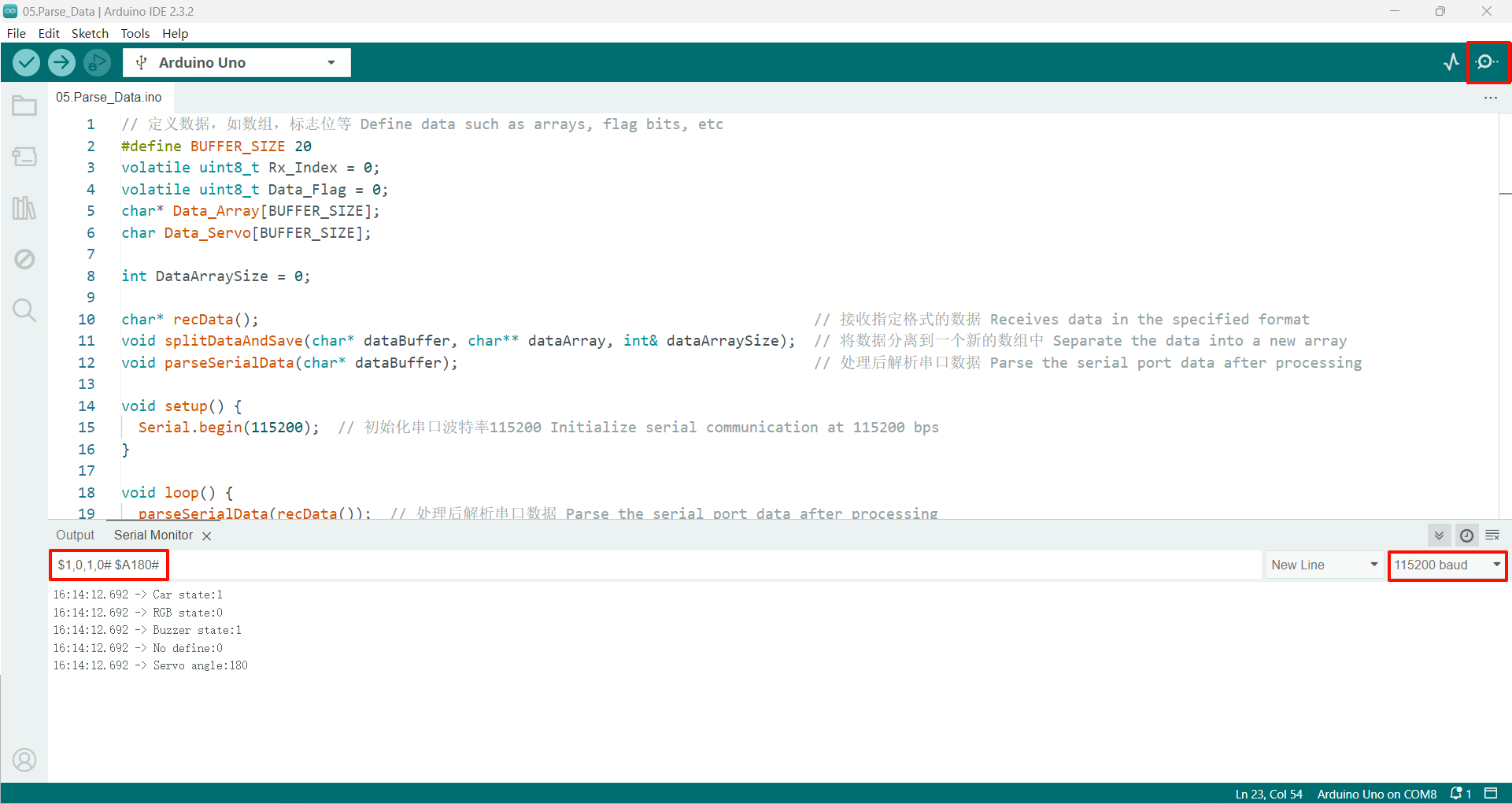
After compiling the program successfully, upload the code to the Arduino Uno development board.
After the program is started, send data in the specified format, and the serial port will return the parsed data!
If there is no display content, you can check whether the serial port baud rate is consistent with the code setting, and then press the RESET button on the development board.
xxxxxxxxxxThe burning program cannot use other programs to occupy the serial port or an external serial communication module (for example: WiFi camera module), otherwise the program cannot be burned or an error message will be prompted!