4. Line drawing
4.1.OpenCV line drawing
When using OpenCV to process images, we sometimes need to draw line segments, rectangles, etc. on the image. In OpenCV, use the
cv2.line(dst,pt1,pt2,color,thickness=None,lineType=None,shift=None)function to draw line segments.
Parameter meaning:
dst: output image.
pt1,pt2: required parameters. The coordinate points of the line segment, indicating the starting point and the end point respectively
color: required parameter. Used to set the color of the line segment
thickness: optional parameter. Used to set the width of the line segment
lineType: optional parameter. Used to set the type of line segment, optional 8 (8 adjacent connecting lines - default), 4 (4 adjacent connecting lines) and cv2.LINE_AA for anti-aliasing
4.2. Actual effect display
Source code path:
/home/pi/project_demo/06.Open_source_cv_fundamentals_course/C.Image_Processing_Text_Drawing/04_Line_Drawing.ipynb
ximport cv2import numpy as npimport matplotlib.pyplot as plt
newImageInfo = (600, 600, 3)dst = np.zeros(newImageInfo,np.uint8)
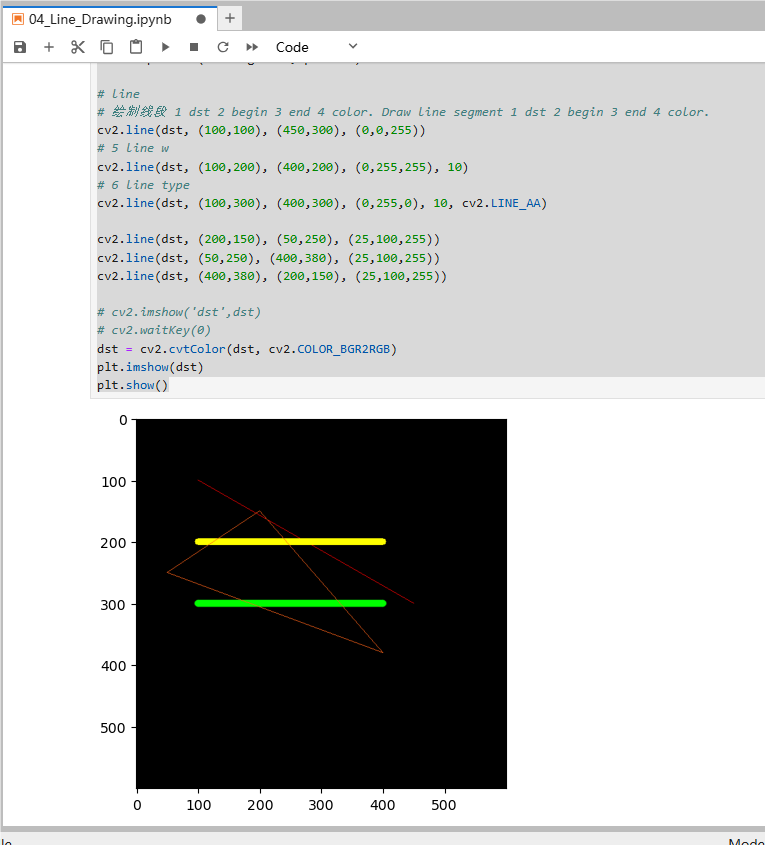
# line# 绘制线段 1 dst 2 begin 3 end 4 color. Draw line segment 1 dst 2 begin 3 end 4 color.cv2.line(dst, (100,100), (450,300), (0,0,255))# 5 line wcv2.line(dst, (100,200), (400,200), (0,255,255), 10)# 6 line typecv2.line(dst, (100,300), (400,300), (0,255,0), 10, cv2.LINE_AA)
cv2.line(dst, (200,150), (50,250), (25,100,255))cv2.line(dst, (50,250), (400,380), (25,100,255))cv2.line(dst, (400,380), (200,150), (25,100,255))
# cv2.imshow('dst',dst)# cv2.waitKey(0)dst = cv2.cvtColor(dst, cv2.COLOR_BGR2RGB)plt.imshow(dst)plt.show()