16. Yolo hand detection
16. Yolo hand detection16.1. Experimental objectives16.2. Preparation before the experiment16.3. Experimental process16.4, Experimental results16.5, Experimental summary
16.1. Experimental objectives
This lesson mainly studies the K210 hand detection function.
The reference code path for this experiment is: K210 developer kit data\10.MicroPython version\source code\yolo_hand_detect.py
16.2. Preparation before the experiment
Please confirm whether the sd card model file is imported successfully, the path is: /sd/KPU/yolo_hand_detect/hand_detect.kmodel
Please save main.py to the sd card and run it offline
16.3. Experimental process
The factory firmware of the module has integrated the AI visual algorithm module. If you have downloaded other firmware, please burn it back to the factory firmware before conducting the experiment.
xxxxxxxxxxlcd.init()sensor.reset()sensor.set_framesize(sensor.QVGA)sensor.set_pixformat(sensor.RGB565)#翻转屏幕 Flip the screen#sensor.set_vflip(True)resize_img = image.Image(size=(320, 256))anchor = (0.8125, 0.4556, 1.1328, 1.2667, 1.8594, 1.4889, 1.4844, 2.2000, 2.6484, 2.9333)names = ['hand']# 创建一个kpu对象 Init a KPU objecthand_detecter = KPU()# 加载手部检测模型 load hand detect modelhand_detecter.load_kmodel("/sd/KPU/yolo_hand_detect/hand_detect.kmodel")# 初始化YOLO2 init yolo2# img_w,img_h为摄像头捕获到的图片原始大小, net_w和net_h为训练模型时使用的图片大小# img_w and img_h represent the original dimensions of the imagehand_detecter.init_yolo2(anchor, anchor_num=len(anchor) // 2, img_w=320, img_h=240, net_w=320, net_h=256, layer_w=10, layer_h=8, threshold=0.68, nms_value=0.3, classes=len(names))xxxxxxxxxxwhile True: gc.collect() img = sensor.snapshot() resize_img.draw_image(img, 0, 0).pix_to_ai() # 进行KPU运算 Perform KPU calculations hand_detecter.run_with_output(resize_img) # 进行YOLO2运算 Perform YOLO2 operation hands = hand_detecter.regionlayer_yolo2() for hand in hands: img.draw_rectangle(hand[0], hand[1], hand[2], hand[3], color=(0, 255, 0)) img.draw_string(hand[0] + 2, hand[1] + 2, "%.2f" % (hand[5]), color=(0, 255, 0)) img.draw_string(hand[0] + 2, hand[1] + 10, names[hand[4]], color=(0, 255, 0)) lcd.display(img) hand_detecter.deinit() del hand_detecter del img gc.collect()16.4, Experimental results
Connect the K210 module to the computer via a microUSB data cable, click the connect button in CanMV IDE, and click the run button after the connection is complete to run the example code. You can also download the code as main.py to the K210 module and run it.
After waiting for the system to initialize, the LCD displays the camera image, and the human hand appearing on the screen will be marked by the drawn box.
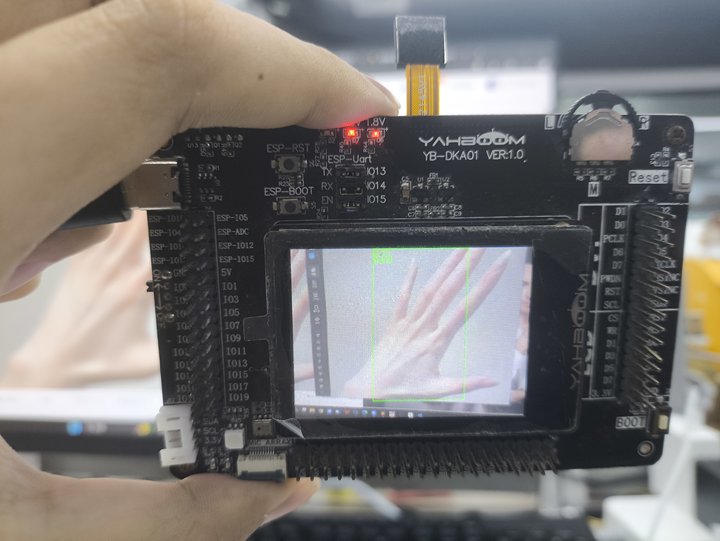
16.5, Experimental summary
Hand recognition requires a memory card to load the model file, so you need to import the model file into the memory card in advance, and then insert the memory card into the memory card slot of the K210 module. If the model file in the memory card cannot be read, an error will be reported. In this experiment, we learned how to implement the hand detection function based on yolo on the K210 platform. Due to the size of the model, the accuracy of recognition may be affected