Yolov5 garbage sorting
Before starting this function, you need to close the process of the big program and APP. Enter the following program in the terminal to close the process of the big program and APP.
sh ~/app_Arm/kill_YahboomArm.shsh ~/app_Arm/stop_app.shIf you need to start the big program and APP again later, start the terminal.
xxxxxxxxxxsudo systemctl start yahboom_arm.servicesudo systemctl start yahboom_app.service
1. Function description
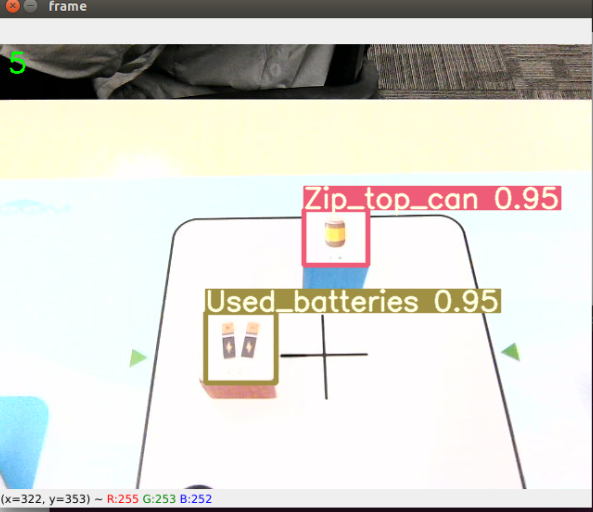
After the program is started, the camera captures the image and places the garbage label code block in the image. The robotic arm recognizes the category of the garbage label code block, and the lower claw grabs the garbage label code block. According to the category of the garbage label code, it is placed in the set position. After the placement is completed, it returns to the recognized posture.
2. Start and operate
2.1. Start command
Enter the following command in the terminal to start,
xxxxxxxxxx#Start the cameraroslaunch orbbec_camera dabai_dcw2.launch#Start the inverse solutionrosrun dofbot_pro_info kinemarics_dofbot_pro#Start the underlying driver of the robotic armrosrun dofbot_pro_info arm_driver.py#Start the image conversion programrosrun dofbot_pro_yolov5 msgToimg.py#Start the Yolov5 recognition programpython ~/dofbot_pro_ws/src/dofbot_pro_yolov5/scripts/yolov5.py#Start the robotic arm garbage sorting programrosrun dofbot_pro_yolov5 yolov5_sortation.pyDue to the performance differences of the motherboard, the time for different motherboards to start loading the Yolov5 recognition program is different, so you need to wait patiently for a while.
2.2, Operation process
After the program is started, place the wooden block with the garbage label code in the middle of the image. The wooden block needs to be straightened and the icon needs to be in the same direction as the robot arm (forward, Y axis direction). Press the space bar to start recognition. The robot arm will grasp the wooden block and place it in the corresponding position according to the type of garbage it recognizes.
3. Program flow chart
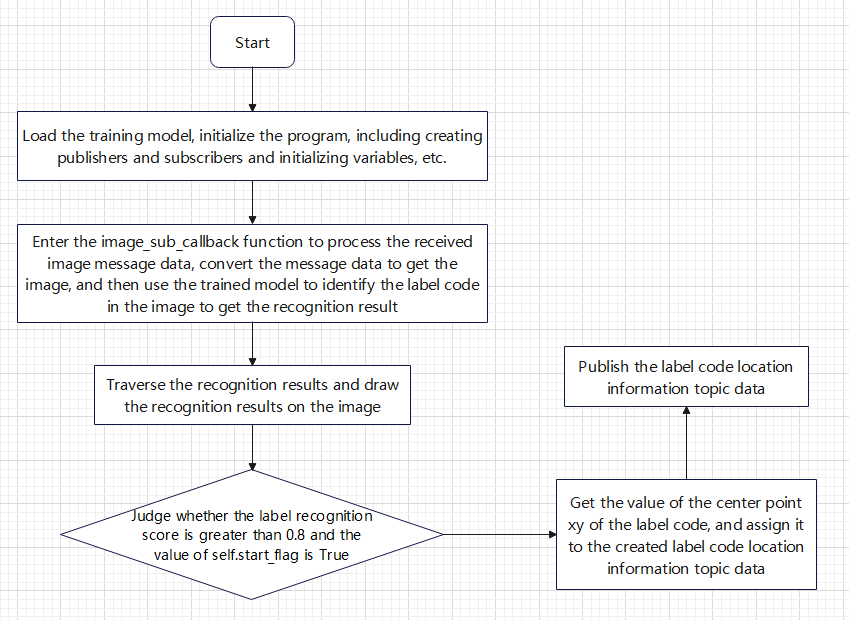
yolov5.py
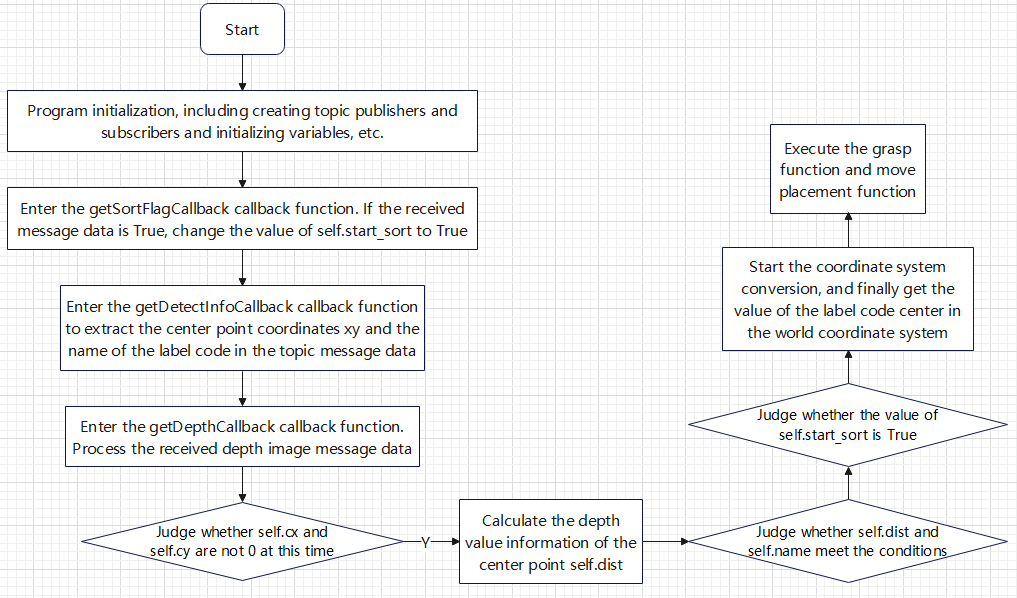
yolov5_sortation.py
4. Core code analysis
4.1. msgToimg.py
Code path: /home/jetson/dofbot_pro_ws/src/dofbot_pro_yolov5/scripts/msgToimg.py
Import necessary libraries,
xxxxxxxxxximport sysimport rospyimport numpy as npimport osfrom sensor_msgs.msg import Imagefrom cv_bridge import CvBridge, CvBridgeErrorfrom dofbot_pro_info.msg import Image_MsgInitialize program parameters, create publishers and subscribers,
xxxxxxxxxxdef __init__(self): #Create a bridge for color image topic message data to image data self.bridge = CvBridge() #Create a color image topic subscriber self.image_sub = rospy.Subscriber("/camera/color/image_raw",Image,self.image_sub_callback) #Create an image data publisher self.image_pub = rospy.Publisher('/image_data', Image_Msg, queue_size=1) self.img = np.zeros((480, 640, 3), dtype=np.uint8) # Initial image self.yolov5_img = np.zeros((480, 640, 3), dtype=np.uint8) # Initial image self.img_flip = rospy.get_param("~img_flip", False) #Initialize the message object of the image data self.image = Image_Msg()image_sub_callback callback function,
xxxxxxxxxxdef image_sub_callback(self, data): #Receive a color image topic message and convert the message data into image data self.img = self.bridge.imgmsg_to_cv2(data, "bgr8") #Get the length and width of the image size = self.img.shape #Assign values ••to the data in the image message object self.image.height = size[0] # 480 self.image.width = size[1] # 640 self.image.channels = size[2] # 3 self.image.data = data.data # image_data #Publish an image topic self.image_pub.publish(self.image)
4.2、yolov5.py
Code path: /home/jetson/dofbot_pro_ws/src/dofbot_pro_yolov5/scripts/yolov5.py
Import necessary library files,
xxxxxxxxxximport cv2import torchimport numpy as npfrom numpy import randomfrom utils.plots import plot_one_boxfrom models.experimental import attempt_loadfrom utils.general import (non_max_suppression, scale_coords, xyxy2xywh)from utils.torch_utils import select_device, time_synchronizedimport timeimport message_filters#rosimport rospyfrom sensor_msgs.msg import Imagefrom std_msgs.msg import Boolfrom dofbot_pro_info.msg import *Initialize program parameters, create publishers and subscribers,
xxxxxxxxxxdef __init__(self): rospy.init_node('detect_node') self.pr_time = time.time() #Create a subscriber to subscribe to the image topic message self.image_sub = rospy.Subscriber("/image_data",Image_Msg,self.image_sub_callback) #Customize the size of the initial image self.img = np.zeros((480, 640, 3), dtype=np.uint8) # Initial image #Initialize the recognition posture of the robotic arm self.init_joints = [90.0, 120, 0.0, 0.0, 90, 90] #Create a publisher to publish the topic "robotic arm target angle" self.pubPoint = rospy.Publisher("TargetAngle", ArmJoint, queue_size=1) #Create a publisher to publish the topic "Yolov5 detection information" self.pubDetect = rospy.Publisher("Yolov5DetectInfo", Yolov5Detect, queue_size=1) #Create a publisher to publish the topic "sorting" self.pub_SortFlag = rospy.Publisher('sort_flag',Bool,queue_size=1) #Create a subscriber to subscribe to gesture recognition results self.grasp_status_sub = rospy.Subscriber('grasp_done', Bool, self.GraspStatusCallback, queue_size=1) #Initialize the flag to start sorting. If it is True, start sorting self.start_flag = FalseThe callback function for subscribing to the image topic,
xxxxxxxxxxdef image_sub_callback(self,data): # Convert custom image messages into images image = np.ndarray(shape=(data.height, data.width, data.channels), dtype=np.uint8, buffer=data.data) # Convert rgb to opencv bgr order self.img[:,:,0],self.img[:,:,1],self.img[:,:,2] = image[:,:,2],image[:,:,1],image[:,:,0] # 将rgb 转化为opencv的bgr顺序 img = self.img.copy() img = np.transpose(img, (2, 0, 1)) img = torch.from_numpy(img).to(device) img = img.float() # uint8 to fp16/32 img /= 255.0 # 0 - 255 to 0.0 - 1.0 if img.ndimension() == 3: img = img.unsqueeze(0) pred = model(img)[0] pred = non_max_suppression(pred, 0.4, 0.5) gn = torch.tensor(self.img.shape)[[1, 0, 1, 0]] key = cv2.waitKey(10) if pred != [None]: for i, det in enumerate(pred): # detections per image det[:, :4] = scale_coords(img.shape[2:], det[:, :4], self.img.shape).round() for *xyxy, conf, cls in reversed(det): xywh = (xyxy2xywh(torch.tensor(xyxy).view(1, 4)) / gn).view(-1).tolist() # normalized xywh label = '%s %.2f' % (names[int(cls)], conf) plot_one_box(xyxy, self.img, label=label, color=colors[int(cls)], line_thickness=3) #Judge whether the score of label recognition is greater than 0.8 and the value of self.start_flag is True if conf.item()>0.8 and self.start_flag == True: #self.pubDetect.publish(center) #Extract the center point coordinates of the tag and assign them to the created tag code location information topic message data cx = (xyxy[0].item() + xyxy[2].item())/2 cy = (xyxy[1].item() + xyxy[3].item())/2 center = Yolov5Detect() center.centerx = cx center.centery = cy center.result = names[int(cls)] #Publish tag code machine code location information topic message data self.pubDetect.publish(center) self.start_flag = False #Get the current timestamp cur_time = time.time() #Calculate frame rate fps = str(int(1/(cur_time - self.pr_time))) self.pr_time = cur_time cv2.putText(self.img, fps, (10, 30), cv2.FONT_HERSHEY_SIMPLEX, 1, (0, 255, 0), 2) cv2.imshow("frame", self.img) #Judge whether the space bar is pressed or the value of self.start_flag is true. If any of these conditions are met, a "start sorting" message is sent if key == 32 or self.start_flag == True: print("Send a start signal.") start_flag = Bool() start_flag.data = True self.pub_SortFlag.publish(start_flag)4.3、yolov5_sortation.py
Code path: /home/jetson/dofbot_pro_ws/src/dofbot_pro_yolov5/scripts/yolov5_sortation.py
Import necessary libraries,
xxxxxxxxxximport rospyimport numpy as npfrom sensor_msgs.msg import Imagefrom std_msgs.msg import Float32,Bool,Int8from cv_bridge import CvBridgeimport cv2 as cvimport timeimport mathfrom dofbot_pro_info.msg import *from dofbot_pro_info.srv import *import transforms3d as tfsimport tf.transformations as tfimport threadingimport yamlencoding = ['16UC1', '32FC1']Open the offset parameter table,
xxxxxxxxxxoffset_file = rospkg.RosPack().get_path("dofbot_pro_info") + "/param/offset_value.yaml"with open(offset_file, 'r') as file: offset_config = yaml.safe_load(file)print(offset_config)print("----------------------------")print("x_offset: ",offset_config.get('x_offset'))print("y_offset: ",offset_config.get('y_offset'))print("z_offset: ",offset_config.get('z_offset'))Initialize program parameters, create publishers, subscribers, etc.
xxxxxxxxxxdef __init__(self): nodeName = 'yolov5_grap' rospy.init_node(nodeName) #Create a publisher to publish the target angle of the robot arm self.pubPoint = rospy.Publisher("TargetAngle", ArmJoint, queue_size=1) #Create a publisher to publish the topic of gripping completion self.pubGraspStatus = rospy.Publisher("grasp_done", Bool, queue_size=1) #Create a publisher to publish the voice ID code self.pub_playID = rospy.Publisher("player_id", Int8, queue_size=1) #Create a subscriber to subscribe to the results of Yolov5 identification label code self.subDetect = rospy.Subscriber("Yolov5DetectInfo", Yolov5Detect, self.getDetectInfoCallback) #Create a subscriber to subscribe to the depth image data topic self.depth_image_sub = rospy.Subscriber('/camera/depth/image_raw',Image,self.getDepthCallback) #Create a subscriber to subscribe to the "start sorting" flag self.sub_SortFlag = rospy.Subscriber('sort_flag',Bool,self.getSortFlagCallback) #Create a client that calls the inverse solution service self.client = rospy.ServiceProxy("get_kinemarics", kinemarics) #Initialize the grip flag. When the value is True, it means that gripping is possible self.grasp_flag = True self.init_joints = [90.0, 120, 0.0, 0.0, 90, 90] self.down_joint = [130.0, 55.0, 34.0, 16.0, 90.0,125] self.set_joint = [90.0, 120, 0.0, 0.0, 90, 90] self.gripper_joint = 90 self.depth_bridge = CvBridge() self.start_sort = False self.CurEndPos = [0.0, 0.0, 0.0, 0.0, 0.0, 0.0] # Camera built-in parameters self.camera_info_K = [477.57421875, 0.0, 319.3820495605469, 0.0, 477.55718994140625, 238.64108276367188, 0.0, 0.0, 1.0] # Rotation transformation matrix of the relative position of the camera and the end of the robotic arm self.EndToCamMat = np.array([[1.00000000e+00,0.00000000e+00,0.00000000e+00,0.00000000e+00], [0.00000000e+00,7.96326711e-04,9.99999683e-01,-9.90000000e-02], [0.00000000e+00,-9.99999683e-01,7.96326711e-04,4.90000000e-02], [0.00000000e+00,0.00000000e+00,0.00000000e+00,1.00000000e+00]]) #Get the current position and posture information of the end of the robot self.get_current_end_pos() #Current label center coordinate value self.cx = 320 self.cy = 240 #Garbage label name self.name = None #Read the content of the offset parameter table and assign it to the offset parameter self.x_offset = offset_config.get('x_offset') self.y_offset = offset_config.get('y_offset') self.z_offset = offset_config.get('z_offset') self.play_id = Int8() #List of four types of garbage self.recyclable_waste=['Newspaper','Zip_top_can','Book','Old_school_bag'] self.toxic_waste=['Syringe','Expired_cosmetics','Used_batteries','Expired_tablets'] self.wet_waste=['Fish_bone','Egg_shell','Apple_core','Watermelon_rind'] self.dry_waste=['Toilet_paper','Peach_pit','Cigarette_butts','Disposable_chopsticks'] print("Current_End_Pose: ",self.CurEndPos) print("Init Done") The callback function getDetectInfoCallback of the identified spam tag result,
xxxxxxxxxxdef getDetectInfoCallback(self,msg): #Assign label center coordinate value and label name self.cx = int(msg.centerx) self.cy = int(msg.centery) self.name = msg.resultThe callback function getDepthCallback of the depth image topic,
xxxxxxxxxxdef getDepthCallback(self,msg): #Process the received deep image topic message depth_image = self.depth_bridge.imgmsg_to_cv2(msg, encoding[1]) frame = cv.resize(depth_image, (640, 480)) depth_image_info = frame.astype(np.float32) #Judge whether the values ••of self.cy and self.cx are both not 0 if self.cy!=0 and self.cx!=0: #Get the depth value of the center point self.dist = depth_image_info[self.cy,self.cx]/1000 print("self.dist",self.dist) print("get the cx,cy",self.cx,self.cy) print("get the detect result",self.name) #Judge whether the depth value of the center point is not 0 and the value of self.name is not none if self.dist!=0 and self.name!=None: #Judge whether self.start_sort is True if self.start_sort == True: #Start coordinate system conversion, and finally output the position of the center point in the world coordinate system camera_location = self.pixel_to_camera_depth((self.cx,self.cy),self.dist) PoseEndMat = np.matmul(self.EndToCamMat, self.xyz_euler_to_mat(camera_location, (0, 0, 0))) #PoseEndMat = np.matmul(self.xyz_euler_to_mat(camera_location, (0, 0, 0)),self.EndToCamMat) EndPointMat = self.get_end_point_mat() WorldPose = np.matmul(EndPointMat, PoseEndMat) #WorldPose = np.matmul(PoseEndMat,EndPointMat) pose_T, pose_R = self.mat_to_xyz_euler(WorldPose) #Add the offset parameter to compensate for the deviation caused by the difference in servo values pose_T[0] = pose_T[0] + self.x_offset pose_T[1] = pose_T[1] + self.y_offset pose_T[2] = pose_T[2] + self.z_offset #Start the clamping thread, the parameter passed in is the position of the label just calculated in the world coordinate system grasp = threading.Thread(target=self.grasp, args=(pose_T,)) grasp.start() grasp.join()The callback function getSortFlagCallback that starts sorting topics.
xxxxxxxxxxdef getSortFlagCallback(self,msg): #Judge whether the received value is True, if so, modify the value of self.start_sort to True if msg.data == True: self.start_sort = TrueGrasp function grasp,
xxxxxxxxxxdef grasp(self,pose_T): print("------------------------------------------------") print("pose_T: ",pose_T) #Call the ik algorithm in the inverse solution service to calculate the values ••of the six servos request = kinemaricsRequest() #The target x value at the end of the robot arm, in m request.tar_x = pose_T[0] #The target y value at the end of the robot arm, in m request.tar_y = pose_T[1] #The target z value at the end of the robot arm, in m, 0.2 is the scaling factor, make slight adjustments based on actual conditions request.tar_z = pose_T[2] + (math.sqrt(request.tar_y**2+request.tar_x**2)-0.181)*0.2 #Specify the service content as ik request.kin_name = "ik" #The target Roll value at the end of the robot arm, in radians, this value is the current roll value at the end of the robot arm request.Roll = self.CurEndPos[3] print("calcutelate_request: ",request) try: response = self.client.call(request) joints = [0.0, 0.0, 0.0, 0.0, 0.0,0.0] #Assign the joint1-joint6 values ••returned by the call service to joints joints[0] = response.joint1 joints[1] = response.joint2 joints[2] = response.joint3 if response.joint4>90: joints[3] = 90 else: joints[3] = response.joint4 joints[4] = 90 joints[5] = 30 print("compute_joints: ",joints) self.pubTargetArm(joints) time.sleep(2.5) #After grabbing, call the move function, determine which garbage list it belongs to based on the value of self.name, and place it in the set position self.move() except Exception: rospy.loginfo("run error")