Model conversion
Model conversion1. Model conversion1.1. CLI: pt → onnx2.2, Python: pt → onnx2. Model predictionCLI usageReferences
1. Model conversion
According to the test parameters of different formats provided by the Ultralytics team, we can find that the inference performance is best when using TensorRT!
xxxxxxxxxxWhen using the export mode of YOLO11 for the first time, some dependencies will be automatically installed. Just wait for it to be completed automatically!
1.1. CLI: pt → onnx
Convert the PyTorch format model to onnx and ncnn
xxxxxxxxxxcd /ultralytics/ultralytics
xxxxxxxxxxyolo export model=yolo11n.pt format=onnx dynamic=True #This will enable dynamic axes to avoid static shape inference errors. For example, it supports inputs of different batch sizes.# yolo export model=yolo11n-seg.pt format=onnx dynamic=True# yolo export model=yolo11n-pose.pt format=onnx dynamic=True# yolo export model=yolo11n-cls.pt format=onnx dynamic=True# yolo export model=yolo11n-obb.pt format=onnx dynamic=True
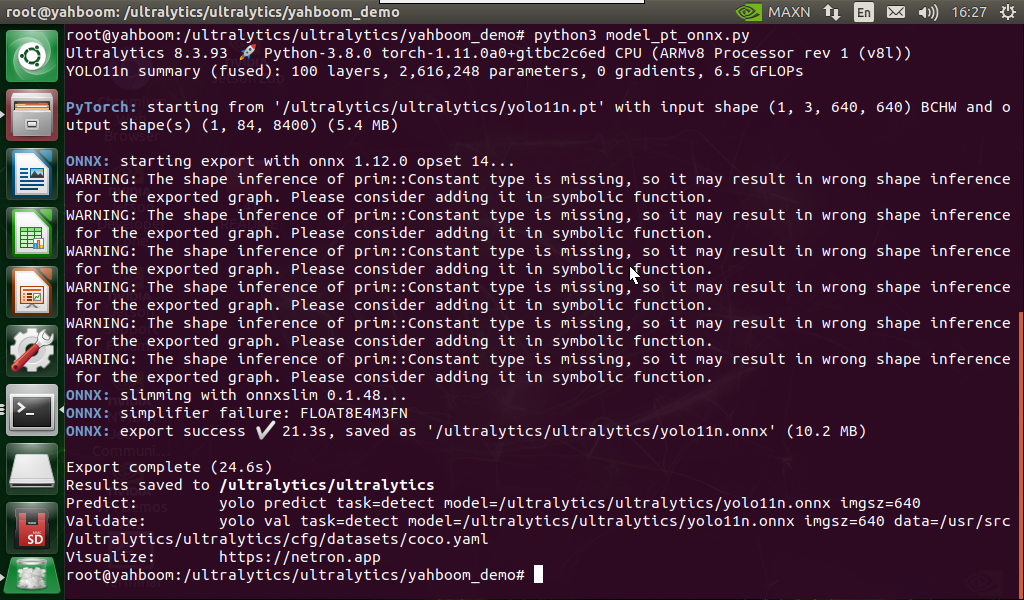
2.2, Python: pt → onnx
Convert pt model to onnx model:
xxxxxxxxxxcd /ultralytics/ultralytics/yahboom_demo
xxxxxxxxxxpython3 model_pt_onnx.py
xxxxxxxxxxfrom ultralytics import YOLO# Load a YOLO11n PyTorch modelmodel = YOLO("/ultralytics/ultralytics/yolo11n.pt")# model = YOLO("/ultralytics/ultralytics/yolo11n-seg.pt")# model = YOLO("/ultralytics/ultralytics/yolo11n-pose.pt")# model = YOLO("/ultralytics/ultralytics/yolo11n-cls.pt")# model = YOLO("/ultralytics/ultralytics/yolo11n-obb.pt")# Export the model to ONNX formatmodel.export(format="onnx") # This will create 'yolo11n.onnx' in the same directoryNote: The converted model file is located in the converted model file location
2. Model prediction
CLI usage
xxxxxxxxxxcd /ultralytics/ultralytics
xxxxxxxxxxyolo predict model=yolo11n.onnx source=0 save=False show
