button
Introduction
In this section, we will learn how to use the user buttons on the K230 module.
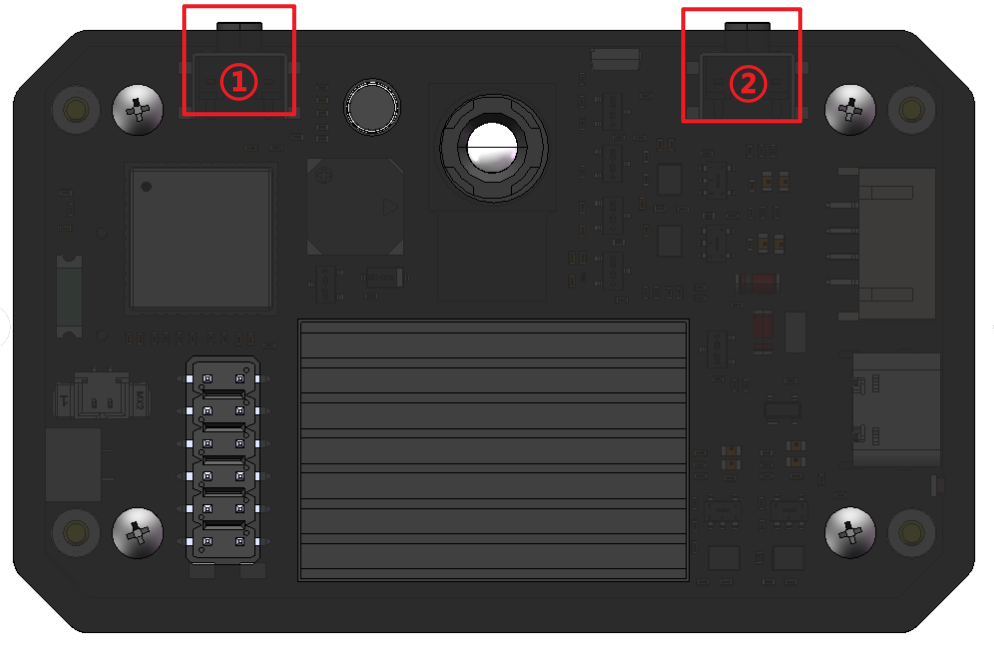
① This button is a custom button that we can use. This tutorial will introduce how to read the status of this button.
② This button is the reset (RST) button. After pressing it, K230 will restart.
Quick Start
For ease of use, we encapsulate the key function in the ybUtils.YbKey library.
Copy the following code into CanMV IDE and run it [Source Code/02.Basic/04.key.py]
x
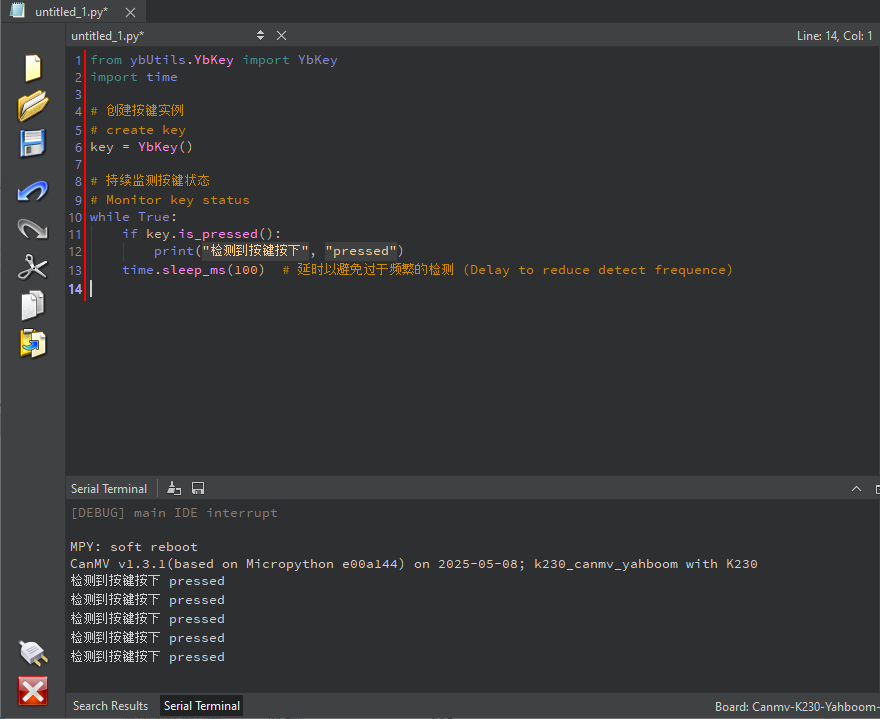
from ybUtils.YbKey import YbKeyimport time# 创建按键实例# create keykey = YbKey()# 持续监测按键状态# Monitor key statuswhile True: if key.is_pressed(): print("检测到按键按下", "pressed") time.sleep_ms(100) # 延时以避免过于频繁的检测 (Delay to reduce detect frequence)After running this code, we can try to press the custom button ① on K230 and observe that the serial terminal will output a prompt when we press it.
Be careful not to press the RST button. The button near the USB cable end is the RST reset button.
Using FPIOA Function
Below is the original code of the YbKey module
We use GPIO61 as the pin for button detection
xxxxxxxxxx# Import FPIOA (Field Programmable I/O Array) and Pin (pin)# (Import machine control modules, including FPIOA (Field Programmable I/O Array) and Pin)from machine import FPIOA , Pin# Import time moduleimport timeclass YbKey : """ Key class, used to process key input (Key class for handling button inputs) """ def __init__ ( self ): """ Initialize the button object (Initialize the key object) """ # Create an FPIOA object to configure pin functions # (Create FPIOA object for configuring pin functions) self . _fpioa = FPIOA () # Set the pin number to 61 # (Set the pin number to be used as 61) self . _pin_num = 61 # Configure pin functions: # - Map physical pins to GPIO functions # - ie=1: Enable input # - oe=0: disable output # (Configure pin function: # - Map physical pin to GPIO function # - ie=1: enable input # - oe=0: disable output) self . _fpioa . set_function ( self . _pin_num , FPIOA . GPIO0 + self . _pin_num , ie = 1 , oe = 0 ) # Create a Pin object: # - Set to input mode # - Enable internal pull-up resistor (keep high when button is not pressed) # - Drive strength is 7 # (Create Pin object: # - Set to input mode # - Enable internal pull-up resistor (maintains high level when button is not pressed) # - Drive strength is 7 (maximum)) self . _key = Pin ( self . _pin_num , Pin . IN , pull = Pin . PULL_UP , drive = 7 ) def value ( self ): """ Get the current value of a button (Get the current value of the key) Return value: 0 means pressed, 1 means not pressed (Return value: 0 means pressed, 1 means not pressed) """ return self . _key . value () def is_pressed ( self ): """ Determine whether a button is pressed (Determine if the key is pressed) Return value: True means pressed, False means not pressed (Return value: True means pressed, False means not pressed) """ # When the button is pressed, the pin value becomes 0 due to the pull-up resistor configuration # (When the button is pressed, due to the pull-up configuration, the pin value becomes 0) return True if self . _key . value ()== 0 else False