Multithreading
MultithreadingIntroduction to the results of routine experimentsCode ExplanationMultithreading module (_thread)typeLockTypemethod:functionallocate_lock()exit()get_ident()stack_size([size])start_new_thread(function, args)
Introduction to the results of routine experiments
The example code for this section is located at: [Source Code/02.Basic/13.thread.py]
We use CanMV IDE to open the sample code and connect K230 to the computer via USB.
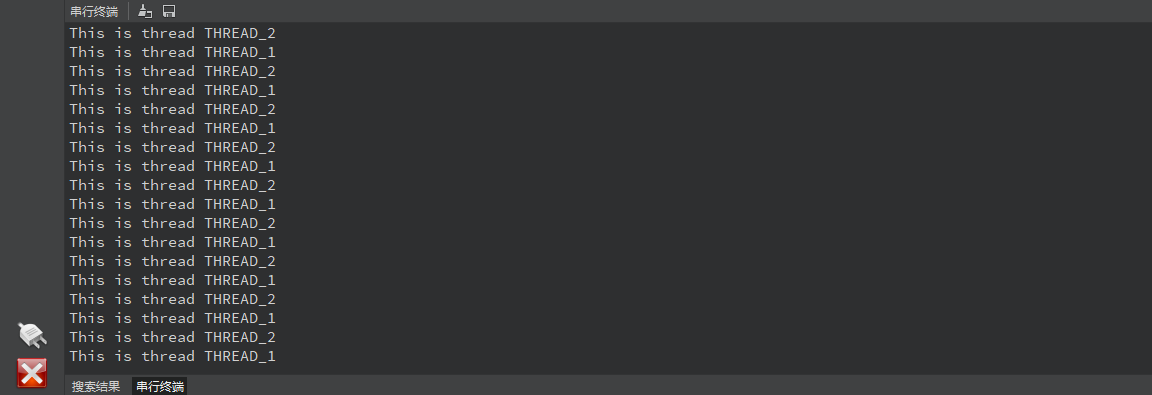
Click the Run button in the lower left corner of CanMV IDE and open the serial terminal below
You can see that the serial terminal will output alternately in a cycle
This is thread THREAD_1
This is thread THREAD_2
Code Explanation
This section mainly uses the multithreaded _thread module, the code is as follows:
xxxxxxxxxx# 导入线程模块 Import thread moduleimport _thread# 导入时间模块用于实现延时 Import time module for delay functionalityimport time# 定义线程执行的函数 Define the function to be executed in threads# name: 线程名称参数 Thread name parameterdef func(name): while True: # 每隔一秒输出一次信息 Print message every second print("This is thread {}".format(name)) # 休眠1秒 Sleep for 1 second time.sleep(1)# 创建并启动第一个线程 Create and start the first thread# func: 线程函数 Thread function# ("THREAD_1",): 传递给线程函数的参数(必须是元组格式)# Arguments passed to thread function (must be tuple format)_thread.start_new_thread(func,("THREAD_1",))# 延时500毫秒# Delay 500ms to give the first thread a chance to starttime.sleep_ms(500)# 创建并启动第二个线程 Create and start the second thread# 参数与第一个线程类似 Similar parameters as the first thread_thread.start_new_thread(func,("THREAD_2",))# 主线程死循环,防止程序退出# Main thread infinite loop to prevent program exit# 延时1毫秒,避免占用过多CPU资源# Delay 1ms to avoid consuming too much CPUwhile True: time.sleep_ms(1)This program is a multithreading example that shows how to create and run concurrent threads in MicroPython. The main functions are as follows:
The program creates two concurrently running threads, named "THREAD_1" and "THREAD_2"
Each thread executes the same function (func), which:
- Loop execution
- Print the name of the current thread
- Pause for 1 second after each print
The execution order of the program is:
- First start the first thread
- Pause for 500 milliseconds (to give the first thread time to start)
- Then start the second thread
- Finally, the main thread enters an infinite loop (keeping the program running)
Operation effect:
- The two threads will print their respective information alternately
- Each thread prints approximately once per second
- Since the threads are concurrent, the output of the two threads will be intertwined
Multithreading module (_thread)
_thread is a basic thread module of MicroPython, used to implement multi-threaded programming
Here are a few points that need to be paid attention to during use
The multithreading of the _thread module implements system-level multithreading
This means that from the hardware point of view, the program is still single-threaded, but Micropython uses its internal thread scheduling mechanism
Simulate the effect of multi-threading.
The thread scheduling mechanism of the _thread module is non-preemptive
This means that you have to manually prevent a thread from occupying the processor resources all the time. The usual practice is to do this in each thread (if there is a loop)
Add an active delay function time.sleep_us(1) at the end of the loop. Only when the sleep function is executed will the system schedule the thread.
Python's _thread module has been updated many times and was not officially used before 3.8.
The usage of _thread in Micropython in K230 firmware may not be completely consistent with the documentation in the latest version of Python
type
LockType
Thread lock type, used for thread synchronization.
method:
acquire(): Acquire a lock. If the lock is already held by another thread, it will block until the lock is released.locked(): Returns the state of the lock. If the lock is held by a thread, returnTrue; otherwise, returnFalse.release(): Releases a lock. Can only be called by the thread holding the lock.
function
allocate_lock()
Creates and returns a new lock object.
exit()
Terminates the calling thread.
get_ident()
Returns the identifier of the current thread.
stack_size([size])
Set or get the stack size of a newly created thread.
start_new_thread(function, args)
Starts a new thread, executing the given function, passing in the specified argument tuple.