Circle detection
Circle detectionIntroduction to the experimental results of the routineCode explanationComplete codeCode structureCircle Detection Functionfind_rects
Introduction to the experimental results of the routine
The routine code of this section is located at: [TODO]
We use CanMV IDE to open the routine code and connect K230 to the computer via USB
Click the run button in the lower left corner of CanMV IDE,
Aim the camera of K230 at the line segment
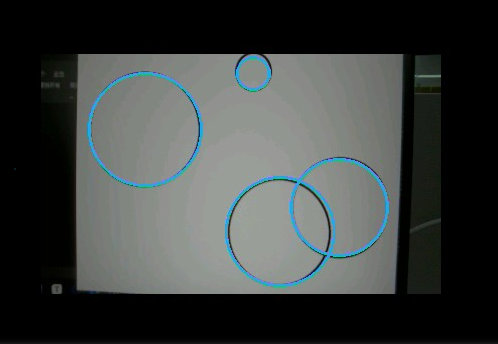
You can see that the circle in the picture will be marked on the screen (if there is no screen, look at the frame buffer)
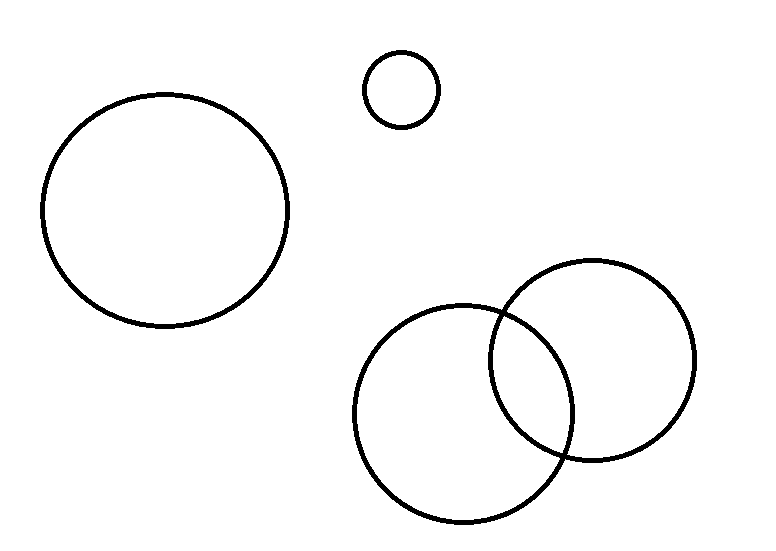
【K230 recognition results】
Code explanation
The peripherals we will use in this section are mainly camera modules
Line segment detection is implemented by the find_circles() method in K230, which belongs to the image module
Complete code
ximport time, os, sysfrom media.sensor import *from media.display import *from media.media import *# 设置图像捕获分辨率 / Set picture capture resolutionPICTURE_WIDTH = 400PICTURE_HEIGHT = 240# 显示模式:"VIRT"用于无屏幕情况,"LCD"用于有屏幕情况# Display mode: "VIRT" for virtual display, "LCD" for physical screenDISPLAY_MODE = "LCD"# 根据显示模式设置显示分辨率 / Set display resolution based on modeif DISPLAY_MODE == "VIRT": # 虚拟显示器模式(1920x1080) / Virtual display mode DISPLAY_WIDTH = ALIGN_UP(1920, 16) # 确保宽度16字节对齐 / Ensure width is 16-byte aligned DISPLAY_HEIGHT = 1080elif DISPLAY_MODE == "LCD": DISPLAY_WIDTH = 640 DISPLAY_HEIGHT = 480else: raise ValueError("未知的显示模式,请选择 'VIRT' 或 'LCD' / Unknown display mode, please choose 'VIRT' or 'LCD'")def init_sensor(): """初始化传感器 / Initialize sensor""" sensor = Sensor(id=2) sensor.reset() sensor.set_framesize(width=PICTURE_WIDTH, height=PICTURE_HEIGHT, chn=CAM_CHN_ID_0) sensor.set_pixformat(Sensor.RGB565, chn=CAM_CHN_ID_0) return sensordef init_display(): """初始化显示器 / Initialize display""" if DISPLAY_MODE == "VIRT": Display.init(Display.VIRT, width=DISPLAY_WIDTH, height=DISPLAY_HEIGHT, fps=60) elif DISPLAY_MODE == "LCD": Display.init(Display.ST7701, width=DISPLAY_WIDTH, height=DISPLAY_HEIGHT, to_ide=True)def process_circles(img, circles): """处理检测到的圆形 / Process detected circles""" print("【圆形信息 / Circle Statistics Start】") for i, circle in enumerate(circles): # 使用蓝色绘制圆形 / Draw circles in blue img.draw_circle(circle.circle(), color=(40,167,225), thickness=3) print(f"Circle {i}: {circle}") print("【==============================】")def main(): try: # 初始化设备 / Initialize devices sensor = init_sensor() init_display() MediaManager.init() sensor.run() # 计算显示偏移量以居中显示 / Calculate display offsets for center alignment x_offset = (DISPLAY_WIDTH - PICTURE_WIDTH) // 2 y_offset = (DISPLAY_HEIGHT - PICTURE_HEIGHT) // 2 while True: os.exitpoint() # 捕获图像 / Capture image img = sensor.snapshot(chn=CAM_CHN_ID_0) # 寻找并处理圆形 / Find and process circles # threshold: 控制圆形检测的阈值,更高的值会减少检测到的圆形数量 # threshold: Controls circle detection sensitivity, higher values reduce the number of detected circles circles = img.find_circles(threshold=3500) process_circles(img, circles) # 居中显示图像 / Display image in center Display.show_image(img, x=x_offset, y=y_offset) except KeyboardInterrupt as e: print("用户中断 / User interrupted: ", e) except Exception as e: print(f"发生错误 / Error occurred: {e}") finally: # 清理资源 / Cleanup resources if 'sensor' in locals() and isinstance(sensor, Sensor): sensor.stop() Display.deinit() os.exitpoint(os.EXITPOINT_ENABLE_SLEEP) time.sleep_ms(100) MediaManager.deinit()if __name__ == "__main__": main()Code structure
Initialization configuration
- Support two display modes: virtual display (VIRT, 1920x1080) and LCD screen (640x480)
- Set the corresponding display resolution according to the selected display mode
Core function
- init_sensor(): Initialize the camera sensor, set the image resolution and format
- init_display(): Initialize the display device according to the display mode
- process_circles(): Process the detected circles, draw on the image and output information
Main loop processing
- Continuously capture images
- Detect circles in the image
- Draw blue circles at the detected circle position
- Center the processed image on the screen
Exception handling and resource cleanup
- Handle abnormal situations such as keyboard interrupts
- Ensure that all resources (sensors, displays, media managers) are properly released when the program ends
Circle Detection Function
find_rects
xxxxxxxxxximage.find_rects([roi=Auto, threshold=10000])This function uses the same quadrilateral detection algorithm as AprilTag to find rectangles in an image. The algorithm works best for rectangles that contrast sharply with the background. AprilTag's quadrilateral detection can handle rectangles of arbitrary scale, rotation, and shear, and returns a list of image.rect objects.
roiis a rectangle tuple(x, y, w, h)that specifies the region of interest. If not specified, the ROI defaults to the entire image. The operation is limited to pixels within the region.
In the returned list of rectangles, rectangles with a bounding size (by sliding the Sobel operator over all pixels on the edge of the rectangle and summing its values) less than threshold are filtered out. The appropriate threshold value depends on the specific application scenario.
Note: Compressed images and Bayer images are not supported.