Palm key point detection
Palm key point detectionRoutine Experiment EffectCode ExplanationCode structureCode Explanationflow chart
Routine Experiment Effect
In this section, we will learn how to use K230 to detect the key points of the human palm.
The example code is in [Source code/08.Body/06.hand_keypoint_detection.py]
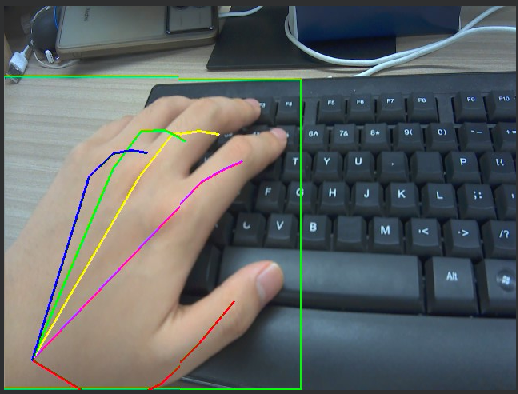
After connecting to the IDE, run the sample code in this section and use K230 to aim at a picture of a human hand. You can see that the key points of the hand are marked with lines of different colors on the screen.
Since the model is relatively complex and the loading process takes a long time, there is only a picture in the first few seconds of running, but no recognition. This is normal.
Code Explanation
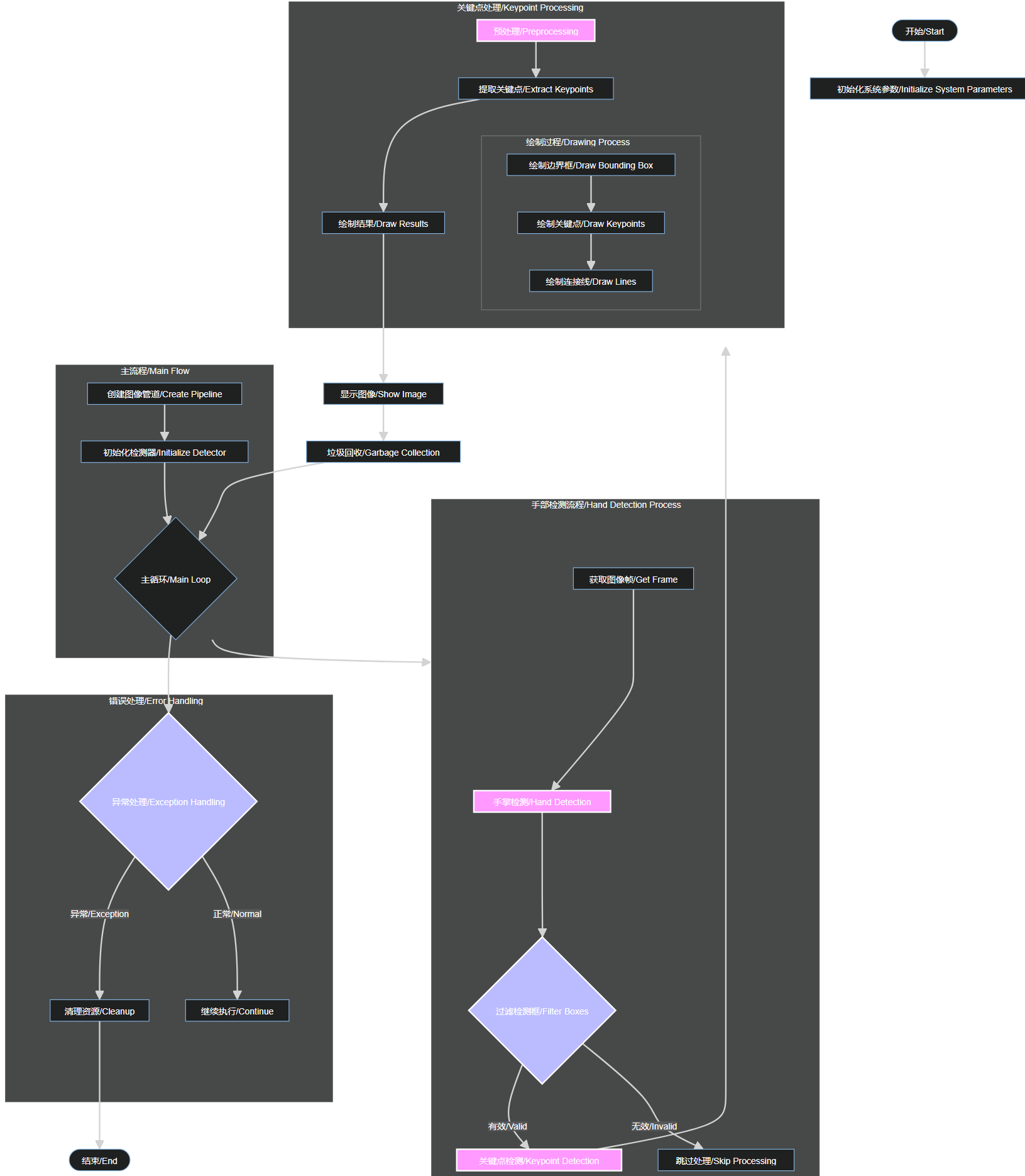
Code structure
System Initialization:
- Parameter initialization
- Create pipeline
- Initialize detector
Hand Detection Process:
- Image preprocessing
- Hand detection
- Detection box filtering
Keypoint Detection Process:
- Hand region cropping
- Keypoint detection
- Coordinate processing
Visualization:
- Draw detection box
- Draw keypoints
- Draw connections
Error Handling:
- Exception catching
- Resource cleanup
- Program exit
Code Explanation
For the complete code, please refer to the file [Source Code/08.Body/05.hand_keypoint_detection.py]
xif __name__ == "__main__": # 显示模式,默认"hdmi",可以选择"hdmi"和"lcd" / Display mode, default is "hdmi", can be "hdmi" or "lcd" display_mode = "lcd" rgb888p_size = [640, 360] # 根据显示模式设置显示尺寸 / Set display size based on display mode if display_mode == "hdmi": display_size = [1920, 1080] else: display_size = [640, 480] # 手掌检测模型路径 / Path to hand detection model hand_det_kmodel_path = "/sdcard/kmodel/hand_det.kmodel" # 手部关键点模型路径 / Path to hand keypoint model hand_kp_kmodel_path = "/sdcard/kmodel/handkp_det.kmodel" # 其它参数 / Other parameters anchors_path = "/sdcard/utils/prior_data_320.bin" hand_det_input_size = [512, 512] hand_kp_input_size = [256, 256] confidence_threshold = 0.2 nms_threshold = 0.5 labels = ["hand"] anchors = [26, 27, 53, 52, 75, 71, 80, 99, 106, 82, 99, 134, 140, 113, 161, 172, 245, 276] # 初始化PipeLine,只关注传给AI的图像分辨率,显示的分辨率 # Initialize PipeLine, focusing only on the image resolution passed to AI and the display resolution pl = PipeLine(rgb888p_size=rgb888p_size, display_size=display_size, display_mode=display_mode) pl.create() # 初始化手掌关键点检测任务 / Initialize hand keypoint detection task hkd = HandKeyPointDet(hand_det_kmodel_path, hand_kp_kmodel_path, det_input_size=hand_det_input_size, kp_input_size=hand_kp_input_size, labels=labels, anchors=anchors, confidence_threshold=confidence_threshold, nms_threshold=nms_threshold, nms_option=False, strides=[8, 16, 32], rgb888p_size=rgb888p_size, display_size=display_size) # 主循环 / Main loop while True: with ScopedTiming("total", 1): img = pl.get_frame() # 获取当前帧 / Get current frame det_boxes, hand_res = hkd.run(img) # 推理当前帧 / Process current frame hkd.draw_result(pl, det_boxes, hand_res) # 绘制推理结果 / Draw inference results pl.show_image() # 展示推理结果 / Show inference results gc.collect() # 执行垃圾回收 / Perform garbage collection time.sleep_ms(5) # 短暂休眠减少CPU占用 / Brief sleep to reduce CPU usage pl.destroy() hkd.hand_det.deinit() hkd.hand_kp.deinit()flow chart