Dynamic gesture recognition
Dynamic gesture recognitionRoutine Experiment EffectCode ExplanationGesture recognition key codeflow chart
Routine Experiment Effect
In this section, we will learn how to use K230 to realize the human body detection function.
The example code is in [Source code/08.Body/09.dynamic_gesture.py]
After connecting to the IDE, run the code and wait for the routine to run and load the model. (It takes about 8 to 10 seconds)
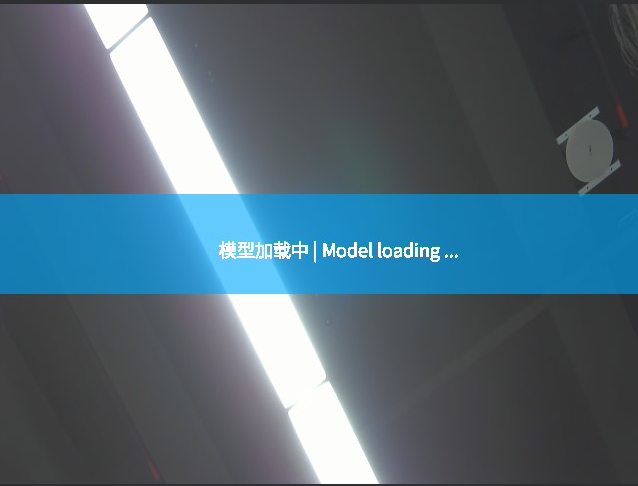
After waiting for the routine to run and load the model, we put our hand in front of the camera and wait for the gesture icon to appear in the upper left corner. The appearance of this icon means that K230 is ready to recognize gestures, and we can perform the corresponding gesture waving behavior. The specific operation can be seen in the following animation:

Serial port output function has been added
After detecting the gesture, the following serial output format will be sent
$dir#
The '$' represents the beginning of the data, and the '#' represents the end of the data.
dir is the direction, 0 is up, 1 is left, 2 is down, 3 is right, 4 is unchanged
*Note: The current code will send multiple serial port data when a gesture is recognized. You can filter it on the receiving end.
Code Explanation
There is too much complete code in this section, so only the key parts of the code are explained here
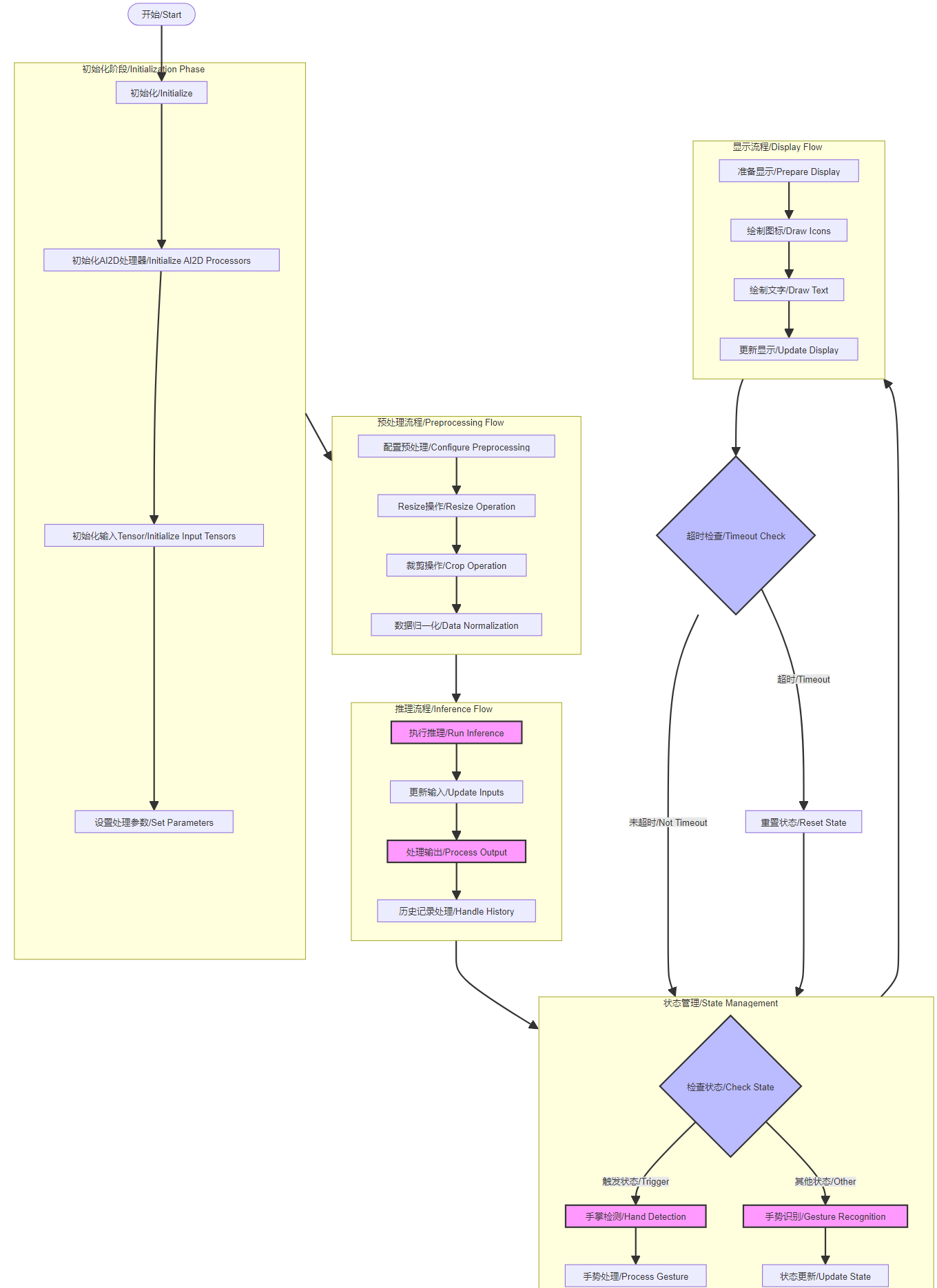
Gesture recognition key code
xxxxxxxxxx def run(self, input_np): """ 运行手势识别 / Run gesture recognition 参数 / Parameter: input_np: 输入图像 / Input image 返回 / Returns: 根据当前状态返回检测结果或识别结果 / Returns detection or recognition results based on current state """ if self.cur_state == self.TRIGGER: # 手掌检测模式 / Hand detection mode det_boxes = self.hand_det.run(input_np) boxes = [] gesture_res = [] for det_box in det_boxes: # 获取检测框坐标 / Get detection box coordinates x1, y1, x2, y2 = det_box[2], det_box[3], det_box[4], det_box[5] w, h = int(x2 - x1), int(y2 - y1) # 过滤无效检测框 / Filter invalid detection boxes if (h < (0.1 * self.rgb888p_size[1])): continue if (w < (0.25 * self.rgb888p_size[0]) and ((x1 < (0.03 * self.rgb888p_size[0])) or (x2 > (0.97 * self.rgb888p_size[0])))): continue if (w < (0.15 * self.rgb888p_size[0]) and ((x1 < (0.01 * self.rgb888p_size[0])) or (x2 > (0.99 * self.rgb888p_size[0])))): continue # 执行关键点检测 / Perform keypoint detection self.hand_kp.config_preprocess(det_box) hk_results, gesture_str = self.hand_kp.run(input_np) boxes.append(det_box) gesture_res.append((hk_results, gesture_str)) return boxes, gesture_res else: # 动态手势识别模式 / Dynamic gesture recognition mode idx, avg_logit = self.dg.run(input_np, self.his_logit, self.history) return idx, avg_logit def draw_result(self, pl, output1, output2): """ 绘制识别结果 / Draw recognition results 参数 / Parameters: pl: 绘图层对象 / Drawing layer object output1: 第一阶段输出(检测框) / First stage output (detection boxes) output2: 第二阶段输出(关键点和手势) / Second stage output (keypoints and gestures) """ # 清空绘图缓存 / Clear drawing cache pl.osd_img.clear() draw_img_np = np.zeros((self.display_size[1], self.display_size[0], 4), dtype=np.uint8) draw_img = image.Image(self.display_size[0], self.display_size[1], image.ARGB8888, alloc=image.ALLOC_REF, data=draw_img_np) if self.cur_state == self.TRIGGER: # 触发状态下的处理 / Processing in trigger state for i in range(len(output1)): hk_results, gesture = output2[i][0], output2[i][1] # 检测到"five"或"yeah"手势 / Detect "five" or "yeah" gesture if ((gesture == "five") or (gesture == "yeah")): # 计算手势方向向量 / Calculate gesture direction vector v_x = hk_results[24] - hk_results[0] v_y = hk_results[25] - hk_results[1] angle = self.hand_kp.hk_vector_2d_angle([v_x,v_y], [1.0,0.0]) if (v_y > 0): angle = 360 - angle # 根据角度判断手势方向 / Determine gesture direction based on angle if ((70.0 <= angle) and (angle < 110.0)): # 向上 / Upward if ((self.pre_state != self.UP) or (self.pre_state != self.MIDDLE)): self.vec_flag.append(self.pre_state) if ((len(self.vec_flag) > 10) or (self.pre_state == self.UP) or (self.pre_state == self.MIDDLE) or (self.pre_state == self.TRIGGER)): draw_img_np[:self.bin_height,:self.bin_width,:] = self.shang_argb self.cur_state = self.UP elif ((110.0 <= angle) and (angle < 225.0)): # 向右 / Rightward if (self.pre_state != self.RIGHT): self.vec_flag.append(self.pre_state) if ((len(self.vec_flag) > 10) or (self.pre_state == self.RIGHT) or (self.pre_state == self.TRIGGER)): draw_img_np[:self.bin_width,:self.bin_height,:] = self.you_argb self.cur_state = self.RIGHT elif((225.0 <= angle) and (angle < 315.0)): # 向下 / Downward if (self.pre_state != self.DOWN): self.vec_flag.append(self.pre_state) if ((len(self.vec_flag) > 10) or (self.pre_state == self.DOWN) or (self.pre_state == self.TRIGGER)): draw_img_np[:self.bin_height,:self.bin_width,:] = self.xia_argb self.cur_state = self.DOWN else: # 向左 / Leftward if (self.pre_state != self.LEFT): self.vec_flag.append(self.pre_state) if ((len(self.vec_flag) > 10) or (self.pre_state == self.LEFT) or (self.pre_state == self.TRIGGER)): draw_img_np[:self.bin_width,:self.bin_height,:] = self.zuo_argb self.cur_state = self.LEFT self.m_start = time.time_ns() self.his_logit = [] else: # 非触发状态下的处理 / Processing in non-trigger state idx, avg_logit = output1, output2[0] # 处理不同状态下的手势动作 / Handle gesture actions in different states if (self.cur_state == self.UP): draw_img_np[:self.bin_height,:self.bin_width,:] = self.shang_argb if ((idx == 15) or (idx == 10)): # 向上挥动确认 / Upward wave confirmation self.vec_flag.clear() if (((avg_logit[idx] >= 0.7) and (len(self.his_logit) >= 2)) or ((avg_logit[idx] >= 0.3) and (len(self.his_logit) >= 4))): self.s_start = time.time_ns() self.cur_state = self.TRIGGER self.draw_state = self.DOWN self.history = [2] self.pre_state = self.UP elif ((idx == 25) or (idx == 26)): # 中间位置确认 / Middle position confirmation self.vec_flag.clear() if (((avg_logit[idx] >= 0.4) and (len(self.his_logit) >= 2)) or ((avg_logit[idx] >= 0.3) and (len(self.his_logit) >= 3))): self.s_start = time.time_ns() self.cur_state = self.TRIGGER self.draw_state = self.MIDDLE self.history = [2] self.pre_state = self.MIDDLE else: self.his_logit.clear() # 处理其他方向的状态(RIGHT/DOWN/LEFT)的逻辑类似 # Similar logic for other directional states (RIGHT/DOWN/LEFT) elif (self.cur_state == self.RIGHT): draw_img_np[:self.bin_width,:self.bin_height,:] = self.you_argb if ((idx==16)or(idx==11)) : self.vec_flag.clear() if (((avg_logit[idx] >= 0.4) and (len(self.his_logit) >= 2)) or ((avg_logit[idx] >= 0.3) and (len(self.his_logit) >= 3))): self.s_start = time.time_ns() self.cur_state = self.TRIGGER self.draw_state = self.RIGHT self.history = [2] self.pre_state = self.RIGHT else: self.his_logit.clear() elif (self.cur_state == self.DOWN): draw_img_np[:self.bin_height,:self.bin_width,:] = self.xia_argb if ((idx==18)or(idx==13)): self.vec_flag.clear() if (((avg_logit[idx] >= 0.4) and (len(self.his_logit) >= 2)) or ((avg_logit[idx] >= 0.3) and (len(self.his_logit) >= 3))): self.s_start = time.time_ns() self.cur_state = self.TRIGGER self.draw_state = self.UP self.history = [2] self.pre_state = self.DOWN else: self.his_logit.clear() elif (self.cur_state == self.LEFT): draw_img_np[:self.bin_width,:self.bin_height,:] = self.zuo_argb if ((idx==17)or(idx==12)): self.vec_flag.clear() if (((avg_logit[idx] >= 0.4) and (len(self.his_logit) >= 2)) or ((avg_logit[idx] >= 0.3) and (len(self.his_logit) >= 3))): self.s_start = time.time_ns() self.cur_state = self.TRIGGER self.draw_state = self.LEFT self.history = [2] self.pre_state = self.LEFT else: self.his_logit.clear() self.elapsed_time = round((time.time_ns() - self.m_start)/1000000) # 超时处理 / Timeout handling if ((self.cur_state != self.TRIGGER) and (self.elapsed_time > 2000)): self.cur_state = self.TRIGGER self.pre_state = self.TRIGGER # 绘制结果显示 / Draw result display self.elapsed_ms_show = round((time.time_ns()-self.s_start)/1000000) if (self.elapsed_ms_show < 1000): # 根据不同状态绘制不同的箭头和文字 / Draw different arrows and text based on state if (self.draw_state == self.UP): draw_img.draw_arrow(self.display_size[0]//2, self.display_size[1]//2, self.display_size[0]//2, self.display_size[1]//2-100, (155,170,190,230), thickness=13) draw_img.draw_string_advanced(self.display_size[0]//2-50, self.display_size[1]//2-50, 32, "向上 UP") elif (self.draw_state == self.LEFT): draw_img.draw_arrow(self.display_size[0]//2, self.display_size[1]//2, self.display_size[0]//2-100, self.display_size[1]//2, (155,170,190,230), thickness=13) draw_img.draw_string_advanced(self.display_size[0]//2-50, self.display_size[1]//2-50, 32, "向左 LEFT") elif (self.draw_state == self.DOWN): draw_img.draw_arrow(self.display_size[0]//2,self.display_size[1]//2,self.display_size[0]//2,self.display_size[1]//2+100, (155,170,190,230), thickness=13) # 判断为向下挥动时,画一个向下的箭头 draw_img.draw_string_advanced(self.display_size[0]//2-50,self.display_size[1]//2-50,32,"向下 DOWN") elif (self.draw_state == self.RIGHT): draw_img.draw_arrow(self.display_size[0]//2,self.display_size[1]//2,self.display_size[0]//2+100,self.display_size[1]//2, (155,170,190,230), thickness=13) # 判断为向左挥动时,画一个向左的箭头 draw_img.draw_string_advanced(self.display_size[0]//2-50,self.display_size[1]//2-50,32,"向右 RIGHT") elif (self.draw_state == self.MIDDLE): draw_img.draw_circle(self.display_size[0]//2,self.display_size[1]//2,100, (255,170,190,230), thickness=2, fill=True) # 判断为五指捏合手势时,画一个实心圆 draw_img.draw_string_advanced(self.display_size[0]//2-50,self.display_size[1]//2-50,32,"中间 MIDDLE") else: self.draw_state = self.TRIGGER # 更新显示 / Update display pl.osd_img.copy_from(draw_img)flow chart