yolov8n object detection
yolov8n object detectionRoutine Experiment EffectCode ExplanationCode structureCode AnalysisAlgorithm OverviewWhat is yolo?
Routine Experiment Effect
In this section, we will learn how to use K230 to implement target detection based on yolov8
The model we use in this section supports the recognition of nearly 80 types of objects. For specific types of objects that can be recognized, we can refer to the content of the labels array in the code.
A simple summary of the following contents
x交通工具/Transportation:自行车/bicycle, 汽车/car, 摩托车/motorcycle, 飞机/airplane, 公共汽车/bus, 火车/train, 卡车/truck, 船/boat交通设施/Traffic Facilities:交通信号灯/traffic light, 消防栓/fire hydrant, 停车标志/stop sign, 停车计时器/parking meter动物/Animals:鸟/bird, 猫/cat, 狗/dog, 马/horse, 羊/sheep, 牛/cow, 大象/elephant, 熊/bear, 斑马/zebra, 长颈鹿/giraffe个人物品/Personal Items:背包/backpack, 雨伞/umbrella, 手提包/handbag, 领带/tie, 行李箱/suitcase运动用品/Sports Equipment:飞盘/frisbee, 滑雪板/skis, 单板滑雪/snowboard, 运动球/sports ball, 风筝/kite, 棒球棒/baseball bat, 棒球手套/baseball glove, 滑板/skateboard, 冲浪板/surfboard, 网球拍/tennis racket餐饮用品/Dining Items:瓶子/bottle, 酒杯/wine glass, 杯子/cup, 叉子/fork, 刀/knife, 勺子/spoon, 碗/bowl食物/Food:香蕉/banana, 苹果/apple, 三明治/sandwich, 橙子/orange, 西兰花/broccoli, 胡萝卜/carrot, 热狗/hot dog, 披萨/pizza, 甜甜圈/donut, 蛋糕/cake家居用品/Home Items:长凳/bench, 椅子/chair, 沙发/couch, 盆栽/potted plant, 床/bed, 餐桌/dining table, 马桶/toilet, 花瓶/vase电子设备/Electronics:电视/tv, 笔记本电脑/laptop, 鼠标/mouse, 遥控器/remote, 键盘/keyboard, 手机/cell phone, 微波炉/microwave, 烤箱/oven, 烤面包机/toaster, 水槽/sink, 冰箱/refrigerator, 吹风机/hair drier其他/Others:书/book, 时钟/clock, 剪刀/scissors, 泰迪熊/teddy bear, 牙刷/toothbrush
After connecting to the IDE, run the sample code in this section, and then we will find a few simple scenarios to experiment with
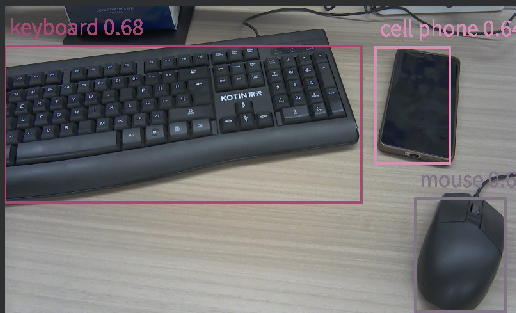
You can see that K230 can correctly identify our items and give them scores.
This model can recognize a lot of things, I won't list them all here, you can try it yourself according to the table I listed above
The current routine has added serial port output
For the protocol format, please refer to [Routine Communication Protocol.xlsx] in the document.
Code Explanation
Code structure
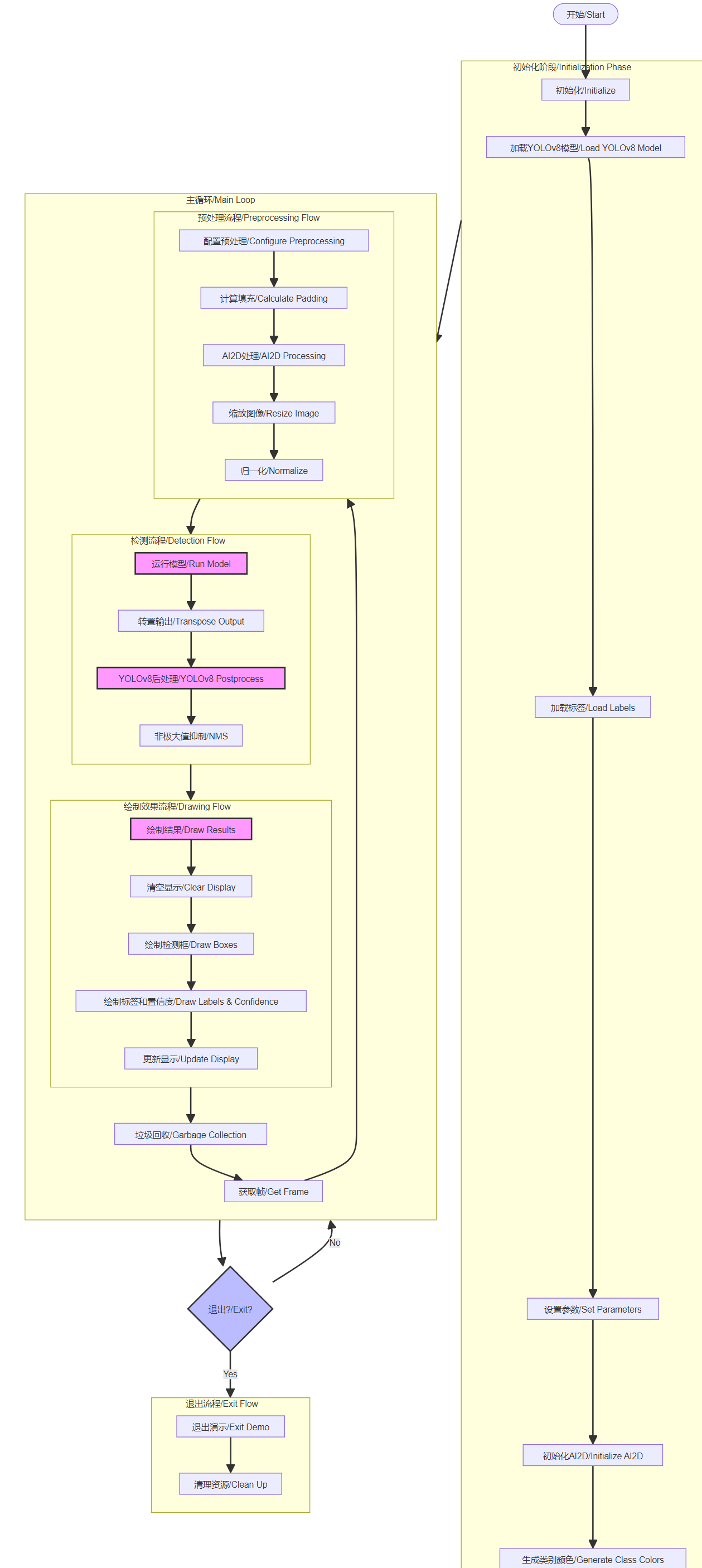
Initialization Phase:
- Load YOLOv8 model
- Load labels
- Set parameters
- Initialize AI2D
- Generate class colors
Preprocessing Flow:
- Configure preprocessing
- Calculate padding
- Resize image
- Normalize
Detection Flow:
- Run model
- Transpose output
- Postprocess
- Non-maximum suppression/NMS
Drawing Flow:
- Clear display
- Draw boxes
- Draw labels
- Update display
Main Loop:
- Get frame
- Process flow
- Garbage collection
Exit Flow:
- Exit demo
- Clean up
Code Analysis
For the complete code, please refer to the file [Source Code/09.Scene/06.licence_det.py]
xxxxxxxxxx# 自定义YOLOv8检测类 Custom YOLOv8 detection classclass ObjectDetectionApp(AIBase): def __init__(self,kmodel_path,labels,model_input_size,max_boxes_num,confidence_threshold=0.5,nms_threshold=0.2,rgb888p_size=[224,224],display_size=[1920,1080],debug_mode=0): """ 初始化函数 Initialization function kmodel_path: 模型路径 Model path labels: 标签列表 Label list model_input_size: 模型输入大小 Model input size max_boxes_num: 最大检测框数量 Maximum number of detection boxes confidence_threshold: 置信度阈值 Confidence threshold nms_threshold: 非极大值抑制阈值 Non-maximum suppression threshold rgb888p_size: RGB图像大小 RGB image size display_size: 显示大小 Display size debug_mode: 调试模式 Debug mode """ super().__init__(kmodel_path,model_input_size,rgb888p_size,debug_mode) self.kmodel_path = kmodel_path self.labels = labels # 模型输入分辨率 Model input resolution self.model_input_size = model_input_size # 阈值设置 Threshold settings self.confidence_threshold = confidence_threshold self.nms_threshold = nms_threshold self.max_boxes_num = max_boxes_num # sensor给到AI的图像分辨率 Image resolution from sensor to AI self.rgb888p_size = [ALIGN_UP(rgb888p_size[0],16),rgb888p_size[1]] # 显示分辨率 Display resolution self.display_size = [ALIGN_UP(display_size[0],16),display_size[1]] self.debug_mode = debug_mode # 检测框预置颜色值 Preset colors for detection boxes self.color_four = get_colors(len(self.labels)) # 宽高缩放比例 Width and height scaling ratios self.x_factor = float(self.rgb888p_size[0])/self.model_input_size[0] self.y_factor = float(self.rgb888p_size[1])/self.model_input_size[1] # Ai2d实例,用于实现模型预处理 Ai2d instance for model preprocessing self.ai2d = Ai2d(debug_mode) # 设置Ai2d的输入输出格式和类型 Set Ai2d input/output format and type self.ai2d.set_ai2d_dtype(nn.ai2d_format.NCHW_FMT,nn.ai2d_format.NCHW_FMT,np.uint8, np.uint8) # 配置预处理操作 Configure preprocessing operations def config_preprocess(self,input_image_size=None): """ 配置图像预处理参数 Configure image preprocessing parameters input_image_size: 输入图像大小(可选) Input image size (optional) """ with ScopedTiming("set preprocess config",self.debug_mode > 0): # 初始化ai2d预处理配置 Initialize ai2d preprocessing configuration ai2d_input_size = input_image_size if input_image_size else self.rgb888p_size top,bottom,left,right,self.scale = letterbox_pad_param(self.rgb888p_size,self.model_input_size) # 配置padding预处理 Configure padding preprocessing self.ai2d.pad([0,0,0,0,top,bottom,left,right], 0, [128,128,128]) self.ai2d.resize(nn.interp_method.tf_bilinear, nn.interp_mode.half_pixel) self.ai2d.build([1,3,ai2d_input_size[1],ai2d_input_size[0]],[1,3,self.model_input_size[1],self.model_input_size[0]]) # 预处理函数 Preprocessing function def preprocess(self,input_np): with ScopedTiming("preprocess",self.debug_mode > 0): return [nn.from_numpy(input_np)] # 后处理函数 Postprocessing function def postprocess(self,results): """ 处理模型输出结果 Process model output results results: 模型输出 Model output """ with ScopedTiming("postprocess",self.debug_mode > 0): new_result = results[0][0].transpose() det_res = aidemo.yolov8_det_postprocess(new_result.copy(), [self.rgb888p_size[1],self.rgb888p_size[0]], [self.model_input_size[1],self.model_input_size[0]], [self.display_size[1],self.display_size[0]], len(self.labels), self.confidence_threshold, self.nms_threshold, self.max_boxes_num) return det_res # 绘制结果函数 Draw results function def draw_result(self,pl,dets): """ 绘制检测结果 Draw detection results pl: PipeLine实例 PipeLine instance dets: 检测结果 Detection results """ with ScopedTiming("display_draw",self.debug_mode >0): if dets: pl.osd_img.clear() for i in range(len(dets[0])): x, y, w, h = map(lambda x: int(round(x, 0)), dets[0][i]) # 绘制矩形框和标签 Draw rectangle box and label pl.osd_img.draw_rectangle(x,y, w, h, color=self.color_four[dets[1][i]],thickness=4) pl.osd_img.draw_string_advanced( x , y-50,32, " " + self.labels[dets[1][i]] + " " + str(round(dets[2][i],2)) , color=self.color_four[dets[1][i]]) else: pl.osd_img.clear()The flow chart is as follows:
Algorithm Overview
What is yolo?
YOLO (You Only Look Once) is a popular family of object detection algorithms. Here are the main features:
YOLO basic principle:
- Divide the image into a grid
- Directly predict bounding boxes and class probabilities
- Single-stage detection, fast speed
YOLOv8n features (n means nano, the smallest version):
- Faster inference speed
- Smaller model size (~3MB)
- Using C2f module and SPPF structure
- Suitable for mobile device deployment
Main performance comparison: YOLOv8n on COCO dataset:
- AP: 37.3%
- Speed: About 30% faster than v5
- Parameter volume: 3.2M