k230 machine code tracking
k230 machine code tracking1. Software-Hardware2. Brief principle1. Hardware schematic2. Physical connection diagram3. Control principle3. Main functions4. Partial code analysis5. Experimental Phenomenon
This tutorial is a comprehensive experiment combining multiple peripherals. You can first understand a single peripheral and then conduct this experiment.
1. Software-Hardware
STM32F103CubeIDE
STM32 Robot Development Board
k230 module: external
Type-C data cable or ST-Link
Download or simulate the development board
2. Brief principle
1. Hardware schematic
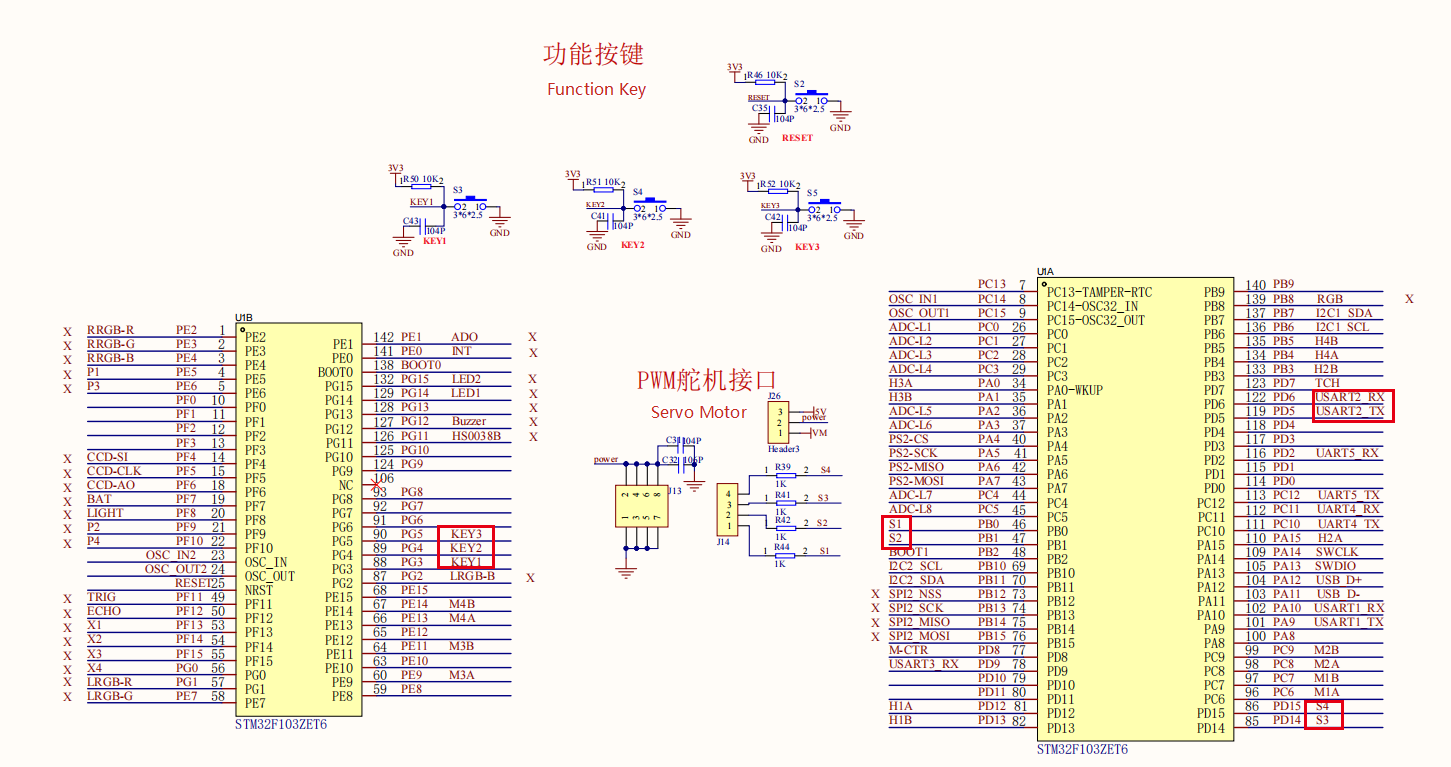
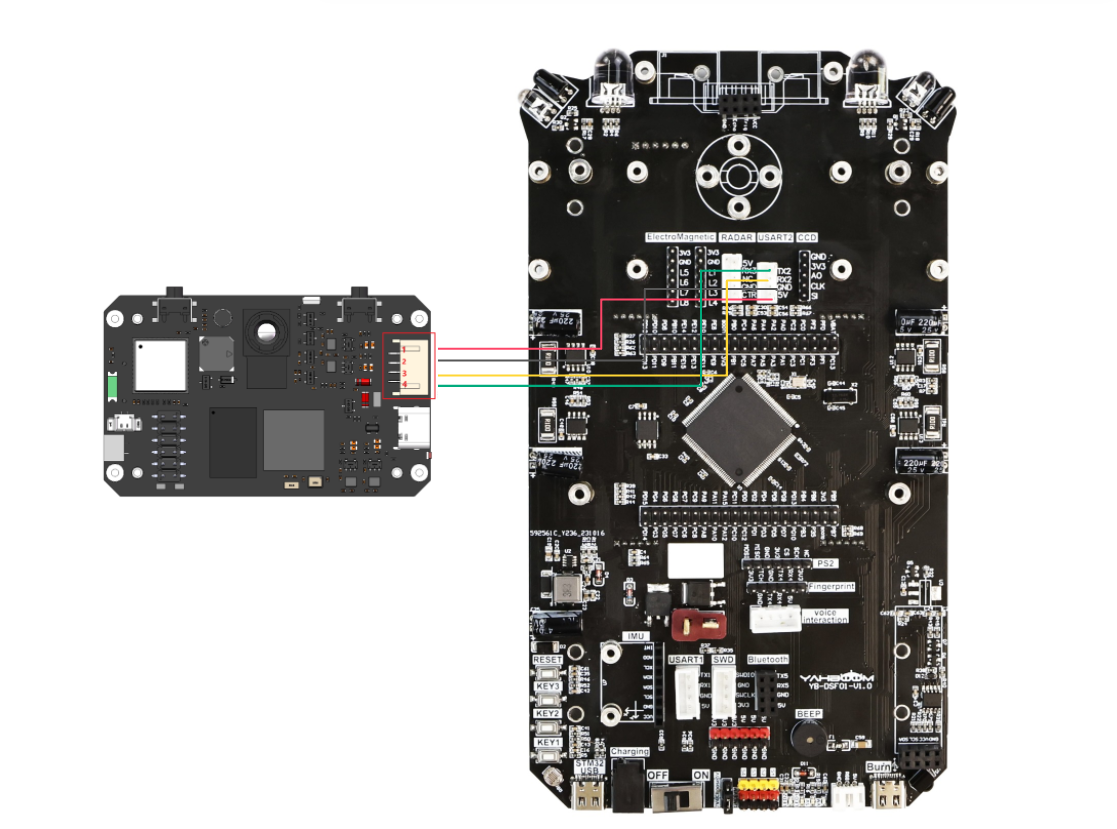
2. Physical connection diagram
K230 wiring (Note: The wiring in the figure below is for position reference only. We are equipped with K230 dual-head PH2.0 4Pin all-black wire, with fool-proof design, no need to worry about wiring problems)
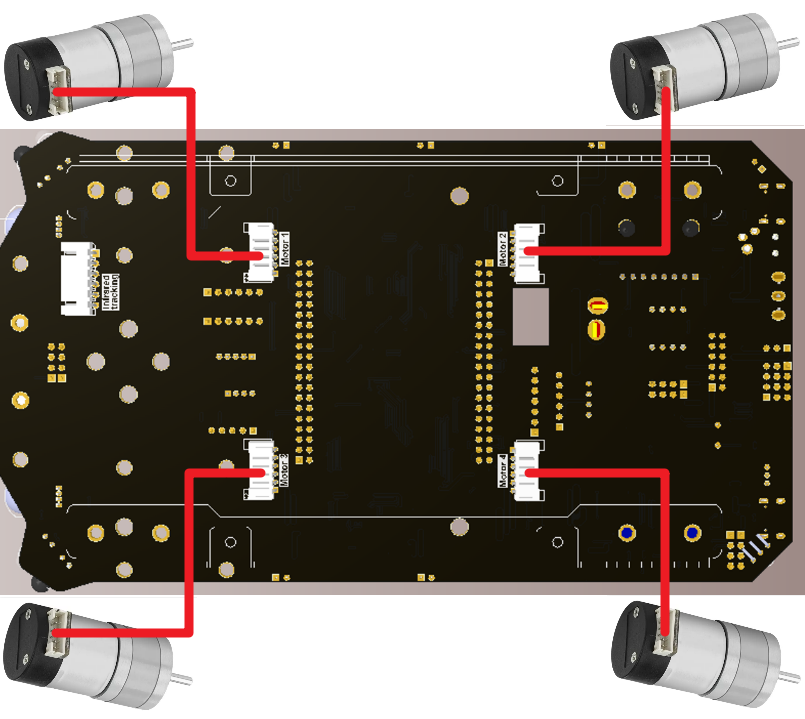
Motor wiring
3. Control principle
Program flow chart
| Module | Function |
|---|---|
| k230 visual module | Identify machine code and send data to the microcontroller through the serial port |
Communication protocol:
| Start character | Length | Delimiter | Routine number | Delimiter | x | Delimiter | y | Delimiter | w | Delimiter | h | Delimiter | ID | Delimiter | degrees | End character |
|---|---|---|---|---|---|---|---|---|---|---|---|---|---|---|---|---|
| $ | XX | , | 04 | , | XXX | , | XXX | , | XXX | , | XXX | , | XXX | , | ... | $ |
id: The label number of the identified mechanical code degress: The angle of the identified mechanical code
The microcontroller receives the data sent by k230 through the serial port and processes the data. By judging whether the received data content is in the above frame format, we extract the data x, y, w, h after it meets the data frame format, and then track it
3. Main functions
Function: Pto_Data_Parse
| Function prototype | void Pto_Data_Parse(uint8_t *data_buf, uint8_t num) |
|---|---|
| Function | Parse the data information returned by K230 |
| Input parameter 1 | Array pointer of received data |
| Input parameter 2 | Size of received data |
| Return value | None |
Function Car_Move**
| Function prototype | void Car_Move(void) |
|---|---|
| Function | Car tracking logic control |
| Return value | None |
For the underlying driver, you can refer to [Chapter 3: Advanced Timer Tutorial] and [Chapter 4: Motor Control Tutorial]For the application layer, you can read the source code in the project file by yourself
4. Partial code analysis
yb_protocol.c
x//* * @Brief: 数据分析 Data analysis * @Note: 解析传入的数据帧,提取字段值并处理 * Parse the incoming data frame, extract field values and process them * @Parm: 传入接受到的一个数据帧和长度 Pass in a received data frame and length * @Retval: 无返回值 No return value */void Pto_Data_Parse(uint8_t *data_buf, uint8_t num){ uint8_t pto_head = data_buf[0]; uint8_t pto_tail = data_buf[num-1]; // 验证帧头和帧尾 Verify frame header and footer if (!(pto_head == PTO_HEAD && pto_tail == PTO_TAIL)) { return; }
uint8_t data_index = 1; uint8_t field_index[PTO_BUF_LEN_MAX] = {0}; int i = 0;
// 处理分隔符,将逗号替换为字符串结束符,记录字段位置 // Process delimiters, replace commas with string terminators and record field positions for (i = 1; i < num-1; i++) { if (data_buf[i] == ',') { data_buf[i] = 0; field_index[data_index] = i; data_index++; } }
// 处理无分隔符的情况,整个数据作为标签处理 // Handle the case without delimiters, treat the entire data as a label if (data_index == 1) { uint8_t len = num - 2; memcpy(lubiao, (char*)data_buf+1, len); lubiao[len] = '\0'; // 确保字符串以'\0'结尾 Ensure the string ends with '\0' } else { // 处理多字段情况 Process multiple fields for (i = 0; i < data_index; i++) { uint8_t start = field_index[i] + 1; uint8_t len; if (i == data_index - 1) { // 最后一个字段,长度计算到帧尾前 // Last field, length calculated up to before the frame footer len = (num - 1) - start; } else { // 中间字段,长度为下一个分隔符位置减去当前起始位置 // Middle field, length is the next delimiter position minus the current start position len = field_index[i + 1] - start; } // 根据字段索引和总数处理不同类型的数据 // Process different types of data based on field index and total count if (i == 6 && data_index == 7) { memcpy(msg, (char*)data_buf + start, len); msg[len] = '\0'; // 确保字符串以'\0'结尾 Ensure the string ends with '\0' } else if (i == 2 && data_index == 3) { memcpy(game, (char*)data_buf + start, len); game[len] = '\0'; // 确保字符串以'\0'结尾 Ensure the string ends with '\0' } else { // 其他字段转换为整数值 // Convert other fields to integer values values[i] = Pto_Char_To_Int((char*)data_buf + start); } } // 帧长度验证,检查协议定义的长度与实际长度是否一致 // Frame length verification, check if the protocol-defined length matches the actual length uint8_t pto_len = values[0]; if (pto_len != num) { printf("pto_len error:%d , data_len:%d\n", pto_len, num); return; }
// 提取协议ID Extract protocol ID pto_id = values[1]; }
// 提取坐标和尺寸信息 Extract coordinate and dimension information int x = values[2]; int y = values[3]; int w = values[4]; int h = values[5];
// 打印坐标和尺寸信息 Print coordinate and dimension information printf("dmcode:x:%d, y:%d, w:%d, h:%d,\n", x, y, w, h);
// 打印游戏信息 Print game information printf("msg:%s\n", game);
// 调试信息已注释 Debug information commented out // printf("game:%d\n", pto_id); // printf("msg:%s\n", msg);}app_motor.c
xxxxxxxxxx//控制小车运行,输入的参数分别为x、y、z三个轴上的速度值//Control the movement of the car. The input parameters are the speed values on the x, y, and z axes.void wheel_Ctrl(int16_t V_x, int16_t V_y, int16_t V_z){    float robot_APB = Motion_Get_APB();//    speed_lr = -V_y;    speed_lr = 0;    speed_fb = V_x;    speed_spin = (V_z / 1000.0f) * robot_APB;    if (V_x == 0 && V_y == 0 && V_z == 0)    {        Motion_Stop(STOP_BRAKE);        return;    }
    speed_L1_setup = speed_fb + speed_lr - speed_spin;    speed_L2_setup = speed_fb - speed_lr - speed_spin;    speed_R1_setup = speed_fb - speed_lr + speed_spin;    speed_R2_setup = speed_fb + speed_lr + speed_spin;
    if (speed_L1_setup > 1000)        speed_L1_setup = 1000;    if (speed_L1_setup < -1000)        speed_L1_setup = -1000;    if (speed_L2_setup > 1000)        speed_L2_setup = 1000;    if (speed_L2_setup < -1000)        speed_L2_setup = -1000;    if (speed_R1_setup > 1000)        speed_R1_setup = 1000;    if (speed_R1_setup < -1000)        speed_R1_setup = -1000;    if (speed_R2_setup > 1000)        speed_R2_setup = 1000;    if (speed_R2_setup < -1000)        speed_R2_setup = -1000;
    Motion_Set_Speed(speed_L1_setup, speed_L2_setup, speed_R1_setup, speed_R2_setup);}
5. Experimental Phenomenon
After successfully downloading the program, we need to take a machine code and then put it under the lens of the k230 visual module for recognition. The car does not move when it does not recognize the machine code. When the machine code enters the camera acquisition range of the car, the car starts to follow the machine code and keep the machine code in the middle of the video screen. Due to the limited acquisition range of the camera, the machine code cannot be moved too fast, otherwise it will be out of the frame and cannot follow the machine code.
xxxxxxxxxxFor program download, please refer to [Chapter 2: Development Environment Construction and Use → 2.6 Program Download and Simulation]
K230 Code Burning
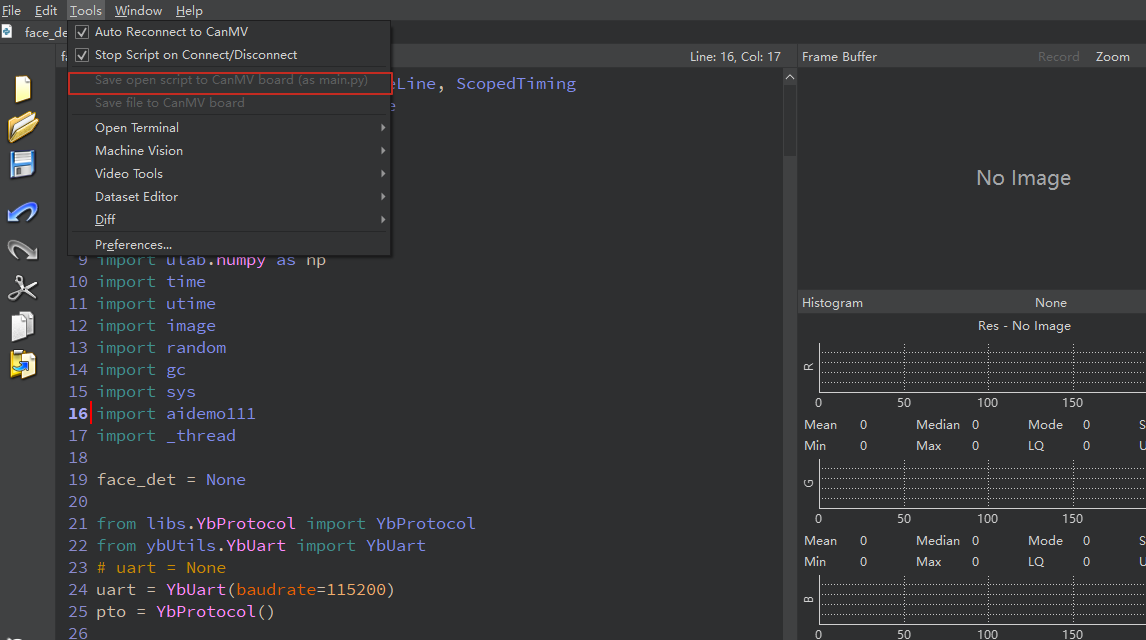
Required tools: K230, SD card, CanMV IDE K230
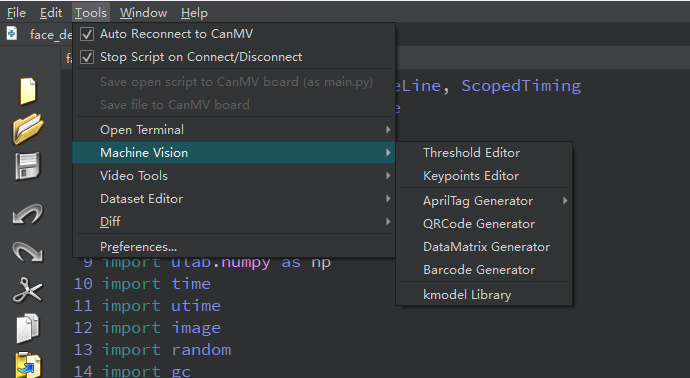
We find the k230_track_recong.py file in the project folder, then drag it to CanMV IDE K230, and then choose to save the opened script as main.py to CanMV
Obtaining machine code:
Click Tools->Machine Vision->AprilTag Machine Code Generator on CanMV IDE