TinyF and STM32 serial port communication
TinyF and STM32 serial port communication0. Introduction to TinyF1.Experimental Preparation2.Experimental wiring3. Main code explanation4.Experimental phenomenon5.Some important parameters of TinyF
0. Introduction to TinyF
- The TinyF laser ranging module is based on a D-TOF single-point laser sensor, an onboard MCU, and a housing. It features built-in sunlight rejection and anti-cover contamination algorithms, enabling accurate and rapid distance measurement. Even in extremely bright ambient light (100-190K Lux), it can accurately measure even the smallest objects, unaffected by variations in reflectivity, achieving precise ranging of 2m to 4m.
1.Experimental Preparation
- TinyF Laser Distance Measurement Module
- STM32F1 Series. This tutorial uses the STM32F103C8T6.
2.Experimental wiring
| STM32 | TinyF |
|---|---|
| PA2 | RX |
| PA3 | TX |
| GND | GND |
| 5V | 5V |
Wiring diagram
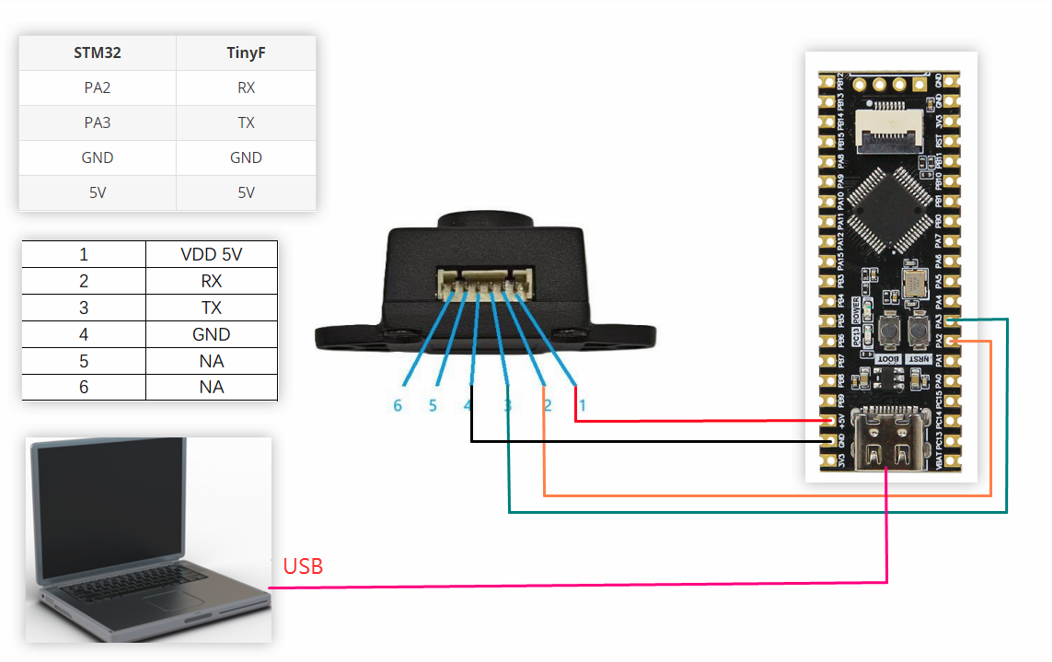
Note: If you want to use a USB to TTL module, refer to the following table for wiring between STM32 and USB to TTL
| STM32 | USB转TTL |
|---|---|
| PA9 | RXD |
| PA10 | TXD |
| GND | GND |
| 5V | 5V |
3. Main code explanation
xvoid Processing_Data(uint8_t RXdata) { static uint8_t recv_buf[16] = {0}; // 接收缓冲区(最大11字节数据) / Receive buffer (max 11 bytes data) static uint8_t index = 0; // 当前缓冲区位置 / Current buffer position static uint8_t parsing = 0; // 解析状态 / Parsing state static uint8_t comma_pos = 0; // 逗号位置(用于截取距离数据) / Comma position (for extracting distance data) // 防溢出:如果缓冲区满则重置状态机 / Overflow protection: reset state machine if buffer full if (index >= sizeof(recv_buf)) { index = 0; parsing = 0; comma_pos = 0; // 重置逗号位置 / Reset comma position return; } // 存储接收到的字节 / Store received byte recv_buf[index++] = RXdata; // 状态机解析 / State machine parsing switch (parsing) { case 0: // 等待帧头0x20 (空格) Wait for header 0x20 (space) if (RXdata == 0x20) { parsing = 1; // 进入距离解析状态 Enter distance parsing state index = 1; } else { index = 0; // 非帧头字符,重置 Non-header character, reset } break; case 1: // 解析距离值 / Parse distance value if (RXdata == 0x2C) { // 遇到逗号 Encounter comma parsing = 2; // 进入分隔符检查状态 Enter separator check state comma_pos = index - 1; // 记录逗号位置 Record comma position } break; case 2: // 检查分隔符0x20 (空格) Check separator 0x20 (space) if (RXdata == 0x20) { parsing = 3; // 进入置信度解析状态 Enter confidence parsing state } else { // 格式错误,重置状态机 Format error, reset state machine parsing = 0; index = 0; comma_pos = 0; // 重置逗号位置 / Reset comma position } break; case 3: // 解析置信度 / Parse confidence value if (RXdata == 0x0A) { uint8_t dist_len = comma_pos - 1; // 距离值长度 Distance value length if (dist_len > 5) dist_len = 5; // 防止溢出 Prevent overflow char dist_str[6] = {0}; memcpy(dist_str, &recv_buf[1], dist_len); dist_str[dist_len] = '\0'; // 添加结束符 Add null terminator // 提取置信度字符串 / Extract confidence string uint8_t conf_start = comma_pos + 2; uint8_t conf_len = index - conf_start - 1; if (conf_len > 2) conf_len = 2; // 置信度最多2字符 Confidence max 2 characters char conf_str[3] = {0}; memcpy(conf_str, &recv_buf[conf_start], conf_len); conf_str[conf_len] = '\0'; // 同上 // 转换为数值 / Convert to numerical values distance_value = atoi(dist_str); // 距离值转换 Distance conversion confidence_value = atoi(conf_str); // 置信度转换 Confidence conversion // 检查数据有效性 Check data validity if (distance_value < DISTANCE_MIN || distance_value > DISTANCE_MAX || confidence_value > CONFIDENCE_MAX) { // 无效数据,清零 Invalid data, clear values distance_value = 0; confidence_value = 0; } // 设置数据就绪标志 Set data ready flag data_ready = 1; // 重置接收状态机 Reset state machine index = 0; parsing = 0; comma_pos = 0; } break; default: // 未知状态,重置状态机 Unknown state, reset state machine parsing = 0; index = 0; comma_pos = 0; break; }}The above program is used to parse data from the TinyF laser ranging module. Only when the protocol is met can the data be correctly parsed.
4.Experimental phenomenon
1.Download the program provided by the routine to STM32
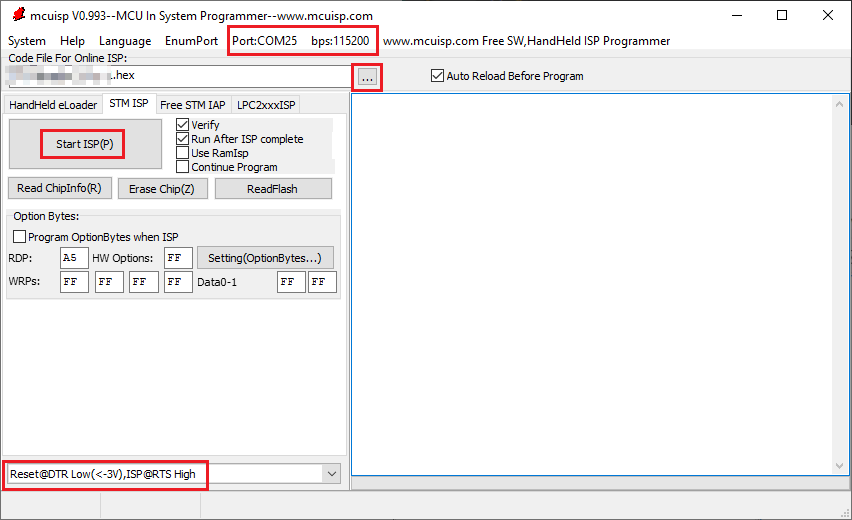
2.Connect the wires according to the wiring diagram.
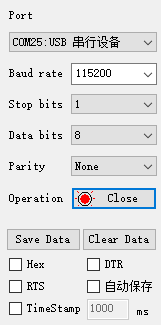
3.The serial port assistant is set to the interface as shown in the figure
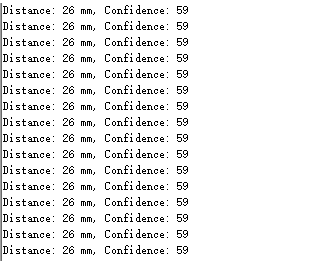
4.After power on, the serial assistant will print the distance information
5.Some important parameters of TinyF
Related parameter description
| name | value |
|---|---|
| Baud rate | 115200 |
| Effective minimum distance (theoretical value) | 20,unit:mm |
| Effective maximum distance (theoretical value) | 4000,unit:mm |
| Confidence | 0~62,The larger the value, the higher the distance reliability. |
Data format
Data frame structure: 
Example: 
| Field | Number of bytes | Example(Hex) | ASCII characters |
|---|---|---|---|
| Frame header (fixed value) | 1 | 20 | space |
| Distance value(distance) | 1~5 | 33 32 37 | 327 |
| Delimiter (fixed value) | 2 | 2C 20 | ,space |
| Confidence(confidence) | 1~2 | 36 31 | 61 |
| Frame tail (fixed value) | 1 | 0A | \n |