Gemma3
Gemma31. Model Size2. Performance3. Using Gemma33.1 Running Gemma33.2 Start a conversation3.3 Visual Function3.4 Ending the Conversation3.5 Chinese DialogueReferences
Note: Due to performance limitations, the Raspberry Pi 5 2GB requires the reduced-parameter version.
Gemma is a series of lightweight models built by Google based on Gemini technology. The Gemma 3 model is multimodal (capable of processing text and images), has a 128K context window, and supports over 140 languages.
1. Model Size
| Model | Size |
|---|---|
| gemma3:1b | 815MB |
| gemma3:4b | 3.3GB |
2. Performance
3. Using Gemma3
3.1 Running Gemma3
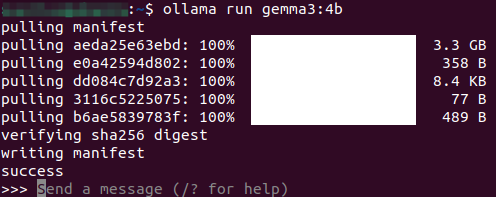
Use the run command to run the model. If the model is not already downloaded, it will automatically pull the model from the Ollama model library:
xxxxxxxxxxollama run gemma3:4b
3.2 Start a conversation
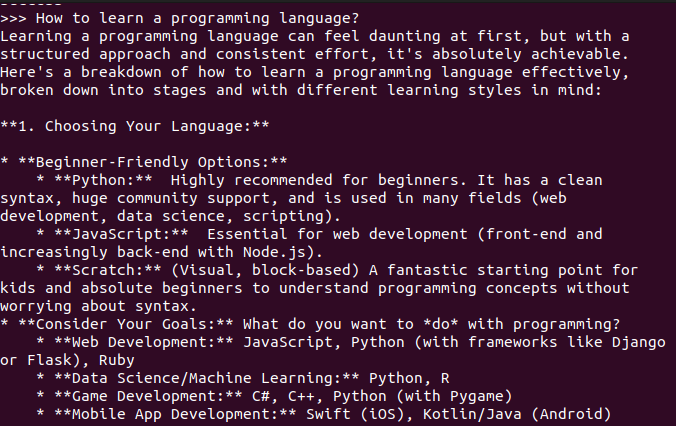
xxxxxxxxxxHow to learn a programming language?
Response time depends on hardware configuration, so please be patient!
3.3 Visual Function

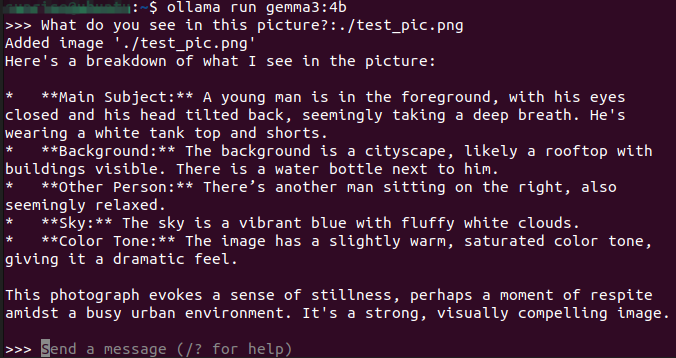
xxxxxxxxxxWhat do you see in this picture? :./test_pic.png#Using ": + the image path" in the conversation allows the model to use its visual function and interpret the information in the image.
3.4 Ending the Conversation
Use the Ctrl+d shortcut or /bye to end the conversation!
3.5 Chinese Dialogue
If you don't have a Chinese input method, please refer to the Chinese input method switching tutorial.
Chinese Dialogue:

References
Ollama
Official Website: https://ollama.com/
GitHub: https://github.com/ollama/ollama
Gemma3
Ollama Compatible Model: https://ollama.com/library/gemma3