AI Large Model Image Usage Instructions
Important Notes Before You Begin
The AI large model development tutorial for RDK X5 requires the use of our pre-configured large model image: System_File\RDK_X5_AI_Pure.zip
1. For users who have purchased Yahboom's RDK X5 mainboard, the TF card you receive is empty and has no image. You need to burn the image yourself. For detailed burning methods, please refer to the tutorial in the "1.Introduction to RDK X5 board/2.Write system file" section. The large language model image is only applicable to running the AI large model development chapter. If you want to run chapters other than the AI large model development, please burn the image in the "System_File\RDK_X5_20250227" folder.
2. Since running a large model with Ollama requires a lot of memory, motherboards with small memory can only use models with a small number of parameters, or even fail to run them. Sometimes when the running memory is at its limit, the effect will be poor. For a better experience with this function, please refer to the online large model chapter.
3. It is normal for the AI large model chapter to start slowly and lag when running.
4. For users outside of mainland China, please edit the following file: ~/yahboom_ws/src/largemodel/config/yahboom.yaml. In this file, comment out the line for the "domestic version" and uncomment the line for the "International Edition".
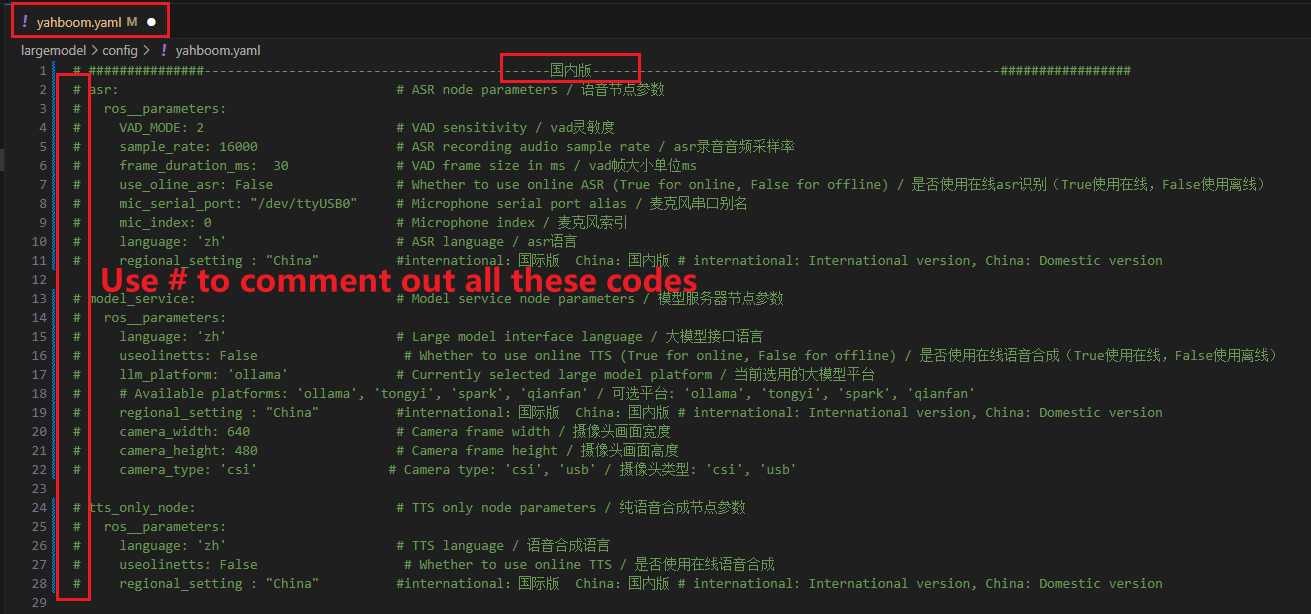
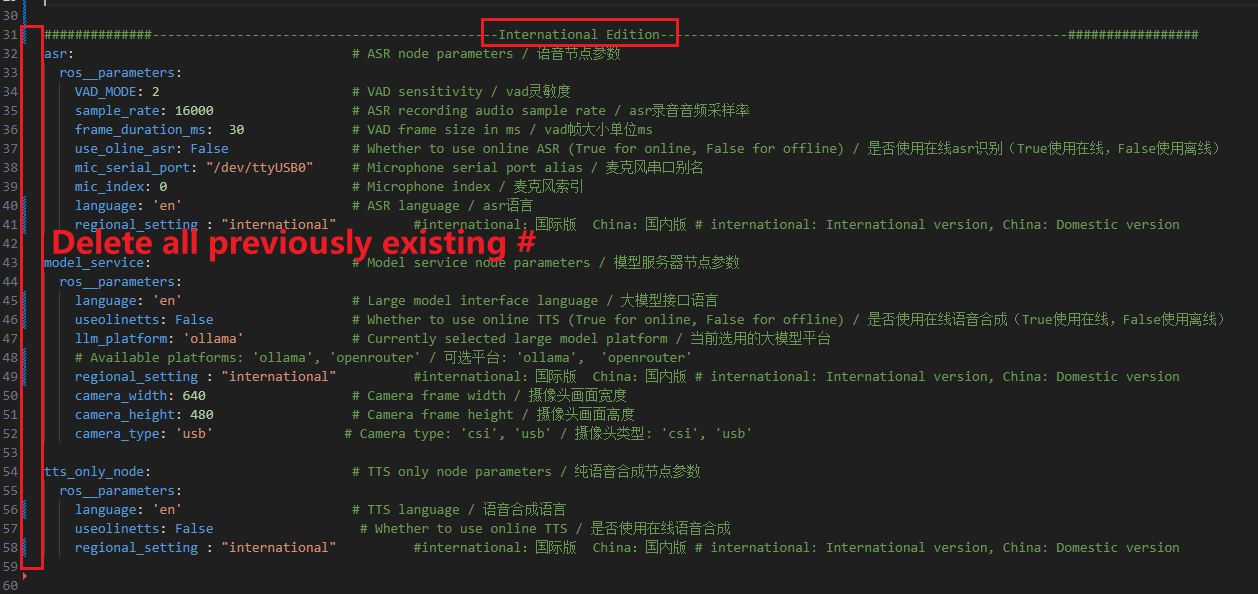
5.Since Tongyi Qianqian, Xunfei Starfire, and Baidu Qianfan AI big models need Chinese ID to register, international version users are only supported to use the openrouter online platform. In the yahboom.yaml file, when you want to use the online AI platform, be sure to set the llm_platform parameter to openrouter
System Information
Based on rdk_os_3.3.1-2025-8-8
Username: sunrise
User password: sunrise
System Environment
Ollama
Docker
Open WebUI
Offline large model storage path: /usr/share/ollama/.ollama/models
xxxxxxxxxxDue to the limitations of the SD (TF) card, we have not downloaded all the models in the tutorial to the system. We have deleted the large parameter version models in some tutorials. Users can delete and download the models themselves.
Parameter Description
RDK X5 (8G RAM): Runs models with 8B and below parameters
RDK X5 (4G RAM): Runs models with 3B and below parameters
The above conclusions are not completely accurate, but can be used as a reference!
Ollama official website model running instructions: running a 7B parameter model requires at least 8G of available running memory, running a 13B parameter model requires at least 16G of available running memory, and running a 33B parameter model requires at least 32G of available running memory.