Embodied intelligent functions core source code
1. Course Content
- Embodied AI gameplay using large language models is a complex function involving the coordinated operation of multiple program nodes. This section of the course will explain the core programs involved.
2. Source Code Package Structure
2.1 Function Package File Structure
The ROS function package for the AI large model embodied intelligence is largemodel, and the package path is:
Jetson Orin Nano, Jetson Orin NX host:
xxxxxxxxxx/home/jetson/LargeModel_ws/src/largemodel
Jetson Nano host:
Requires entering the Docker container first:
xxxxxxxxxxroot/LargeModel_ws/src/largemodel
The function package file structure is as follows:
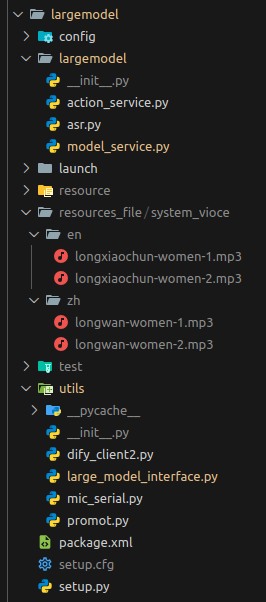
Description of folders and files:
2.1.1 config
Configuration folder, stores configuration files
- large_model_interface.yaml
Large model interface configuration file, used to configure API keys and large model parameters for various platforms.
- yahboom.yaml
Node configuration file: used to configure parameters for core nodes.
2.1.2 largemodel
Source code folder, core program for AI large model embodied intelligence gameplay
- asr.py
Speech recognition program file, used to run the speech recognition model and interact with the user.
- model_service.py
Model server program file, used to call various model interfaces to implement the model inference architecture.
- action_service.py
Action server program file, used to receive the action list requested by the model server, control the robot's movement and play sounds.
2.1.3 launch
Launch file folder, used to store ROS2 node launch files
- largemodel_control.launch.py
Launch file for AI large model embodied intelligence gameplay: starts multiple nodes, with two startup methods: voice interaction mode and text interaction mode.
2.1.4 resources_file
Stores audio files for system sounds.
2.1.5 utils
Component folder, stores program files for non-core functions
- large_model_interface.py
Large model interface program file, contains the underlying interfaces for calling large models from various platforms. The calling programs for different platforms and models are different, and the calling methods are uniformly managed in the interface file.
- mic_serial.py
Voice module driver program file, used to drive the wake-up word function of the voice module.
- promot.py Large language model prompt file: A file used to generate prompt words for the execution layer large language model.
- dify_client2.py
Dify API functions, used for requesting the local Dify application from the international version of Dify.
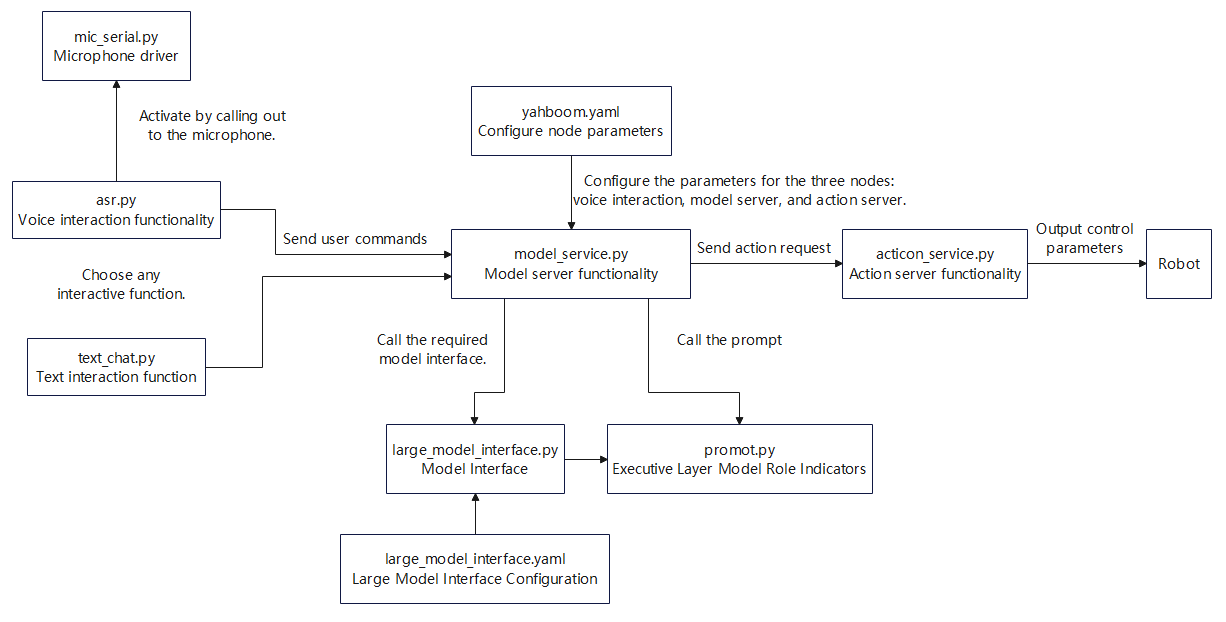
2.2 Inter-program Call Relationship Diagram
3. Speech Recognition Function
The speech recognition function includes two parts: VAD (Voice Activity Detection) and speech-to-text conversion. The source code path is:
Jetson Orin Nano, Jetson Orin NX host:
xxxxxxxxxx/home/jetson/LargeModel_ws/src/largemodel/largemodel/asr.py
Jetson Nano host:
Requires entering the Docker container first:
xxxxxxxxxxroot/LargeModel_ws/src/largemodel/largemodel/asr.py
3.1 Program Flowchart
asr program flowchart.
3.2 VAD Voice Activity Detection
Implementation Program: The listen_for_speech method in the ASRNode class.
Program Description: The program uses a specified microphone to record audio in real time and uses VAD (Voice Activity Detection) to determine if someone is speaking. When a segment of speech is detected to have ended (continuous silence exceeding a set number of frames), recording stops and the valid speech content is saved to a file.
Detailed logic is as follows:
- Initialize the audio stream and configure parameters (such as sampling rate, number of channels, etc.).
- Continuously read audio frames and perform voice activity detection.
- If speech is detected, add the audio frames to the buffer; if continuous silence exceeding the threshold (90 frames, approximately 1 second) is detected, end the recording.
- After recording ends, remove the trailing silence and save the valid speech as a WAV file.
- If no valid speech is detected, no file is saved.
xxxxxxxxxx def listen_for_speech(self, mic_index=0): p = pyaudio.PyAudio() audio_buffer = [] silence_counter = 0 MAX_SILENCE_FRAMES = 90 # 30帧*30ms=900ms静音后停止 / Stop after 900ms of silence (30 frames * 30ms) speaking = False # 语音活动标志 / Flag indicating speech activity frame_counter = 0 # 计数器 / Frame counter stream_kwargs = { "format": pyaudio.paInt16, "channels": 1, "rate": self.sample_rate, "input": True, "frames_per_buffer": self.frame_bytes, } if mic_index != 0: stream_kwargs["input_device_index"] = mic_index # 通过蜂鸣器提示用户讲话 / Prompt the user to speak via the buzzer self.pub_beep.publish(UInt16(data=1)) time.sleep(0.5) self.pub_beep.publish(UInt16(data=0)) try: # 打开音频流 / Open audio stream stream = p.open(**stream_kwargs) while True: if self.stop_event.is_set(): return False frame = stream.read( self.frame_bytes, exception_on_overflow=False ) # 读取音频数据 / Read audio data is_speech = self.vad.is_speech( frame, self.sample_rate ) # VAD检测 / VAD detection if is_speech: # 检测到语音活动 / Detected speech activity speaking = True audio_buffer.append(frame) silence_counter = 0 else: if speaking: # 在语音活动后检测静音 / Detect silence after speech activity silence_counter += 1 audio_buffer.append( frame ) # 持续记录缓冲 / Continue recording buffer # 静音持续时间达标时结束录音 / End recording when silence duration meets the threshold if silence_counter >= MAX_SILENCE_FRAMES: break frame_counter += 1 if frame_counter % 2 == 0: self.get_logger().info("1" if is_speech else "-") # print('1-' if is_speech else '0-', end='', flush=True) # 实时状态显示方式 / Real-time status display finally: stream.stop_stream() stream.close() p.terminate() # 保存有效录音(去除尾部静音) / Save valid recording (remove trailing silence) if speaking and len(audio_buffer) > 0: # 裁剪最后静音部分 / Trim the last silent part clean_buffer = ( audio_buffer[:-MAX_SILENCE_FRAMES] if len(audio_buffer) > MAX_SILENCE_FRAMES else audio_buffer ) with wave.open(self.user_speechdir, "wb") as wf: wf.setnchannels(1) wf.setsampwidth(p.get_sample_size(pyaudio.paInt16)) wf.setframerate(self.sample_rate) wf.writeframes(b"".join(clean_buffer)) return True3.3 ASR Speech Recognition
Implementation: The ASR_conversion method in the ASRNode class converts the audio file into text.
It calls the speech recognition model interface function in the large_model_interface.py file.
Note: Text recognized as having fewer than 4 characters will be considered invalid. This is to prevent misrecognized content from being treated as valid.
Program Explanation:
- If using online_asr, the corresponding method is called, and the result is checked to see if it is valid text (length greater than 4). If successful, the recognized content is returned; otherwise, an error is logged, and 'error' is returned.
- Otherwise, SenseVoiceSmall_ASR is used for recognition, and the same result judgment and processing are performed.
Note that SenseVoiceSmall_ASR is a local model speech recognition method and can only be used on Jetson Orin Nano and Jetson Orin NX hosts.
xxxxxxxxxxdef ASR_conversion(self, input_file): if self.use_oline_asr: result=self.modelinterface.oline_asr(input_file) if result[0] == 'ok' and len(result[1]) > 4: return result[1] else: self.get_logger().error(f'ASR Error:{result[1]}') return 'error' else: result=self.modelinterface.SenseVoiceSmall_ASR(input_file) if result[0] == 'ok' and len(result[1]) > 4: return result[1] else: self.get_logger().error(f'ASR Error:{result[1]}') return 'error'
4. Model Server Functionality
The program is implemented in model_service.py, which receives speech recognition results in voice interaction mode or terminal input in text interaction mode, and implements the large language model inference logic. The source code path is:
Jetson Orin Nano, Jetson Orin NX host:
xxxxxxxxxx/home/jetson/LargeModel_ws/src/largemodel/largemodel/model_service.py
Jetson Nano host:
Requires entering the Docker container first:
xxxxxxxxxxroot/LargeModel_ws/src/largemodel/largemodel/model_service.py
4.1 Program Flowchart
model_service program flowchart
4.2 Dual Model Inference (Domestic Version)
The dual model inference mode is used by default. The implementation is in the dual_large_model_mode and instruction_process methods of the LargeModelService class.
Program interpretation:
- If it's a new instruction cycle (self.new_order_cycle is True):
- Initialize the multimodal historical context;
- Use the task decision model to plan the task based on the user input prompt;
- Pass the planning result to the instruction execution layer model for processing;
- Set new_order_cycle to False, indicating that the current instruction cycle has started execution.
- Otherwise (not a new cycle):
- Directly pass the input prompt and type to the instruction execution layer model for processing.
xxxxxxxxxxdef dual_large_model_mode(self, type, prompt=""): """ 此函数实现了双模型推理模式,即先由文本生成模型进行任务规划,然后由多模态大模型生成动作列表 This function implements the dual model inference mode, where the text generation model first plans the task, and then the multimodal large model generates the action list. """ if ( self.new_order_cycle ): # 判断是否是新任务周期 / Determine if it is a new task cycle # 判断上一轮对话指令是否完成如果完成就清空历史上下文,开启新的上下文 / Determine if the previous round of dialogue instructions are completed. If completed, clear the historical context and start a new context self.model_client.init_Multimodal_history( get_prompt() ) # 初始化执行层上下文历史 / Initialize execution layer context history execute_instructions = self.model_client.TaskDecision( prompt ) # 调用决策层大模型进行任务规划 / Call the decision layer large model for task planning if not execute_instructions == "error": if self.text_chat_mode: msg = String( data=f"The upcoming task to be carried out:{execute_instructions}" ) self.text_pub.publish(msg) else: self.get_logger().info( f"The upcoming task to be carried out:{execute_instructions}" ) # Tasks to be performed: ... self.instruction_process( type="text", prompt=f"用户:{prompt},决策层AI规划:{execute_instructions}", ) # 传递决策层模型规划好的执行步骤给执行层模型 / Pass the planned execution steps from the decision layer model to the execution layer model self.new_order_cycle = ( False # 重置指令周期标志位 / Reset the instruction cycle flag ) else: self.get_logger().info( "The model service is abnormal. Check the large model account or configuration options" ) # Model inference failed. Please check your model quota and account status! else: self.instruction_process( prompt, type ) # 调用执行层大模型生成成动作列表并执行 / Call the execution layer large model to generate an action list and executedef instruction_process(self, prompt, type, conversation_id=None): """ 根据输入信息的类型(文字/图片),构建不同的请求体进行推理,并返回结果) Based on the type of input information (text/image), construct different request bodies for inference and return the result. """ if self.regional_setting == "China": # Domestic version if type == "text": raw_content = self.model_client.multimodalinfer(prompt) elif type == "image": self.save_single_image() raw_content = self.model_client.multimodalinfer( "机器人反馈:执行seewhat()完成", image_path=self.image_save_path ) json_str = self.extract_json_content(raw_content) elif self.regional_setting == "international": # International Version if type == "text": result = self.model_client.TaskExecution( input=prompt, map_mapping=self.map_mapping, language=self.language_dict[self.language], conversation_id=conversation_id, ) if result[0]: json_str = self.extract_json_content(result[1]) self.conversation_id = result[2] else: self.get_logger().info(f"ERROR:{result[1]}") elif type == "image": self.save_single_image() result = self.model_client.TaskExecution( input="机器人反馈:执行seewhat()完成", map_mapping=self.map_mapping, language=self.language_dict[self.language], image_path=self.image_save_path, conversation_id=conversation_id, ) if result[0]: json_str = self.extract_json_content(result[1]) self.conversation_id = result[2] else: self.get_logger().info(f"ERROR:{result[1]}") if json_str is not None: # 解析JSON字符串,分离"action"、"response"字段 / Parse JSON string, separate "action" and "response" fields action_plan_json = json.loads(json_str) action_list = action_plan_json.get("action", []) llm_response = action_plan_json.get("response", "") else: self.get_logger().info( f"LargeScaleModel return: {json_str},The format was unexpected. The output format of the AI model at the execution layer did not meet the requirements" ) return if self.text_chat_mode: msg = String(data=f'"action": {action_list}, "response": {llm_response}') self.text_pub.publish(msg) else: self.get_logger().info( f'"action": {action_list}, "response": {llm_response}' ) self.send_action_service( action_list, llm_response ) # 异步发送动作列表、回复内容给ActionServer / Asynchronously send action list and response content to ActionServer
4.3 Dual-Model Inference (International Version)
- The program implementation logic is the same as the domestic version, the difference being that the international version requests the local Dify application, which then requests the cloud-based large language model.
xxxxxxxxxxdef dual_large_model_international_model(self, type, prompt=""): """ This function is applicable to the international version of the dual-model inference mode, using Dify as middleware. """ if ( self.new_order_cycle ): # 判断是否是新任务周期 / Determine if it is a new task cycle self.conversation_id = None result = self.model_client.TaskDecision(prompt) if result[0]: if self.text_chat_mode: # 文字交互模式 / Text interaction mode msg = String( data=f"The upcoming task to be carried out:{result[1]}" ) self.text_pub.publish(msg) else: # 语音交互模式 / Voice interaction mode self.get_logger().info( f"The upcoming task to be carried out:{result[1]}" ) self.instruction_process( type="text", prompt=f"用户:{prompt},决策层AI规划:{result[1]}" ) self.new_order_cycle = ( False # 重置指令周期标志位 / Reset the instruction cycle flag ) else: self.get_logger().info(f"ERROR: {result[1]}") else: self.instruction_process( prompt, type, conversation_id=self.conversation_id ) # 调用执行层大模型生成成动作列表并执行 / Call the execution layer large model to generate an action list and execute
5. Action Server Functionality
The program implementing this functionality is action_service.py, which receives the list of actions requested by the model server, parses the action list, and executes them. Source code path:
Jetson Orin Nano, Jetson Orin NX host:
xxxxxxxxxx/home/jetson/LargeModel_ws/src/largemodel/largemodel/action_service.py
Jetson Nano host:
Requires entering the Docker container first:
xxxxxxxxxxroot/LargeModel_ws/src/largemodel/largemodel/action_service.py
5.1 Program Flowchart
Saction_service program flowchart
5.2 Action Function Library
The robot's action functions come from the methods in the CustomActionServer class, which includes functions for various sub-actions. This section uses the function for controlling the robotic arm to move upwards as an example; other action functions will be explained when they first appear in subsequent chapters.
Program explanation:
- Convert the input string parameter to a floating-point number.
- Directly call the function, passing the parameter, and communicate with the underlying driver board to control the six servos.
- Determine whether to publish the completion message based on the mode.
xxxxxxxxxxdef arm_up(self): # Robotic arm moves upward # Call the function to communicate directly with the underlying driver board and control the six servos to extend upwards. Arm.Arm_serial_servo_write6(90,90,90,90,90,90,1000) #If it's not in combination mode and the process hasn't been interrupted, publish the message that the robotic arm has completed its upward movement. if not self.combination_mode and not self.interrupt_flag: self.action_status_pub("arm_up_done")5.3 Parsing the Action List to Control Robot Functionality
This section describes parsing the action list generated by the large language model into functions that control the robot entity, and then executing them. The implementation is found in the execute_callback method of the CustomActionServer class.
Program Description:
- Receives the action list (in string format) sent by the client;
- If the action list is empty, return a success result directly;
- If there is only one action, parse and execute the corresponding method; if it fails, terminate the process;
- If there are multiple actions, enter a combined mode to execute them sequentially, recording logs and providing feedback during the process;
- After all actions are completed, call
stop()to stop the robot; - Finally, return the successful execution result to the client.
xxxxxxxxxxdef execute_callback(self, goal_handle): feedback_msg = Rot.Feedback() stop = getattr(self, "stop") # Get the stop method, which stops the robot's movement by publishing a topic. actions=goal_handle.request.actions if not actions: # If the action list is empty, return success directly. if not self.text_chat_mode: self.send_Audiorequest(goal_handle.request.llm_response) if self.use_double_llm: self.action_status_pub('机器人反馈:回复用户完成') goal_handle.succeed() result = Rot.Result() result.success = True return result elif len(actions) == 1:# The action list contains only one action; the normal execution flow will be followed. # Case 2: The list has only one element action = actions[0] if not self.text_chat_mode: self.send_Audiorequest(goal_handle.request.llm_response) match = re.match(r"(\w+)\((.*)\)", action) if not match: self.get_logger().warning(f'action_service: {action} is invalid action,skip execution') goal_handle.abort() result = Rot.Result() result.success = False return result else: action_name, args_str = match.groups() args = [arg.strip() for arg in args_str.split(",")] if args_str else [] try: if hasattr(self, action_name): method = getattr(self, action_name) method(*args) feedback_msg.status = f'action service execute {action} successed' # self.get_logger().info(feedback_msg.status) # Add logging goal_handle.publish_feedback(feedback_msg) else: self.get_logger().warning(f'action_service:inviald: {action_name},skip execution') self.action_status_pub('机器人反馈:动作函数不存在,无法执行') goal_handle.abort() result = Rot.Result() result.success = False return result except Exception as e: self.get_logger().error(f'action_service:execute action: {action} failed,error-log: {str(e)}') goal_handle.abort() result = Rot.Result() result.success = False return result else:#If the action list contains multiple actions, enable combination mode. if not self.text_chat_mode: self.send_Audiorequest(goal_handle.request.llm_response) self.combination_mode=True for action in actions: # Using regular expressions to parse action names and parameters match = re.match(r"(\w+)\((.*)\)", action) if not match: self.get_logger().warning(f'action_service: {action} is invalid action,skip execution') continue action_name, args_str = match.groups() args = [arg.strip() for arg in args_str.split(",")] if args_str else [] try: # Check if the action is a method of the CustomActionServer class if hasattr(self, action_name): method = getattr(self, action_name) # Dynamically call a method and pass parameters method(*args) # method(*converted_args) feedback_msg.status = f'action service execute {action} successed' self.get_logger().info(feedback_msg.status) # Add logging goal_handle.publish_feedback(feedback_msg) else: self.get_logger().warning(f'action_service:inviald: {action_name},skip execution') except Exception as e: self.get_logger().error(f'action_service:execute action: {action} failed,error-log: {str(e)}') goal_handle.abort() result = Rot.Result() result.success = False return result self.action_status_pub(f'机器人反馈:执行{actions}完成') self.combination_mode=False#Reset the combination mode flag stop() # Stop the robot after completing all actions. # Return success message to the client goal_handle.succeed() result = Rot.Result() result.success = True return result6. Interruption Function
The robot supports interruptions at any stage, which can be divided into recording stage interruptions, dialogue stage interruptions, and action stage interruptions. This section introduces the principles of interruption at each stage.
6.1 Recording Stage Interruption
If you make a mistake during recording, or are dissatisfied with the recorded content and need to re-record, you can interrupt the previous recording and start speaking and recording again by re-activating the robot during the recording process.
- The logic is implemented in the main_loop method of the ASRNode class in the asr.py file:
- Each time the robot is activated, if there is already a running thread for recording, it is interrupted via the thread event
stop_event, and waits for its termination; - After clearing the stop event flag, a new recording thread is started.
xxxxxxxxxxdef main_loop(self): while rclpy.ok(): while ( self.audio_request_queue.qsize() > 1 ): # 只处理最近的一次唤醒请求,防止重复唤醒 / Process only the most recent wake-up request to prevent duplicates self.audio_request_queue.get() if not self.audio_request_queue.empty(): self.audio_request_queue.get() self.wakeup_pub.publish( Bool(data=True) ) # 发布唤醒信号 / Publish wake-up signal self.get_logger().info("I'm here") playsound( self.audio_dict[self.first_response] ) # 应答用户 / Respond to the user if ( self.current_thread and self.current_thread.is_alive() ): # 打断上次的唤醒处理线程 / Interrupt the previous wake-up handling thread self.stop_event.set() self.current_thread.join() # 等待当前线程结束 / Wait for the current thread to finish self.stop_event.clear() # 清除事件 / Clear the event self.current_thread = threading.Thread(target=self.kws_handler) self.current_thread.daemon = True self.current_thread.start() rclpy.spin_once(self, timeout_sec=0.1) time.sleep(0.1)
6.2 Interrupting the Dialogue Phase
If you are dissatisfied with the robot's response during its speech or don't want the robot to continue speaking, you can use the wake word to interrupt the robot's speech and start recording your voice. At this point, you can give the robot a new command (still within the current task cycle), or you can say "End current task" to directly end the current task and start a new task cycle.
- The logic is implemented in the wakeup_callback and play_audio methods of the CustomActionServer class in the action_service.py file:
- wakeup_callback is the callback function for wake-up processing. In the asr.py program, each time a wake-up signal is detected, it publishes a wake-up signal via topic communication. wakeup_callback subscribes to and processes this signal.
- Each time a wake-up occurs, it checks whether pygame.mixer is currently playing audio. If so, it notifies the playback thread to stop playback via the thread event self.stop_event.
- If a previous action is detected to be running after the wake-up, the self.interrupt_flag flag is set, which is used for subsequent action interruption.
xxxxxxxxxxdef wakeup_callback(self, msg): if msg.data: if pygame.mixer.music.get_busy(): self.stop_event.set() if self.action_runing: self.interrupt_flag = True self.stop() self.pubSix_Arm(self.init_joints)When playing audio, the system checks if self.stop_event has been set. If it detects that it has been set, it immediately stops the currently playing audio.
xxxxxxxxxxdef play_audio(self, file_path: str, feedback: Bool = False) -> None: """ 同步方式播放音频函数The function for playing audio in synchronous mode """ pygame.mixer.music.load(file_path) pygame.mixer.music.play() while pygame.mixer.music.get_busy(): if self.stop_event.is_set(): pygame.mixer.music.stop() self.stop_event.clear() # Clear events return pygame.time.Clock().tick(10) if feedback: self.action_status_pub("机器人反馈:回复用户完成")
6.3 Action Phase Interruption
If the robot is interrupted during the execution of an action, it will stop the current action and return to its initial posture.
For example, actions such as robotic arm grasping and sorting require launching external programs in a subprocess. Here, we use the color block handling function change_pose as an example:
While the color block handling is not complete, the program will continuously wait in the while not self.change_pose_future.done(): loop. During this process, if the self.interrupt_flag interrupt flag is detected as set, the check_close_change_pose function will be called to recursively terminate the subprocess tree, then the robotic arm will be controlled to return to the grasping posture, and the task will be terminated.
xxxxxxxxxxdef change_pose(self, x1, y1, x2, y2,x3,y3,x4,y4,src,tar,side): src_color = src.strip("'\"") # Remove single and double quotes self.cur_down_name = src_color self.cur_down_pose[self.cur_down_name] = [] cmd1 = "ros2 run largemodel_arm Get_Target_Pose_KCF" subprocess.Popen( [ "gnome-terminal", "--title=grasp_desktop", "--", "bash", "-c", f"{cmd1}; exec bash", ] ) time.sleep(3.0) x1 = int(x1) y1 = int(y1) x2 = int(x2) y2 = int(y2) x3 = int(x3) y3 = int(y3) x4 = int(x4) y4 = int(y4) side = int(side) time.sleep(5.0) self.object_position_pub.publish(Int16MultiArray(data=[x1, y1, x2, y2,x3,y3,x4,y4,side])) while not self.change_pose_future.done(): if self.interrupt_flag: self.check_close_change_pose() Arm.Arm_serial_servo_write6(90,150,12,20,90,30,1000) return time.sleep(0.1)