ClawHub
ClawHub is OpenClaw's public Skills registry. It's a free service: all Skills are public and open, everyone can view, share, and reuse them. Skills are just folders containing a SKILL.md file (and supporting text files). You can browse Skills in the web app, or use the CLI to search, install, update, and publish Skills. Website: clawhub.com
Target Audience (Beginner Friendly)
If you want to add new features to OpenClaw agents, ClawHub is the easiest way to find and install Skills. You don't need to understand how the backend works. You can:
- Search Skills using natural language.
- Install Skills into your workspace.
- Update Skills later with a single command.
- Back up your own Skills by publishing them.
Quick Start (Non-Technical)
Install CLI (see next section).
Search for what you need: (requires internet access in China)
clawhub search "find"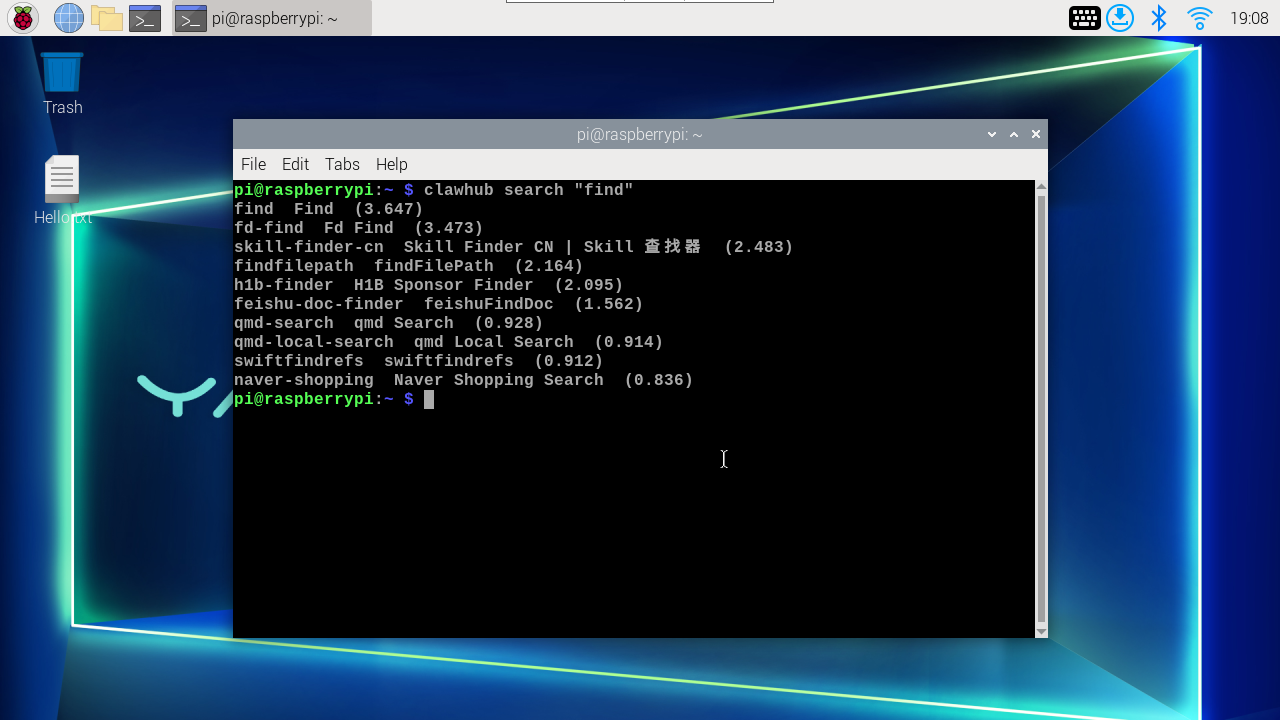
Install a Skill:
Syntax:
clawhub install <skill-slug>xxxxxxxxxxclawhub install findStart a new OpenClaw session to load new Skills.
Install CLI
Choose one:
xxxxxxxxxxnpm i -g clawhubpnpm add -g clawhub
Position in OpenClaw
By default, CLI installs Skills to ./skills in the current working directory. If OpenClaw workspace is configured, clawhub falls back to that workspace unless you override via --workdir (or CLAWHUB_WORKDIR). OpenClaw loads workspace Skills from <workspace>/skills and takes effect in the next session. If you're already using ~/.openclaw/skills or built-in Skills, workspace Skills have higher priority. For more details on Skills loading, sharing, and permission control, see Skills.
Service Features
- Public browsing of Skills and their
SKILL.mdcontent. - Search based on embeddings (vector search), not just keyword matching.
- Version management supporting semantic versioning, changelogs, and tags (including
latest). - Download each version in zip format.
- Stars and comments for community feedback.
- Review hooks for approval and auditing.
- CLI-friendly API for automation and scripting.
CLI Commands and Parameters
Global options (apply to all commands):
--workdir <dir>: Working directory (default: current directory; falls back to OpenClaw workspace).--dir <dir>: Skills directory, relative to working directory (default:skills).--site <url>: Website base URL (browser login).--registry <url>: Registry API base URL.--no-input: Disable prompts (non-interactive mode).-V, --cli-version: Print CLI version.
Authentication:
clawhub login(browser flow) orclawhub login --token <token>clawhub logoutclawhub whoami
Options:
--token <token>: Paste API token.--label <label>: Label for browser login token storage (default:CLI token).--no-browser: Don't open browser (requires--token).
Search:
clawhub search "query"--limit <n>: Maximum results.
Install:
clawhub install <slug>--version <version>: Install specific version.--force: Overwrite if folder exists.
Update:
clawhub update <slug>clawhub update --all--version <version>: Update to specific version (single slug only).--force: Force overwrite when local files don't match any published version.
List:
clawhub list(reads.clawhub/lock.json)
Publish:
clawhub publish <path>--slug <slug>: Skills identifier.--name <name>: Display name.--version <version>: Semantic version.--changelog <text>: Changelog text (can be empty).--tags <tags>: Comma-separated tags (default:latest).
Delete/Restore (owner/admin only):
clawhub delete <slug> --yesclawhub undelete <slug> --yes
Sync (scan local Skills + publish new/updated Skills):
clawhub sync--root <dir...>: Additional scan root directories.--all: Upload everything without prompts.--dry-run: Show what would be uploaded.--bump <type>: Version bump typepatch|minor|major(default:patch).--changelog <text>: Changelog for non-interactive updates.--tags <tags>: Comma-separated tags (default:latest).--concurrency <n>: Registry check concurrency (default: 4).
Common Agent Workflows
Search Skills
xxxxxxxxxxclawhub search "postgres backups"
Download New Skills
xxxxxxxxxxclawhub install my-skill-pack
Update Installed Skills
xxxxxxxxxxclawhub update --all
Back Up Your Skills (Publish or Sync)
For a single Skills folder:
xxxxxxxxxxclawhub publish ./my-skill --slug my-skill --name "My Skill" --version 1.0.0 --tags latest
Scan and back up multiple Skills at once:
xxxxxxxxxxclawhub sync --all
Advanced Details (Technical)
Version Management and Tags
- Each publish creates a new semantic version
SkillVersion. - Tags (like
latest) point to a version; moving tags enables rollbacks. - Changelogs are attached to each version and can be empty when syncing or publishing updates.
Local Changes vs Registry Versions
During updates, content hashes are used to compare local Skills content with registry versions. If local files don't match any published version, CLI asks for confirmation before overwriting (or requires --force in non-interactive mode).
Sync Scanning and Fallback Roots
clawhub sync first scans the current working directory. If no Skills are found, it falls back to known legacy locations (e.g., ~/openclaw/skills and ~/.openclaw/skills). This design is to find legacy Skills installations without extra flags.
Storage and Lock Files
- Installed Skills are recorded in
.clawhub/lock.jsonin the working directory. - Authentication tokens are stored in ClawHub CLI config (overridable via
CLAWHUB_CONFIG_PATH).
Telemetry (Install Counts)
When you run clawhub sync while logged in, CLI sends a minimal snapshot for counting installations. You can disable this completely:
xxxxxxxxxxexport CLAWHUB_DISABLE_TELEMETRY=1
Environment Variables
CLAWHUB_SITE: Override website URL.CLAWHUB_REGISTRY: Override registry API URL.CLAWHUB_CONFIG_PATH: Override where CLI stores tokens/config.CLAWHUB_WORKDIR: Override default working directory.CLAWHUB_DISABLE_TELEMETRY=1: Disable telemetry forsync.
For more ClawHub content, refer to: ClawHub - OpenClaw