Configuring Passwordless sudo Operations
1. Introduction
When using sudo to grant temporary administrator privileges in Ubuntu, a user password is required to execute administrator commands. While entering the correct password once grants passwordless operation for a short period, frequent password entry is cumbersome. Therefore, configuring passwordless sudo operations can reduce unnecessary operations.
Note: Configuring passwordless sudo operations is for personal learning and convenience only. In collaborative projects or production development, there may be issues such as system permission leaks. Please carefully weigh the pros and cons.
2. Configure passwordless sudo operation
Open the terminal, enter the following command, find the line %sudo (as shown in the image below), and change the last ALL to NOPASSWD:ALL
sudo visudo
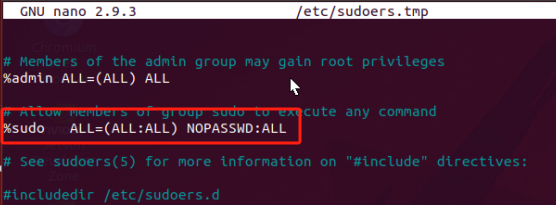
Then press Ctrl+S to save, and then press Ctrl+X to exit.
After restarting the system, when you enter sudo to obtain temporary administrator privileges again, you will no longer need to enter a password.