Ros Driver Lidar
We provide the lidar ROS driver package, which has been successfully compiled and can drive the lidar on the Orin-Nano motherboard. Orin-Nano motherboard system environment: Ubuntu22.04+ROS2-Humble.
Installing Dependencies
Enter the following command in the terminal to install the necessary dependency files,
xxxxxxxxxxsudo apt-get updatesudo apt-get install -y libyaml-cpp-dev libpcap-dev
Transplanting the Package and Compiling
Copy the contents of [ROS_SDK] from the Attachments folder to your workspace directory, then go back to the workspace and enter the following command to compile,
xxxxxxxxxxcolco build
Wait for the compilation to pass.
Lidar Connection
Connect the lidar to the lidar adapter cable, making sure to align the raised and recessed parts of the interface to avoid inserting it backwards and damaging the interface. Then power the lidar adapter cable's power port, and connect the Ethernet port to the motherboard's Ethernet port.
Driving the Lidar
Open a terminal and enter the lidar startup command,
xxxxxxxxxxros2 launch vanjee_lidar_sdk start.py
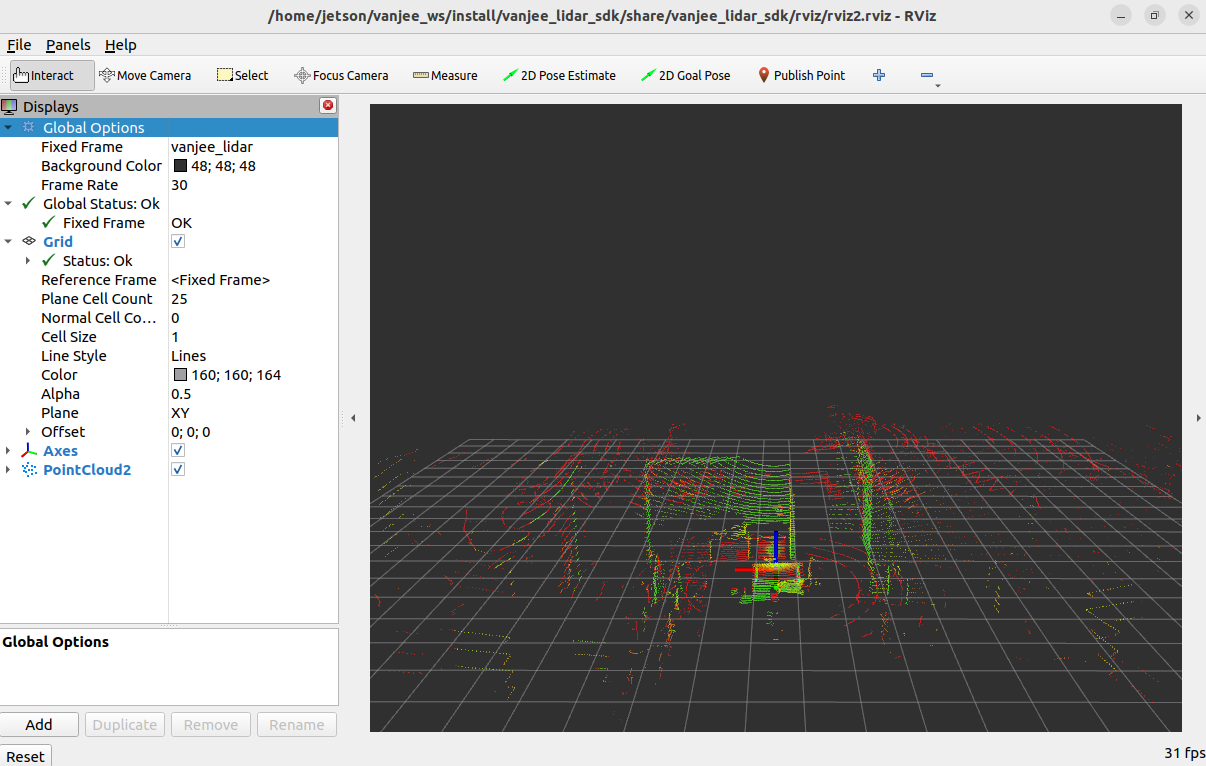
After running, an rviz will open, which will display the 32-line lidar point cloud,
Viewing Topics
To view the lidar point cloud topic, enter in the terminal,
xxxxxxxxxxros2 topic echo /rslidar_points
To view the imu topic, enter in the terminal,
ros2 topic echo /vanjee_lidar_imu_packets