yahboom
HomeLearn
Solution
Blog
Online Store
About Us
EN/中文
USB Microphone Camera📖
1.About Camera
  • About Camera
2.For Raspberry Pi
  • 1.1 Camera test tutorial
  • 1.2 Camera webpage access tutorial
  • 1.3 Camera python driver tutorial
3.For Jetson NANO
  • 2.1 USB camera test tutorial
  • 2.2 Camera python driver tutorial
4.For RDK X3
  • Drive tutorials
Download
  • Master.zip
  • Winscp
Download ZIP

Welcome to USB Microphone Camera repository

2.1 USB camera test tutorial


Input lsusb or ls /dev/video* command to view camera service

As shown below.
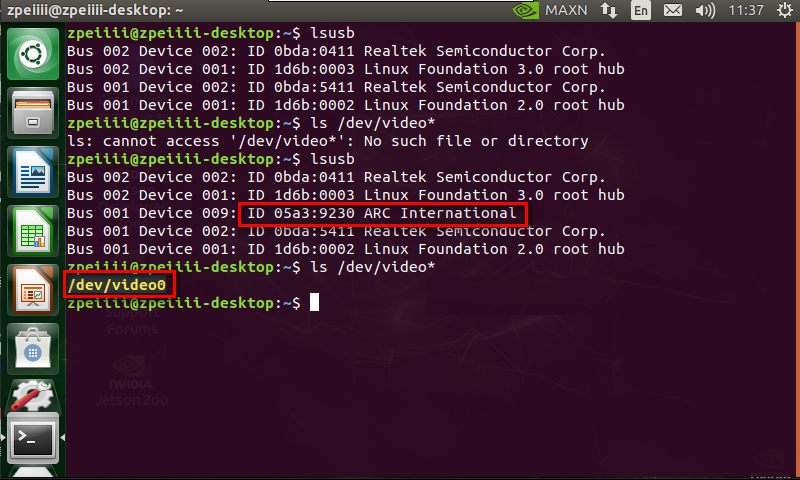
image.png 

Test camera:

1) Using application camorama

Input following command

sudo apt-get install camorama

After installation is complete, input following command.

camorama

The video information is displayed.

2)  Using application cheese

Input following command

sudo apt-get install cheese

After installation is complete, input following command.

cheese

The video information is displayed.


Camera python driver tutorial

COMPANY

  • About us
  • Team Style
  • Blog

LEARNING & EXPLORATION

  • Tutorials
  • Edge AI hardware
  • Educational robots
  • Embedded intelligent hardware

WHERE TO BUY

  • Yahboom Online Store
  • Amazon
  • Alibaba
  • AliExpress
  • Mercado

TECHNOLOGY SUPPORT

  • Email: support@yahboom.com

BE A DISTRIBUTOR

  • Email: sales@yahboom.com
QR Code

Copyright © 2017-2026 Yahboom. All Rights Reserved.

EN/中文