Welcome to Laser Ranging Module repository
2. OLED display distance
1. Learning target
In this course, we mainly learn to use the Raspberry Pi and laser ranging module. Then, use the OLED on the RGB Cooling HAT to display the current distance.
2. Preparation
2.1 The laser ranging module uses I2C communication, and connect the SDA and SCL of the module to the SDA and SCL pins of the Raspberry Pi board. VCC and GND are respectively connected to 5V and GND of the Raspberry Pi.
!Tip: Raspberry Pi needs to enable I2C service.
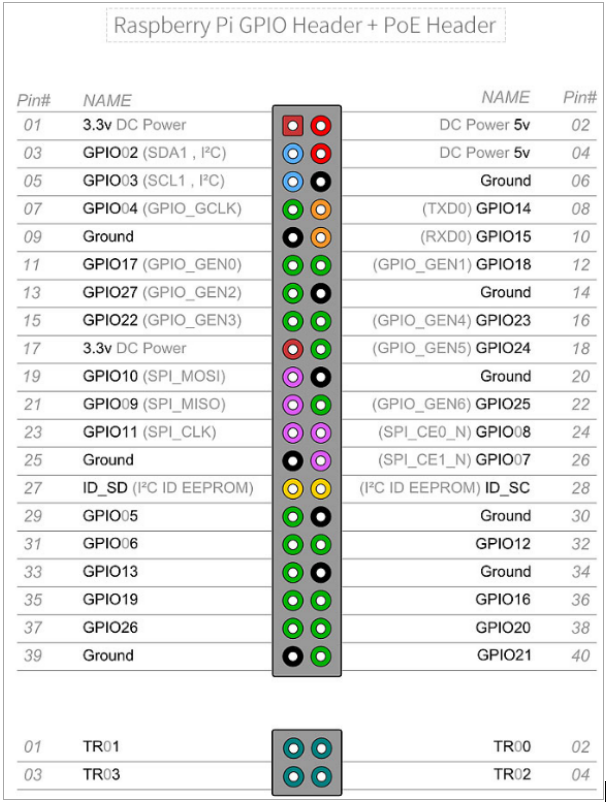
2.2 After the Raspberry Pi I2C is enabled, input command lmusb in the terminal to check whether the I2C is successfully started.
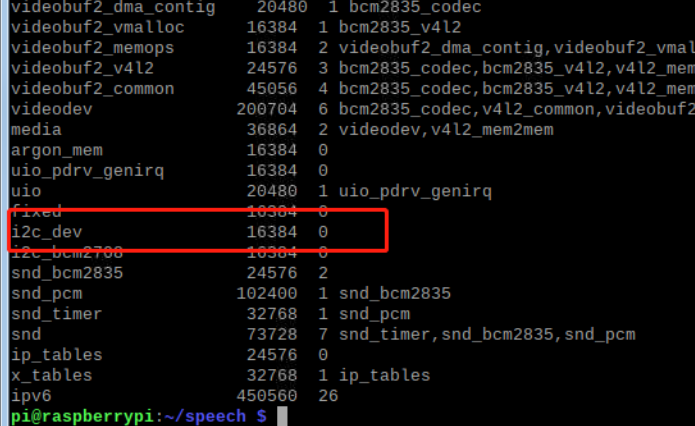
2.3 Download i2c-tools, the software can monitor the usage and faults of hardware devices.
Input command: sudo apt-get install i2c-tools
Input command: i2cdetect -y -a 1 in the terminal.
Check if there is an IIC device: 0x52 or 0x29
3. About code
3.1 Transfer this file into Raspberry Pi system

3.2 Input following command to enter VL53L0X folder.
cd VL53L0X-python
3.3 Input following command to compile this file.
make
3.4 Input following command to enter python folder.
cd python
3.5 Input command to run program
python VL53L0X_Cooling_HAT.py
4. Phenomenon
After the program is downloaded successfully, after the program is running, the RGB Cooling HAT will light up the purple breathing light, the cooling fan rotates with 50% speed. At the same time, OLED displays the current CPU usage, current temperature, and distance.