Welcome to RDK MIPI Camera repository
2.Local save camera images
Local save camera images
1. Experimental preparation
This example vio_capture implements the MIPI camera image acquisition and local storage of images in two formats: RAW and YUV. The example flow chart is as follows:
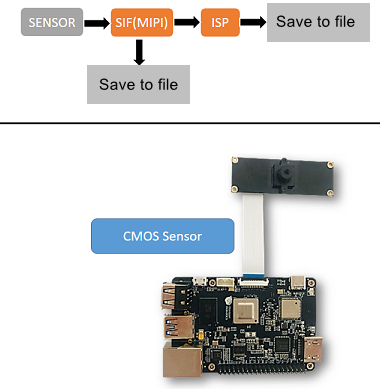
- When the development board is powered off, connect the
MIPIcamera to the development board (with the black side facing the HDMI interface). - Connect the development board and the monitor via an HDMI cable
- Power on the development board and log in to the system
2. Running method
The sample code is provided in source code form and needs to be compiled and run using the make command. The steps are as follows:
xxxxxxxxxxsunrise@ubuntu:~$ cd /app/cdev_demo/vio_capture/sunrise@ubuntu:/app/cdev_demo/vio_capture$ sudo makesunrise@ubuntu:/app/cdev_demo/vio_capture$ sudo ./capture -b 16 -c 10 -h 1080 -w 1920Parameter description:
- -b: RAW image bit number, IMX219 / IMX477 / OV5647 are all set to 16, only a few camera sensors need to be set to 8
- -c: Number of images to save
- -w: Width of saved images
- -h: Height of saved images
3. Expected results
After the program runs correctly, when the terminal stops printing, enter 0 or 1, then press Enter to start the camera. The current directory saves the specified number of image files.
The RAW format is named as raw_*.raw, and the YUV format is named as yuv_*.yuv.
The running log is as follows.
sunrise@ubuntu:/app/cdev_demo/vio_capture$ sudo ./capture -b 16 -c 10 -h 1080 -w 1920Setting VPS channel-2: src_w:1920, src_h:1080; dst_w:1920, dst_h:1080;Setting VPS channel-1: src_w:1920, src_h:1080; dst_w:1920, dst_h:1080;jiale:start streaming...capture time :0capture time :1capture time :2capture time :3capture time :4capture time :5capture time :6capture time :7capture time :8capture time :9sensor_name imx477, setting_size = 1[ 701.213210]hb_isp_algo_stop@main_user.c:389 GENERIC(ERR) :g_mutex destroy.