Welcome to 9G Servo PTZ repository
For MSPM0G3519
2-DOF gimbal
I. Learning objectives
Drive 2-DOF gimbal.
II. Hardware connection
The servos used in this case are 180 and 270
MSPM0G3519 connected to servo pins
PA17 connected to 180-degree servo
PA18 connected to 270-degree servo
All modules connected together must share a common ground
III. Program description
bsp_servo.h
x
void Set_Servo270_Angle(unsigned int angle);void Set_Servo_Angle(unsigned int angle);unsigned int Get_Servo_Angle(void);unsigned int Get_Servo_Angle270(void);
Define four servo control functions.
bsp_servo.c
xxxxxxxxxx/****************************************************************** * Function name: Set_Servo270_Angle * Function description: Set 270 degree servo * Function parameter: angle = angle to be set, range 0-270 * Function return: None******************************************************************/void Set_Servo270_Angle(unsigned int angle){      uint32_t period = 400;
      if(angle > 270)      {            angle = 270; // Limit the angle to between 0 and 270 degrees      }
      Servo_Angle270 = angle;
      // Calculate pwm duty cycle      // 0.5ms corresponding count = 10      // 2.5ms corresponding count = 50      float min_count = 10.0f;      float max_count = 50.0f;      float range = max_count - min_count;      float ServoAngle = min_count + (((float)angle / 270.0f) * range);
      DL_TimerG_setCaptureCompareValue(PWM_Servo_INST, (unsigned int)(ServoAngle + 0.5f), GPIO_PWM_Servo_C1_IDX);}
unsigned int Get_Servo_Angle270(void){      return Servo_Angle270;}
Set_Servo270_Angle is used to set the angle of the servo motor, and Get_Servo_Angle270 is used to obtain the current angle of the servo motor.
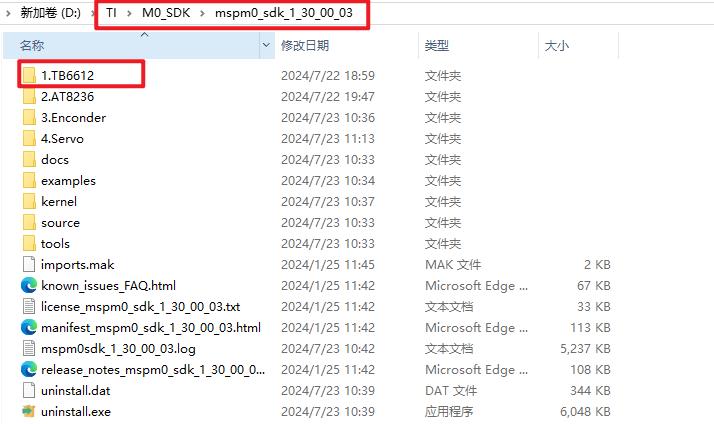
Note: The project source code must be placed in the SDK path for compilation,
For example, the path: D:\TI\M0_SDK\mspm0_sdk_1_30_00_03\1.TB6612