Welcome to SDM18 Laser Ranging Module repository
Get distance information_Linux
2.Get distance information_Linux
For those who haven't watched "Preparation Before Use", they need to read it first and then run the following tutorial
1.start-up
When compiling the SDK, we will generate an sdm_test program located in the YDLidar SDK/build directory,
If compiled normally, this executable file will be generated. We open the terminal and enter the command in this directory,
./sdm18_test
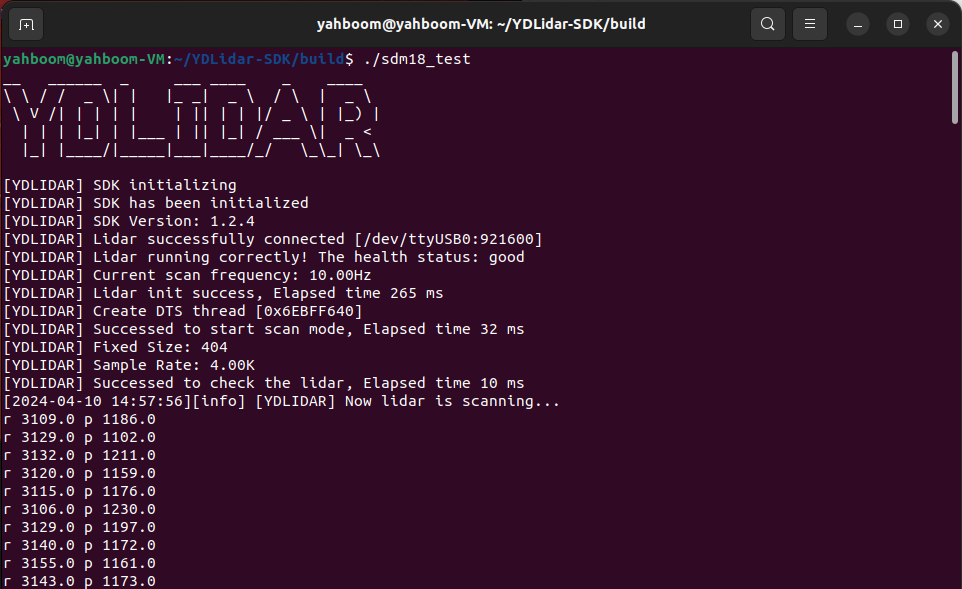
Here, r represents distance, and p represents the strength of this point. The unit is mm。
2、Code
Source code location(SDK Installation location:~/YDLidar-SDK):~/YDLidar-SDK/samples/sdm18_test.cpp
Note: Search based on your SDK installation location, which is in the samples section of the SDK directory.
x/********************************************************************* * Software License Agreement (BSD License) * * Copyright (c) 2018, EAIBOT, Inc. * All rights reserved. * * Redistribution and use in source and binary forms, with or without * modification, are permitted provided that the following conditions * are met: * * * Redistributions of source code must retain the above copyright * notice, this list of conditions and the following disclaimer. * * Redistributions in binary form must reproduce the above * copyright notice, this list of conditions and the following * disclaimer in the documentation and/or other materials provided * with the distribution. * * Neither the name of the Willow Garage nor the names of its * contributors may be used to endorse or promote products derived * from this software without specific prior written permission. * * THIS SOFTWARE IS PROVIDED BY THE COPYRIGHT HOLDERS AND CONTRIBUTORS * "AS IS" AND ANY EXPRESS OR IMPLIED WARRANTIES, INCLUDING, BUT NOT * LIMITED TO, THE IMPLIED WARRANTIES OF MERCHANTABILITY AND FITNESS * FOR A PARTICULAR PURPOSE ARE DISCLAIMED. IN NO EVENT SHALL THE * COPYRIGHT OWNER OR CONTRIBUTORS BE LIABLE FOR ANY DIRECT, INDIRECT, * INCIDENTAL, SPECIAL, EXEMPLARY, OR CONSEQUENTIAL DAMAGES (INCLUDING, * BUT NOT LIMITED TO, PROCUREMENT OF SUBSTITUTE GOODS OR SERVICES; * LOSS OF USE, DATA, OR PROFITS; OR BUSINESS INTERRUPTION) HOWEVER * CAUSED AND ON ANY THEORY OF LIABILITY, WHETHER IN CONTRACT, STRICT * LIABILITY, OR TORT (INCLUDING NEGLIGENCE OR OTHERWISE) ARISING IN * ANY WAY OUT OF THE USE OF THIS SOFTWARE, EVEN IF ADVISED OF THE * POSSIBILITY OF SUCH DAMAGE. *********************************************************************/#include "CYdLidar.h"#include <iostream>#include <string>#include <algorithm>#include <cctype>using namespace std;using namespace ydlidar;
#if defined(_MSC_VER)#pragma comment(lib, "ydlidar_sdk.lib")#endif
/** * @brief sdm test * @param argc * @param argv * @return * @par Flow chart * Step1: instance CYdLidar.\n * Step2: set paramters.\n * Step3: initialize SDK and LiDAR.(::CYdLidar::initialize)\n * Step4: Start the device scanning routine which runs on a separate thread and enable motor.(::CYdLidar::turnOn)\n * Step5: Get the LiDAR Scan Data.(::CYdLidar::doProcessSimple)\n * Step6: Stop the device scanning thread and disable motor.(::CYdLidar::turnOff)\n * Step7: Uninitialize the SDK and Disconnect the LiDAR.(::CYdLidar::disconnecting)\n */
int main(int argc, char *argv[]){ printf("__ ______ _ ___ ____ _ ____ \n"); printf("\\ \\ / / _ \\| | |_ _| _ \\ / \\ | _ \\ \n"); printf(" \\ V /| | | | | | || | | |/ _ \\ | |_) | \n"); printf(" | | | |_| | |___ | || |_| / ___ \\| _ < \n"); printf(" |_| |____/|_____|___|____/_/ \\_\\_| \\_\\ \n"); printf("\n"); fflush(stdout);
//initialization ydlidar::os_init(); //Initialize serial port number std::string port = "/dev/ttyUSB0";
int baudrate = 921600;
bool isSingleChannel = false; CYdLidar laser; //////////////////////string property///////////////// /// lidar port laser.setlidaropt(LidarPropSerialPort, port.c_str(), port.size()); /// ignore array std::string ignore_array; ignore_array.clear(); laser.setlidaropt(LidarPropIgnoreArray, ignore_array.c_str(), ignore_array.size()); //////////////////////int property///////////////// /// lidar baudrate laser.setlidaropt(LidarPropSerialBaudrate, &baudrate, sizeof(int)); /// sdm lidar int optval = TYPE_SDM18; laser.setlidaropt(LidarPropLidarType, &optval, sizeof(int)); /// device type optval = YDLIDAR_TYPE_SERIAL; laser.setlidaropt(LidarPropDeviceType, &optval, sizeof(int)); /// sample rate optval = 4; laser.setlidaropt(LidarPropSampleRate, &optval, sizeof(int)); /// abnormal count optval = 3; laser.setlidaropt(LidarPropAbnormalCheckCount, &optval, sizeof(int)); /// Intenstiy bit count optval = 8; laser.setlidaropt(LidarPropIntenstiyBit, &optval, sizeof(int));
//////////////////////bool property///////////////// /// fixed angle resolution bool b_optvalue = false; laser.setlidaropt(LidarPropFixedResolution, &b_optvalue, sizeof(bool)); /// rotate 180 laser.setlidaropt(LidarPropReversion, &b_optvalue, sizeof(bool)); /// Counterclockwise laser.setlidaropt(LidarPropInverted, &b_optvalue, sizeof(bool)); b_optvalue = true; laser.setlidaropt(LidarPropAutoReconnect, &b_optvalue, sizeof(bool)); /// one-way communication laser.setlidaropt(LidarPropSingleChannel, &isSingleChannel, sizeof(bool)); /// intensity b_optvalue = true; laser.setlidaropt(LidarPropIntenstiy, &b_optvalue, sizeof(bool)); /// Motor DTR b_optvalue = true; laser.setlidaropt(LidarPropSupportMotorDtrCtrl, &b_optvalue, sizeof(bool)); /// HeartBeat b_optvalue = false; laser.setlidaropt(LidarPropSupportHeartBeat, &b_optvalue, sizeof(bool));
//////////////////////float property///////////////// /// unit: ° float f_optvalue = 180.0f; laser.setlidaropt(LidarPropMaxAngle, &f_optvalue, sizeof(float)); f_optvalue = -180.0f; laser.setlidaropt(LidarPropMinAngle, &f_optvalue, sizeof(float)); /// unit: m f_optvalue = 20.f; laser.setlidaropt(LidarPropMaxRange, &f_optvalue, sizeof(float)); f_optvalue = 0.025f; laser.setlidaropt(LidarPropMinRange, &f_optvalue, sizeof(float)); /// unit: Hz float frequency = 10.0; laser.setlidaropt(LidarPropScanFrequency, &frequency, sizeof(float));
// laser.setEnableDebug(true); //Print raw serial port data
// Radar initialization bool ret = laser.initialize(); if (!ret) { fprintf(stderr, "[YDLIDAR] Fail to initialize %s\n", laser.DescribeError()); return -1; } // Start scan ret = laser.turnOn(); if (!ret) { fprintf(stderr, "[YDLIDAR] Fail to turn on %s\n", laser.DescribeError()); return -1; }
LaserScan scan; while (ret && ydlidar::os_isOk()) { if (laser.doProcessSimple(scan)) { for (size_t i = 0; i < scan.points.size(); ++i) { const LaserPoint &p = scan.points.at(i); printf("r %.01f p %.01f\n", p.range * 1000.0f, p.intensity); } fflush(stdout); } else { fprintf(stderr, "[YDLIDAR] Failed to get lidar data\n"); fflush(stderr); } }
laser.turnOff(); laser.disconnecting();
return 0;}Here we locate the while function,
xxxxxxxxxxfor (size_t i = 0; i < scan.points.size(); ++i) { const LaserPoint &p = scan.points.at(i); printf("r %.01f p %.01f\n", p.range * 1000.0f, p.intensity); }Here is to obtain the distance and print it out. The actual code logic is to select the serial port, initialize the serial port, initialize the radar, start scanning, and print the result. Please interpret the specific code implementation yourself.