Welcome to SDM18 Laser Ranging Module repository
7.Get distance information_MSPM03519
Single point laser ranging
1. Learning Objectives
The distance is measured by a single-point laser ranging module and printed to the computer's serial port assistant through the serial port.
2. Hardware Connection
Single-point laser ranging module, USB to TTL and MSPM0G3519 wiring
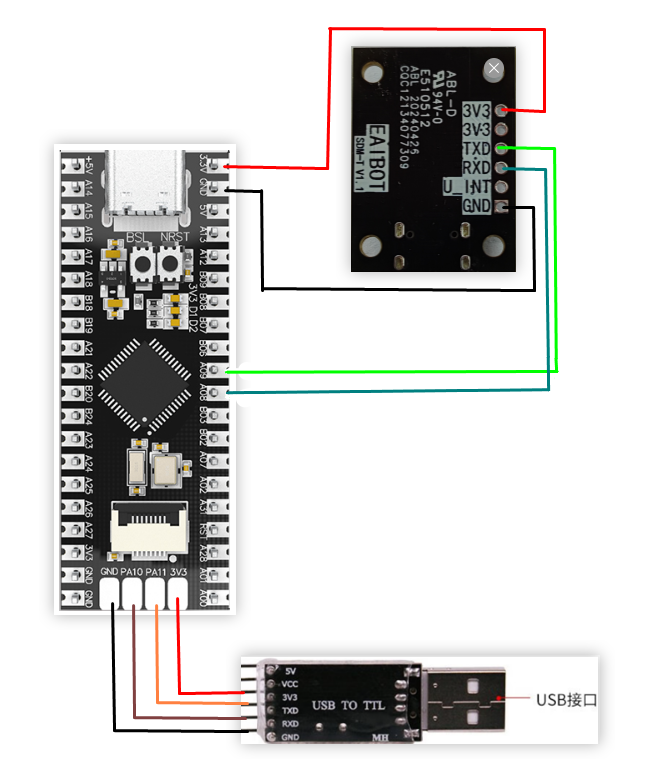
Note: If you don't have a TTL module, you can also use the type-c serial port directly
3. Explanation of some important parameters of SDM18
The SDM18 interface is shown in the figure:
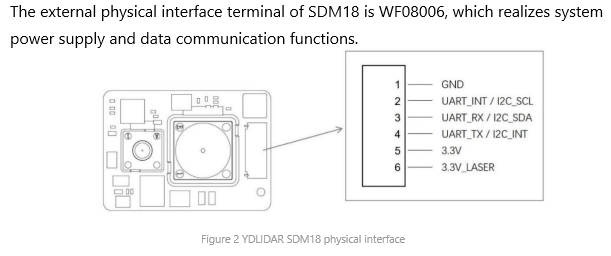
Serial port default configuration The default baud rate of SDM18 is 921600

Important protocol commands based on the serial port (all sent in hexadecimal format) The default mode of SDM18 when powered on is idle mode. If you want to perform ranging, you must first issue the ranging command.
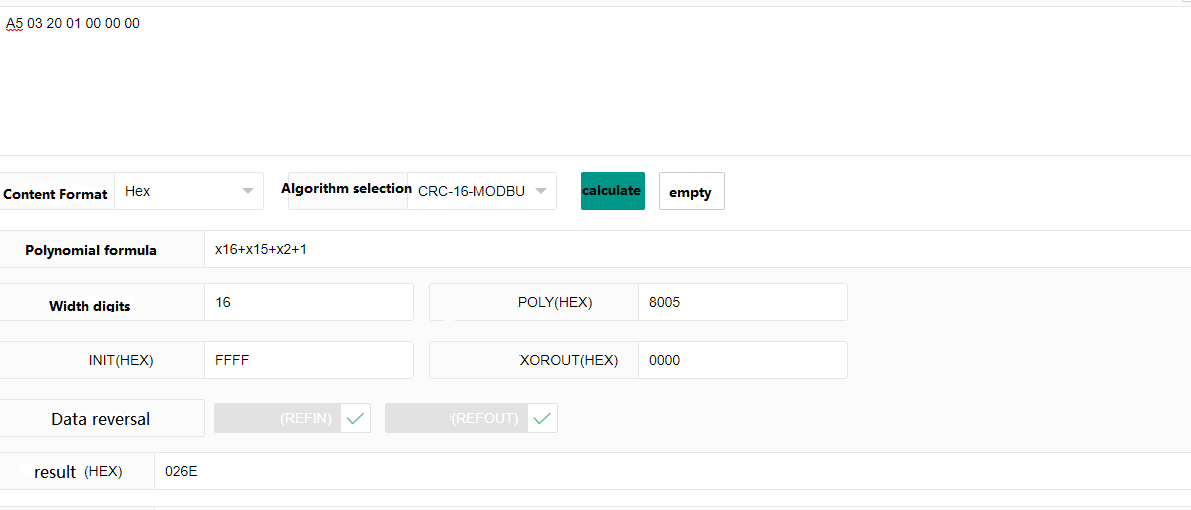
Start ranging:A5 03 20 01 00 00 00 02 6E
Stop ranging:A5 03 20 02 00 00 00 46 6E
Protocol analysis of receiving ranging

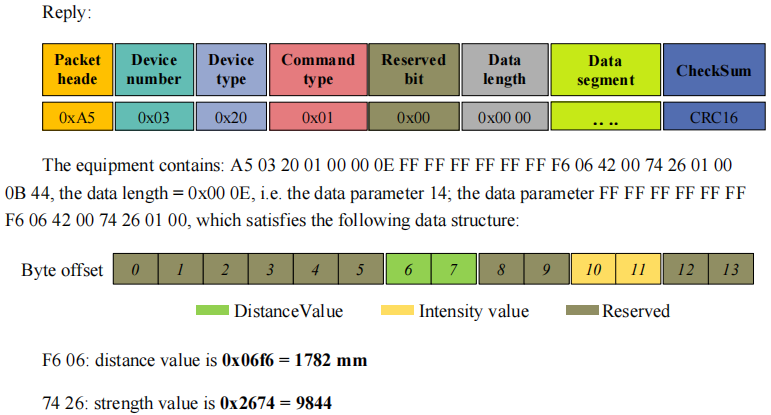
Calculation of checksum The checksum is calculated using the CRC-16-modelbus method, and all bytes except the check digit are calculated. The following figure shows the check digit calculation result of the commandStart Distance Measurement
Other protocols will not be explained. If you are interested, you can refer to the SDM18 Development Manual
4. Program Description
usart.c
xvoid USART_Init(void){// SYSCFG初始化// SYSCFG initializationSYSCFG_DL_init();//清除串口中断标志//Clear the serial port interrupt flagNVIC_ClearPendingIRQ(UART_0_INST_INT_IRQN);//使能串口中断//Enable serial port interruptNVIC_EnableIRQ(UART_0_INST_INT_IRQN);NVIC_ClearPendingIRQ(UART_1_INST_INT_IRQN);NVIC_EnableIRQ(UART_1_INST_INT_IRQN);}//USART1发送一个字符//USART1 sends a charactervoid USART1_Send_U8(uint8_t data){//当串口1忙的时候等待//Wait when serial port 1 is busywhile( DL_UART_isBusy(UART_1_INST) == true );//发送 SendDL_UART_Main_transmitData(UART_1_INST, data);;}//串口1发送N个字符//Serial port 1 sends N charactersvoid USART1_Send_ArrayU8(uint8_t *pData, uint16_t Length){while (Length--){USART1_Send_U8(*pData);pData++;}}//串口的中断服务函数//Serial port interrupt service functionvoid UART_0_INST_IRQHandler(void){uint8_t receivedData = 0;//如果产生了串口中断//If a serial port interrupt occursswitch( DL_UART_getPendingInterrupt(UART_0_INST) ){case DL_UART_IIDX_RX://如果是接收中断 If it is a receive interrupt// 接收发送过来的数据保存 Receive and save the data sentreceivedData = DL_UART_Main_receiveData(UART_0_INST);if((recv0_length&0x8000)==0)//接收未完成 Receiving is not completed{if(recv0_length&0x4000)//接收到了0x0d Received 0x0d{if(receivedData!=0x0a)recv0_length=0;//接收错误,重新开始 Receive error, restartelse recv0_length|=0x8000; //接收完成了 Receiving completed}else //还没收到0X0D Haven't received 0X0D yet{if(receivedData==0x0d)recv0_length|=0x4000;else{recv0_buff[recv0_length&0X3FFF]=receivedData ;recv0_length++;if(recv0_length>(RE_0_BUFF_LEN_MAX-1))recv0_length=0;//接收数据错误,重新开始接收 Receive data error, restart receiving}}}break;default://其他的串口中断 Other serial port interruptsbreak;}}//串口1的中断服务函数//Interrupt service function of serial port 1void UART_1_INST_IRQHandler(void){uint8_t receivedData = 0;//如果产生了串口中断//If a serial port interrupt occursswitch( DL_UART_getPendingInterrupt(UART_1_INST) ){case DL_UART_IIDX_RX://如果是接收中断 If it is a receive interrupt// 接收发送过来的数据保存//Receive and save the data sentreceivedData = DL_UART_Main_receiveData(UART_1_INST);SDM18_Decode(receivedData);break;default://其他的串口中断 Other serial port interruptsbreak;}}
USART_Init: Initialization function of serial port 0 and serial port 1.
USART1_Send_U8, USART1_Send_ArrayU8: Send function of serial port 1, used to send instructions to SDM18.
UART_0_INST_IRQHandler: Receive interrupt of serial port 0, after receiving data, it can be printed on the serial port assistant.
UART_1_INST_IRQHandler: Receive interrupt of serial port 1, used to receive data sent by SDM18 and check it.
empty.c
xxxxxxxxxxint main(void){USART_Init();printf("waiting for SDM18 start work!\r\n");SMD18_init(B921600);//SDM18初始化 SDM18 Initializationwhile(1){//stop_scan();if(newlines == 1){newlines = 0;//清掉它 Clear it//打印信息 Print informationprint_message();delay_ms(50);}}}
Initialize the serial port and SDM18, and print the measurement data transmitted by SDM18 on the serial port every 50 milliseconds.
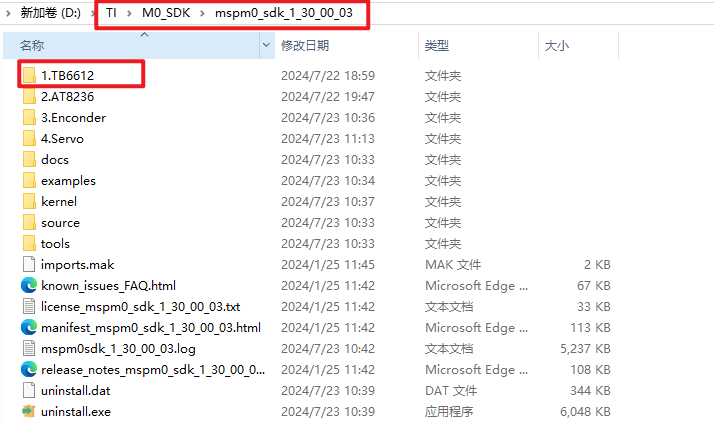
Note: The project source code must be placed in the SDK path for compilation.
For example, the path:D:\TI\M0_SDK\mspm0_sdk_1_30_00_03\1.TB6612
5. Experimental Phenomenon
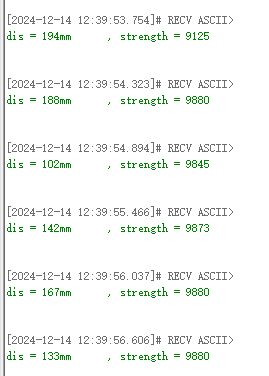
Burn the program to MSPM0G3519, connect the wires according to the wiring diagram. Close other programs occupying the serial port, open the serial port assistant on the computer, select the serial port number, and set the baud rate to 115200. In the serial port assistant, you can see the printed distance data in millimeters (mm) and intensity information
Effect picture: