Welcome to STM32F103C8T6 core board repository
3.2.button control
3.2.button control
1. Learning Objectives
1.Learn the basic working principle of STM32 buttons
2.Use the button to control the switch of the onboard LED light.
Introduction of button:
The button is an electronic switch, which can be turned on by lightly pressing the switch button when in use, and turned off when the hand is released.
Due to the elastic effect of the mechanical point, the button switch will not be stably connected immediately when it is closed, nor will it be disconnected suddenly when it is turned off, so there is a series of vibrations at the moment of closing and disconnecting. The length of the shaking time is determined by the mechanical characteristics of the button, generally 5ms to 10ms.The length of the button's stable closing time is determined by the operator's button action, generally from a few tenths of a second to a few second. button chatter can cause keys to be misread multiple times. In order to ensure that the CPU only processes a button once closed, it must be debounced. There are two methods of button debounce, one is hardware debounce, the other is software debounce. In order to make the circuit simpler, software debounce is usually used.Our development board also uses software to debounce. Generally speaking, a simple button debounce is to read the state of the button first. If the button is pressed, delay 10ms and read the state of the key again. If the key is still pressed , then the key has been pressed. Among them, the delay of 10ms is the software debounce processing. As for the hardware debounce, you can find out about it on Baidu, and there are very detailed introductions on the Internet.
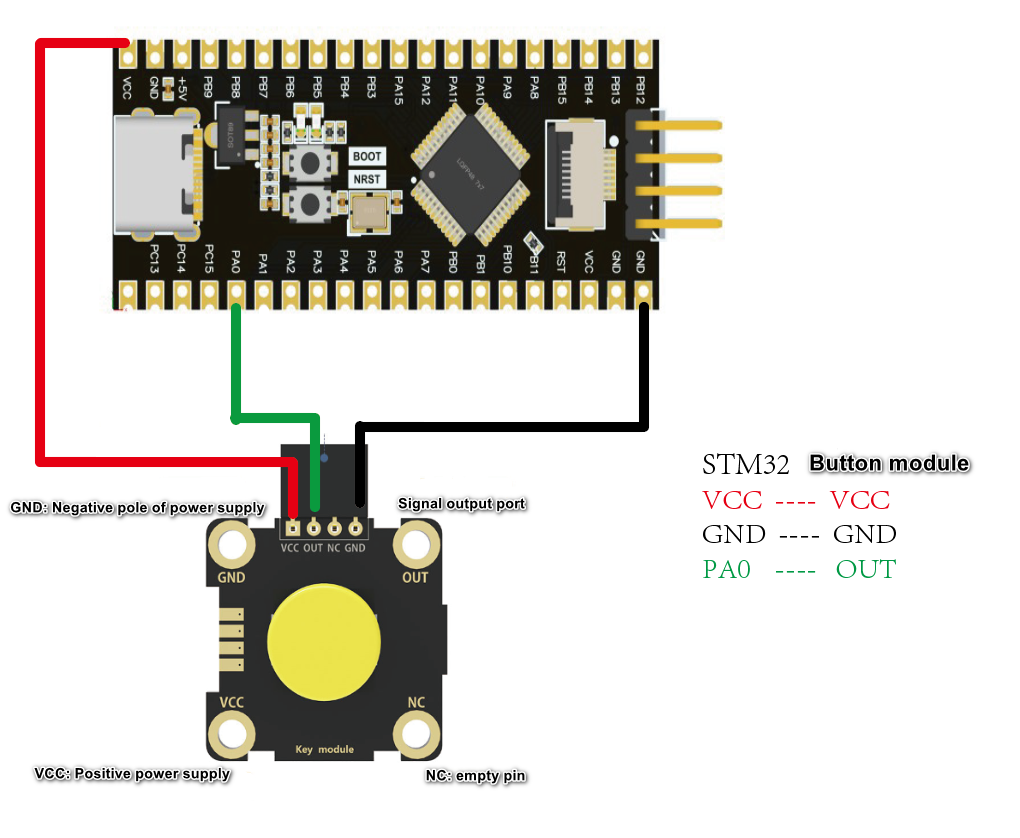
2.hardware construction
The button module and Dupont cable used in the external interrupt experiment need to be purchased separately, otherwise the course cannot be completed due to the lack of important accessories.
3. Program code analysis
button initialization:
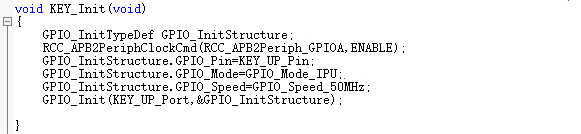
The KEY_Init() function is used to initialize the port and clock of the button . To know whether the button is pressed, it is necessary to read the level status of the IO port corresponding to the button, so we need to configure the GPIO as input mode.
button detection function:
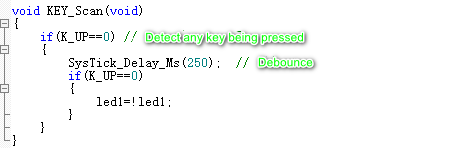
The KEY_Scan function is relatively simple. It directly judges whether the key is pressed after debounce, and changes the state of the LED light when pressed.
main function code:
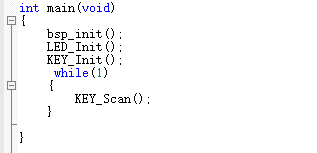
The main function first initializes the hardware used, and then calls the key scanning function in the while loop
4. Experimental phenomena
After the program download is complete, you can control the LED light to turn on and off by pressing the button, press the button once, the LED light turns on and then turns off.

