yahboom
HomeLearn
Solution
Blog
Online Store
About Us
EN/中文
AI Vision USB Camera📖
01.Basic course
  • 1.Camera parameters
  • 2.Camera detect
  • 3.Camera preview screen
02.Docker
  • 1.Docker overview and docker installation
  • 2.Common commands for docker image containers
  • 3.Docker images deeply understand and publish images
  • 4.Docker hardware interaction and data processing
  • 5.Enter the bot's docker container
  • 6.Robot development environment construction in Docker
  • 7.How customers can update docker images in the future
03.ROS vision course
  • 0.Camera preview screen
  • 1.QR code
  • 2.Human pose estimation
  • 3.Target Detection
  • 4.AR vision
  • 5.ROS+Opencv basics
  • 6.Face recognition
  • 7.harris corner detection
  • 8.Target tracking algorithm
  • 9.Contour moment
  • 10.Polygon outline
  • 11.Discrete fourier transform algorithm
  • 12.Edge detection algorithm
  • 13.Face detection algorithm
  • 14.Optical flow detection algorithm
  • 15.Contour detection
  • 16.General contour detection
  • 17.Feature point tracking
  • 18.HLS color filtering
  • 19.Hough circle detection
  • 20.Hough linear detection
  • 21.HSV color filtering
  • 22.LK optical flow algorithm
  • 23.Detection algorithm
  • 24.Phase dependent displacement detection
  • 25.Image pyramid sampling algorithm
  • 26.RGB color filtering
  • 27.Clear background detection algorithm
  • 28.Simplified optical flow algorithm
  • 29.Simple filter
  • 30.Threshold image processing
  • 31.Watershed segmentation algorithm
04.Mediapipe course
  • 1.Hand detection
  • 2.Attitude detection
  • 3.Overall inspection
  • 4.Face detection
  • 5.Face recognition
  • 6.Face effects
  • 7.3D object recognition
  • 8.Brush
  • 9.Finger control
  • 10.Gesture recognition
05.Robot Vision course
  • Tracking color line
06.Camera preview and frame rate test
  • Camera preview and frame rate test
Download
  • Docker Image
  • PC_Software
Download ZIP

Welcome to AI Vision USB Camera repository

12.Edge detection algorithm

Edge detection algorithm

1.Use

Code path:~/yahboomcar_ws/src/opencv_apps/launch

  • Start the camera
roslaunch yahboomcar_visual opencv_apps.launch img_flip:=false
  • img_flip parameter: whether the image needs to be flipped horizontally, the default is false.

[usb_cam-test.launch] file opens the [web_video_server] node by default, and you can directly use the [IP:8080] web page to view images in real time.

  • Start the corner detection function of Opencv_apps
roslaunch opencv_apps edge_detection.launch               # Edge detection algorithm

The debug_view for some functions is disabled, and there is no screen appearing. You can view the effect in the following two ways.

x
The reason for closing debug_view is that it will generate errors on the terminal, but the actual effect has not been affected.
  • Local View Screen

Enter the following command and select the corresponding topic to see the effect:

xxxxxxxxxx
rqt_image_view
  • LAN viewing screen

In the same local area network, enter IP+port (8080) in the browser, for example:

x
192.168.2.150:8080 # IP is the IP of the host computer

2. Effect display

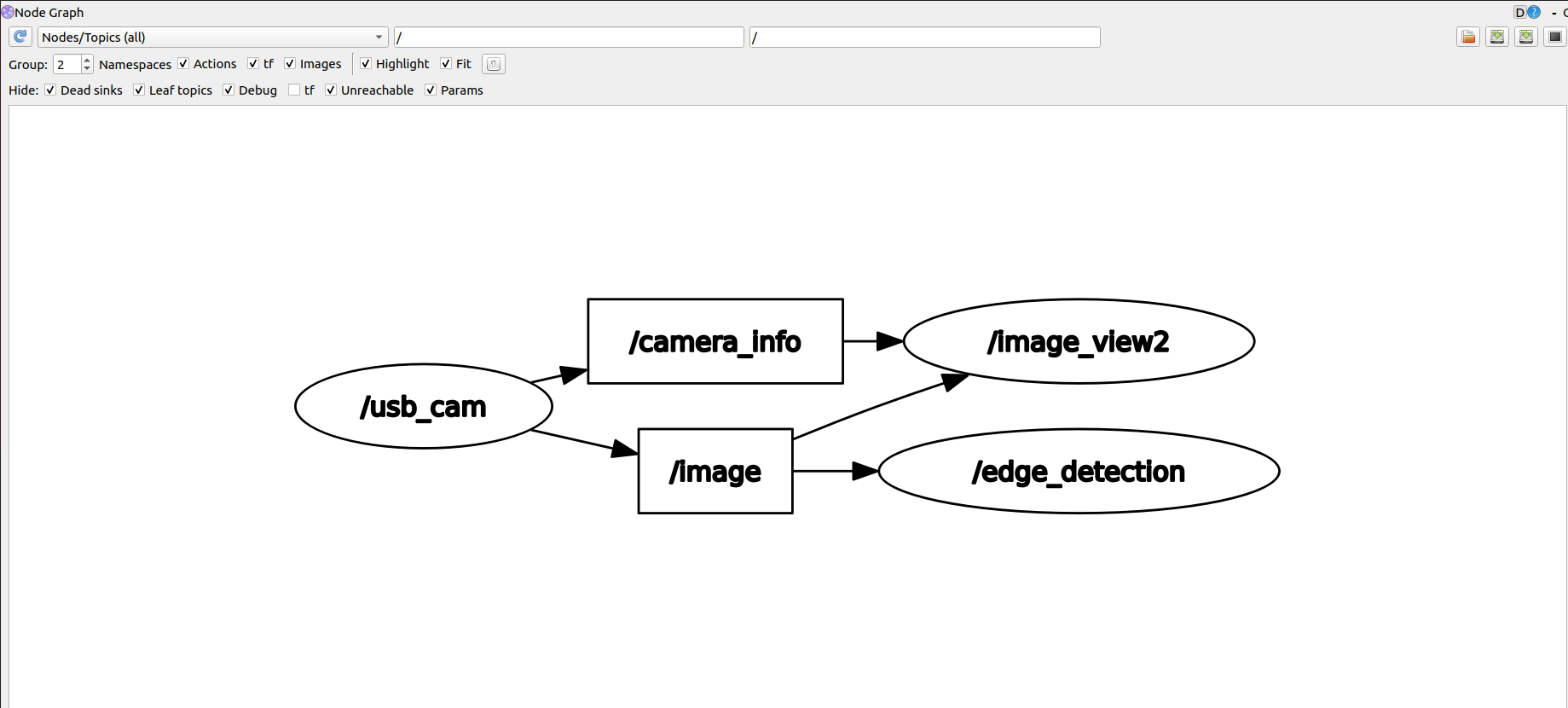
There will be a topic for subscribing images and publishing images.

ParameterTypeDefaultAnalyze
~use_camera_infobooltrueSubscribe to the topic [camera_info] to get the default coordinate system ID, otherwise use the image information directly.
~debug_viewboolfalseWhether to create a window to display the node image
~edge_typeint0Specify the edge detection method: 0: Sobel operator, 1: Laplacian operator, 2: Canny edge detection
~canny_threshold1int100Specify the second canny threshold
~canny_threshold2int200Specify the first canny threshold
~apertureSizeint3Aperture size of the Sobel operator.
~apply_blur_preboolTrueWhether to apply blur() to the input image
~postBlurSizedouble3.2Input image aperture size
~apply_blur_postboolFalseWhether to apply GaussianBlur() to the input image
~L2gradientboolFalseCanny's parameters
~queue_sizeint3Queue size

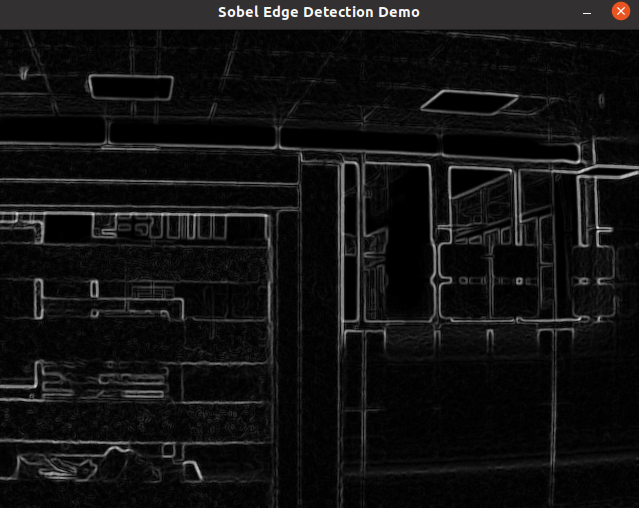
Effect picture:

Node picture:


Discrete fourier transform algorithm
Face detection algorithm

COMPANY

  • About us
  • Team Style
  • Blog

LEARNING & EXPLORATION

  • Tutorials
  • Edge AI hardware
  • Educational robots
  • Embedded intelligent hardware

WHERE TO BUY

  • Yahboom Online Store
  • Amazon
  • Alibaba
  • AliExpress
  • Mercado

TECHNOLOGY SUPPORT

  • Email: support@yahboom.com

BE A DISTRIBUTOR

  • Email: sales@yahboom.com
QR Code
QR Code

Copyright © 2017-2026 Yahboom. All Rights Reserved.

EN/中文