yahboom
HomeLearn
Solution
Blog
Online Store
About Us
EN/中文
YDLIDAR 4ROS LiDAR📖
01.Linux basic course
  • 1.Introduction to Linux system
  • 2.Ubuntu file system
  • 3.Ubuntu common commands
  • 4.Ubuntu common editors
  • 5.Ubuntu software operation commands
  • 6.Virtual machine installation
  • 7.SSH remote control
  • 8.VNC remote control
  • 9.Transfer files remotely
  • 10.Driver library and communication
  • 11.Static IP and hotspot mode
  • 12.Bind device ID
  • 13.Capacity expansion and resource allocation
  • 14.Update system software sources
  • 15.Set root user password
  • 16.sudo free password
  • 17.Connect to WiFi network
  • 18.View system version
  • 19.Customized service management
  • 20.Back up system image
02.ROS1 basic course
  • 1.ROS introduction
  • 2.ROS installation
  • 3.ROS common command tools
  • 4.ROS workspace
  • 5.ROS function package
  • 6.ROS node
  • 7.ROS topic publisher
  • 8.ROS topic subscribers
  • 9.ROS service client
  • 10.ROS service server
  • 11.ROS action client
  • 12.ROS action server
  • 13.ROS custom message reception
  • 14.ROS-launch file
  • 15.ROS-TF transformation
  • 16.ROS parameter service
  • 17.ROS-rviz use
  • 18.ROS-rqt tool usage
  • 19.Topic message recording and playback
  • 20.urdf model introduction
  • 21.gazebo introduction
  • 22.ROS distributed communication
03.ROS1 lidar course
  • 0.Instructions before use
  • 1.Preparation
  • 2.Handheld lidar mapping
  • 3.Lidar avoiding
  • 4.Lidar guard
  • 5.Lidar follow
  • 6.Lidar mapping
  • 7.rrt_exploration mapping algorithm
  • 8.Navigation
  • 9.APP Mapping and Navigation
  • 10.RTAB 3D mapping and navigation
04.ROS2 basic course
  • 1. Introduction to ROS2
  • 2.ROS2 install Humble
  • 3.ROS2 development environment
  • 4.ROS2 workspace
  • 5.ROS2 function package
  • 6.ROS2 node
  • 7.ROS2 topic communication
  • 8.ROS2 service communication
  • 9.ROS2 action communication
  • 10.ROS2 custom interface message
  • 11.ROS2 parameter service case
  • 12.ROS2 meta-function package
  • 13.ROS2 distributed communication
  • 14.ROS2 DDS
  • 15.ROS2 time related API
  • 16.ROS2 common command tools
  • 17.ROS2 rviz2 use
  • 18.ROS2 rqt toolbox
  • 19.ROS2 Launch startup file configuration
  • 20.ROS2 recording and playback tool
  • 21.ROS2 URDF model
  • 22.ROS2 Gazebo simulation platform
  • 23.ROS2 TF2 coordinate transformation
05.ROS2 lidar course
  • 0.ReadMe
  • 1.Preparation
  • 2.Handheld lidar mapping
  • 3.Lidar avoiding
  • 4.Lidar follow
  • 5.Lidar guard
  • 6.Lidar patrol
  • 7.gmapping mapping
  • 8.cartographer mapping
  • 9.Navigation and avoiding
  • 10.APP Mapping and Navigation
  • 11.RTAB 3D mapping and navigation
06.RPi 5 Docker course
  • 1.Overview and installation
  • 2.Common commands
  • 3.Understand and publish images
  • 4.Hardware interaction data processing
  • 5.Enter docker container
  • 6.Update docker images
  • 7.Docker container to install ROS using accessories
Download
  • ROS1-Code
  • ROS1-VMFile
  • ROS2-Code
  • ROS2-VMFile
  • Other File
  • ROS2_Basic_VM
Download ZIP

Welcome to YDLIDAR 4ROS LiDAR repository

9.Navigation and avoiding

Navigation and avoiding

This chapter needs to be used with a car chassis and other sensors to operate. This is just an explanation of the implementation method. In fact, it cannot be run. It needs to be used with the company's rosmaster-X3 car to achieve this function.

If you need to transplant it to your own motherboard, you need to install other dependency files.

1. Function description

After the program starts, the system will open rviz to display the map.

By setting target points, single-point and multi-point navigation of the car can be achieved.

2. Install Navigation 2 package

Take ros2-foxy as an example, Input following command:

sudo apt install ros-foxy-nav2-* -y

3. Code path

launch source code, the function source code is located in the Yahboom virtual machine file.

xxxxxxxxxx
~/ydlidar_ws/src/yahboomcar_nav/launch

4. Start

4.1 Start rviz display

Input following command:

xxxxxxxxxx
ros2 launch yahboomcar_rviz yahboomcar_nav_launch.py

At this time, the map will not be displayed on the screen.

Don't worry about the errors reported by each node topic on the left, because the navigation node has not been started yet.

4.2 Start the lidar

Input following command:

xxxxxxxxxx
ros2 launch yahboomcar_nav laser_bringup_launch.py

4.3 Start navigation node

Input following command:

xxxxxxxxxx
ros2 launch yahboomcar_nav navigation_dwb_launch.py

The DWB navigation algorithm is used here.
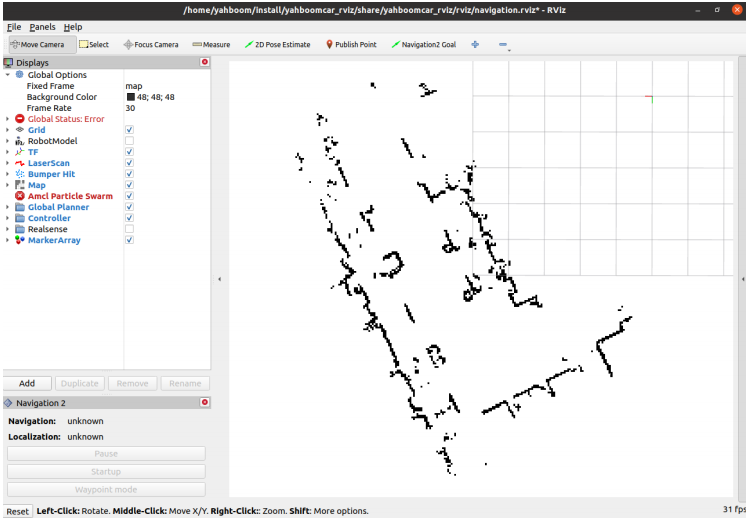
image-20231109170436977

A map will appear in rviz.

Click [2D Pose Estimate] on rviz.

Then compare the position and posture of the car and mark an initial position and posture for the car on the map.
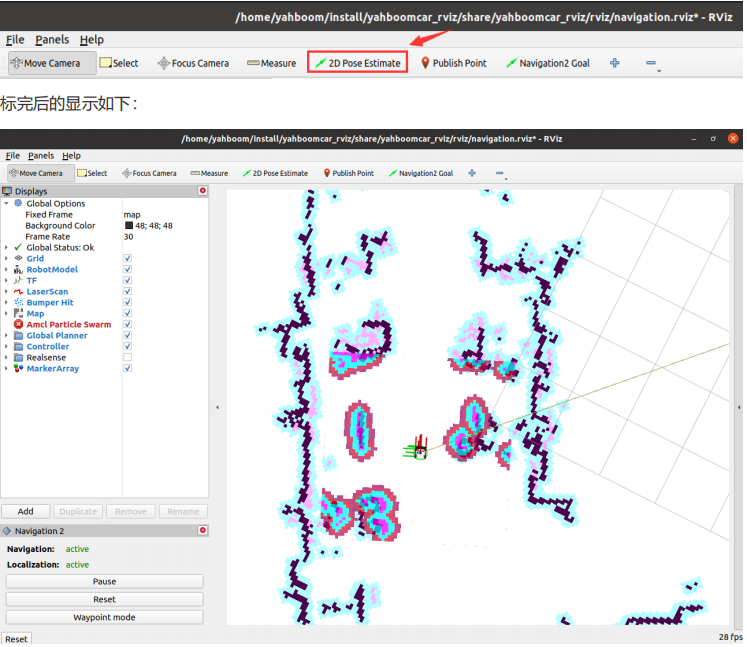
image-20231109170504042

Compare the overlap between the lidar scanning point and the obstacle, and set the initial pose of the car multiple times until the lidar scanning point and the obstacle roughly overlap.

4.4 Single point navigation

After the initial pose is set, you can click [2D Goal Pose] to set a navigation target point, and the car will start single-point navigation.
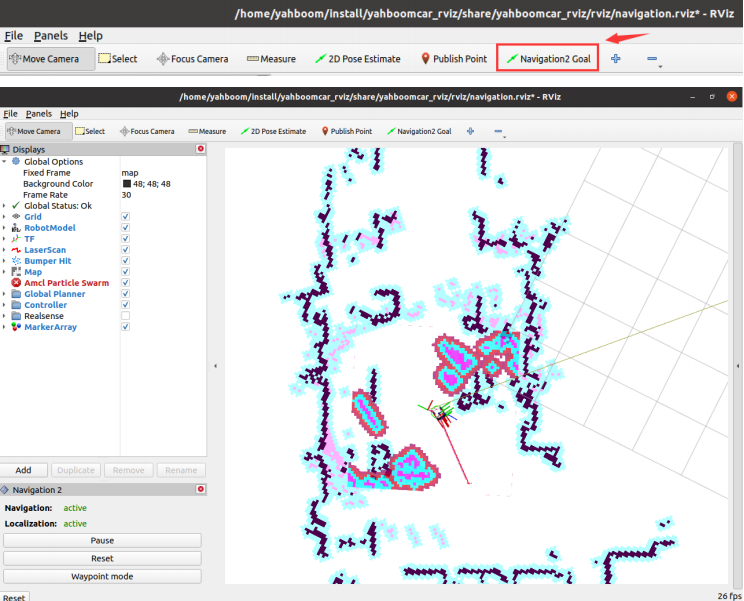
image-20231109170553127

4.5 Multi-point navigation

After setting the initial pose, click [Waypoint mode] in the lower left corner.

Then, click [Navigation2 Goal] on rviz, and we can mark a target point on the map.

Click [Navigation2 Goal] again to mark the second target point on the map. By continuing the cycle, you can mark multiple target points at once.
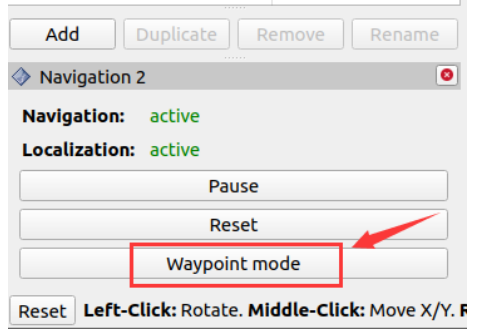
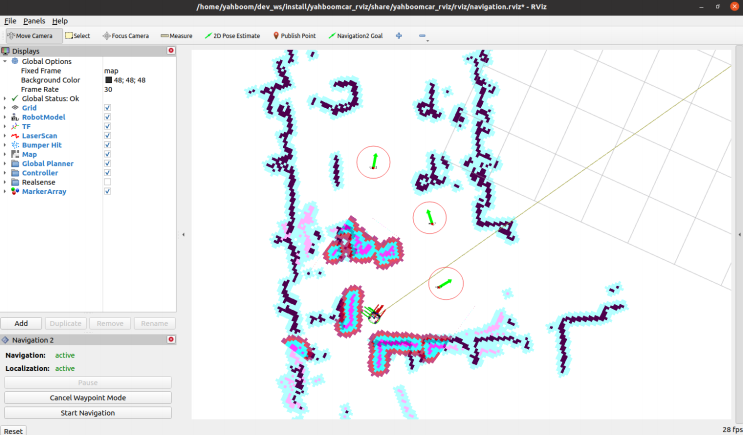
image-20231109170643086

image-20231109170657453

After marking multiple target points, click [Start Navigation] to start multi-point navigation.
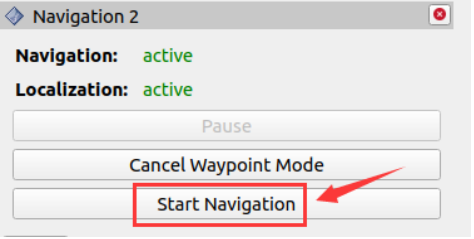
image-20231109170737309

After the multi-point navigation is completed, the car will stay at the last target point.

For some parameters of DWB, you can refer to:

xxxxxxxxxx
~/ydlidar_ws/src/yahboomcar_nav/params/dwb_nav_params.yaml


cartographer mapping
APP Mapping and Navigation

COMPANY

  • About us
  • Team Style
  • Blog

LEARNING & EXPLORATION

  • Tutorials
  • Edge AI hardware
  • Educational robots
  • Embedded intelligent hardware

WHERE TO BUY

  • Yahboom Online Store
  • Amazon
  • Alibaba
  • AliExpress
  • Mercado

TECHNOLOGY SUPPORT

  • Email: support@yahboom.com

BE A DISTRIBUTOR

  • Email: sales@yahboom.com
QR Code

Copyright © 2017-2026 Yahboom. All Rights Reserved.

EN/中文