yahboom
HomeLearn
Solution
Blog
Online Store
About Us
EN/中文
EAI X3 Pro LiDAR📖
01.Linux basic course
  • 1.Introduction to Linux system
  • 2.Ubuntu file system
  • 3.Ubuntu common commands
  • 4.Ubuntu common editors
  • 5.Ubuntu software operation commands
  • 6.Virtual machine installation
  • 7.SSH remote control
  • 8.VNC remote control
  • 9.Transfer files remotely
  • 10.Driver library and communication
  • 11.Static IP and hotspot mode
  • 12.Bind device ID
  • 13.Capacity expansion and resource allocation
  • 14.Update system software sources
  • 15.Set root user password
  • 16.sudo free password
  • 17.Connect to WiFi network
  • 18.View system version
  • 19.Customized service management
  • 20.Back up system image
02.ROS1 basic course
  • 1.ROS introduction
  • 2.ROS installation
  • 3.ROS common command tools
  • 4.ROS workspace
  • 5.ROS function package
  • 6.ROS node
  • 7.ROS topic publisher
  • 8.ROS topic subscribers
  • 9.ROS service client
  • 10.ROS service server
  • 11.ROS action client
  • 12.ROS action server
  • 13.ROS custom message reception
  • 14.ROS-launch file
  • 15.ROS-TF transformation
  • 16.ROS parameter service
  • 17.ROS-rviz use
  • 18.ROS-rqt tool usage
  • 19.Topic message recording and playback
  • 20.urdf model introduction
  • 21.gazebo introduction
  • 22.ROS distributed communication
03.ROS1 lidar course
  • 0.Instructions before use
  • 1.Preparation
  • 2.Handheld lidar mapping
  • 3.Lidar avoiding
  • 4.Lidar guard
  • 5.Lidar follow
  • 6.Lidar mapping
  • 7.rrt_exploration mapping algorithm
  • 8.Navigation
  • 9.APP Mapping and Navigation
  • 10.RTAB 3D mapping and navigation
04.ROS2 basic course
  • 1. Introduction to ROS2
  • 2.ROS2 install Humble
  • 3.ROS2 development environment
  • 4.ROS2 workspace
  • 5.ROS2 function package
  • 6.ROS2 node
  • 7.ROS2 topic communication
  • 8.ROS2 service communication
  • 9.ROS2 action communication
  • 10.ROS2 custom interface message
  • 11.ROS2 parameter service case
  • 12.ROS2 meta-function package
  • 13.ROS2 distributed communication
  • 14.ROS2 DDS
  • 15.ROS2 time related API
  • 16.ROS2 common command tools
  • 17.ROS2 rviz2 use
  • 18.ROS2 rqt toolbox
  • 19.ROS2 Launch startup file configuration
  • 20.ROS2 recording and playback tool
  • 21.ROS2 URDF model
  • 22.ROS2 Gazebo simulation platform
  • 23.ROS2 TF2 coordinate transformation
05.ROS2 lidar course
  • 0.ReadMe
  • 1.Preparation
  • 2.Handheld lidar mapping
  • 3.Lidar avoiding
  • 4.Lidar follow
  • 5.Lidar guard
  • 6.Lidar patrol
  • 7.gmapping mapping
  • 8.cartographer mapping
  • 9.Navigation and avoiding
  • 10.APP Mapping and Navigation
  • 11.RTAB 3D mapping and navigation
06.RPi 5 Docker course
  • 1.Overview and installation
  • 2.Common commands
  • 3.Understand and publish images
  • 4.Hardware interaction data processing
  • 5.Enter docker container
  • 6.Update docker images
  • 7.Docker container to install ROS using accessories
07.RDK course
  • 0.ReadMe before use
  • 1.Environment Construction
  • 2.Handheld Lidar Mapping
Download
  • ROS1-Code
  • ROS2-Code
  • ROS1-VMFile
  • ROS2-VMFile
  • PC Software
  • 3D_Model_File
  • RDK_Code
  • ROS2_Basic_VM
Download ZIP

Welcome to EAI X3 Pro LiDAR repository

6.Update docker images

6.Update docker images


6.Update docker images6.1、Method 1 (Rewrite the factory image of the motherboard)6.2、Method 2 (Download the latest docker image from docker hub)6.3、Method 3 (Update docker image via tar pack)

Currently, ROS2's courses are all placed in docker containers, and you can experience learning to use containerized development methods.

Before updating the docker image, please check the version number of your image, and then check whether your image is the latest image according to the following methods

xxxxxxxxxx
docker images

In the future, new functional modules will continue to be added to docker, and these new functional modules will be put into the new docker image, and users need to experience these new functions, and there are three ways to update the docker image:


6.1、Method 1 (Rewrite the factory image of the motherboard)

When the new docker image is updated, the image with the host will be published, and the new docker image has been downloaded from the host machine. You can brush image directly to your board. If you feel trouble, you can use the following two ways.


6.2、Method 2 (Download the latest docker image from docker hub)

When a new docker image is updated, users can manually update the image without brushing the machine

docker hub website address:

https://hub.docker.com/r/yahboomtechnology/ros2-base/tags
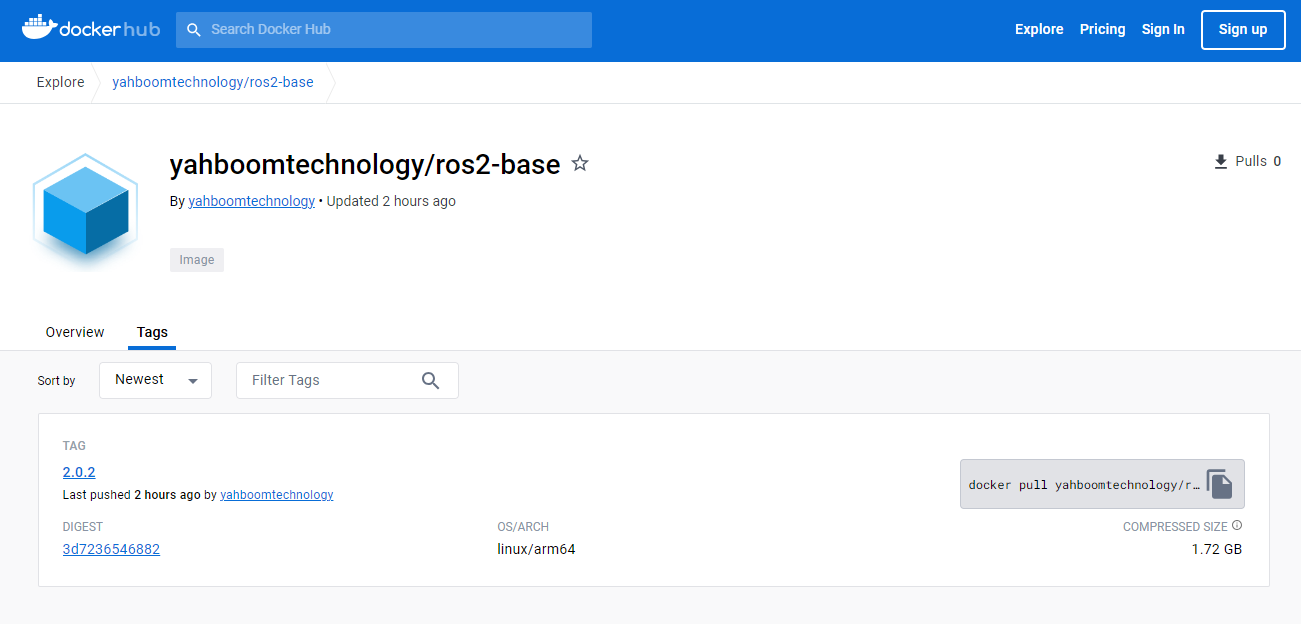
Use commands on the host:

​x
docker pull [the latest image version number]

example:
docker pull yahboomtechnology/ros2-base:2.0.2  
# The latest image version number here is modified according to the actual view

For the latest docker image version number, see the file of this tutorial [Latest Docker image version number.txt]

After the pull execution is complete, you can view the downloaded image

xxxxxxxxxx
docker images


6.3、Method 3 (Update docker image via tar pack)

When a new docker image is updated, users can manually update the image without brushing the machine:

The new docker image will provide a [xxx.tar] file, which will store the new docker image. see the file of this tutorial [Latest Docker image version number.txt], If the version number of the file is higher than that of the current host, it indicates that there is an update and the image can be updated. Download the file to the host machine.
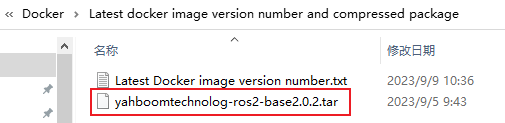
The tar file here is updated in real time, and may be older than 2.0.2 when you see it, depending on the actual version.

Use the command in the directory where the [xxx.tar] file of the host is located:

xxxxxxxxxx
docker load -i xxx.tar

After the docker load execution is complete, you can view the downloaded image

docker images
Enter docker container
Docker container to install ROS using accessories

COMPANY

  • About us
  • Team Style
  • Blog

LEARNING & EXPLORATION

  • Tutorials
  • Edge AI hardware
  • Educational robots
  • Embedded intelligent hardware

WHERE TO BUY

  • Yahboom Online Store
  • Amazon
  • Alibaba
  • AliExpress
  • Mercado

TECHNOLOGY SUPPORT

  • Email: support@yahboom.com

BE A DISTRIBUTOR

  • Email: sales@yahboom.com
QR Code

Copyright © 2017-2026 Yahboom. All Rights Reserved.

EN/中文