Welcome to EAI X3 Pro LiDAR repository
2.Handheld lidar mapping
2.Handheld lidar mapping
This function needs to start the program in the slam_gmapping function package. The source code is located in the [ydlidar_ws] source code file.
Here we use the supporting virtual machine to explain how to start the program. If you want to put it on your own motherboard, you need to put [slam_gmapping] and [openslam_gmapping] in the src directory of the workspace to compile.
2.1 Start gmapping mapping
Input following command:
x
ros2 launch ydlidar_ros2_driver test_gmapping_launch.py#x3 lidarros2 launch slam_gmapping gmapping_x3_launch.py#4ros lidarros2 launch slam_gmapping gmapping_4ros_launch.py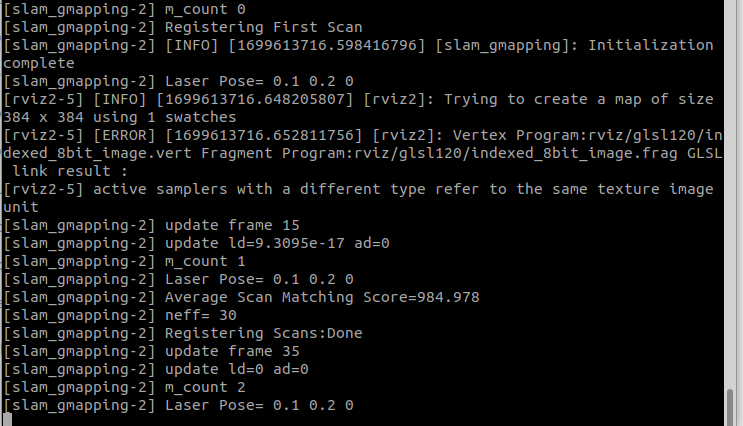
rviz displays as follows:
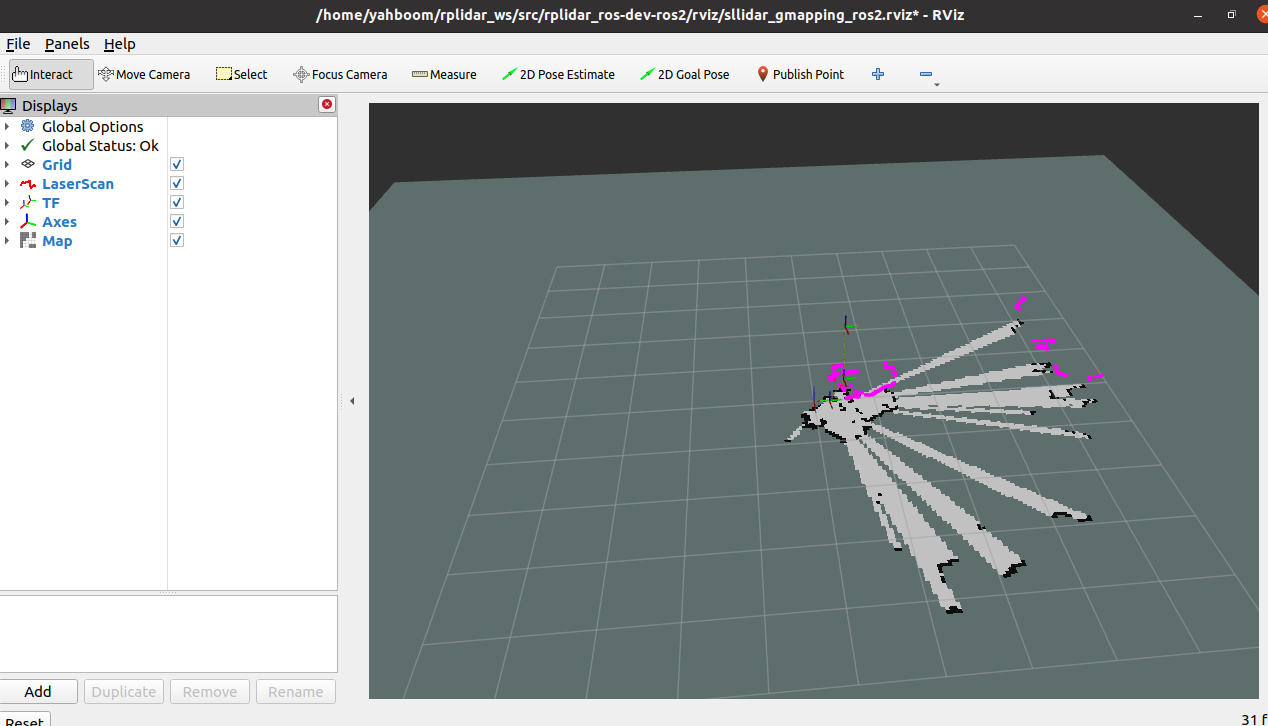
2.2 View node communication
Input following command:
xxxxxxxxxxros2 run rqt_graph rqt_graph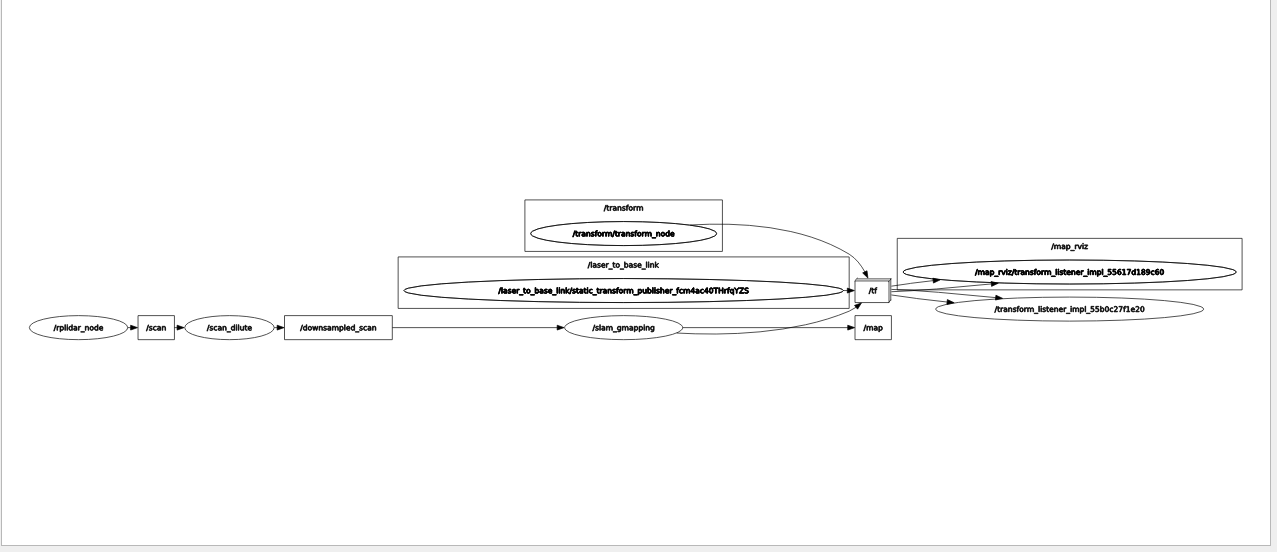
2.3 View TF tree
Input following command:
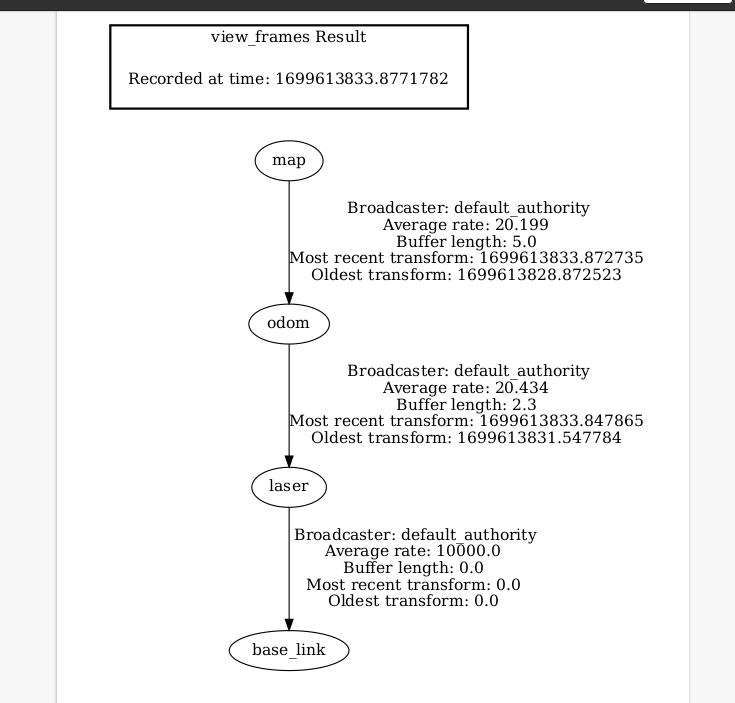
xxxxxxxxxxros2 run tf2_tools view_frames.py

In the directory where the command terminal is started, the system will generate a frames.pdf file, which is the generated TF tree.
2.4 launch file analysis
File path (combined with virtual machine):
xxxxxxxxxx/home/yahboom/ydlidar_ws/src/rplidar_ros-dev-ros2/launch/test_gmapping.launch.pytest_gmapping.launch.py
xfrom launch import LaunchDescriptionfrom launch_ros.actions import Node import osfrom launch.actions import IncludeLaunchDescriptionfrom launch.conditions import LaunchConfigurationEquals,LaunchConfigurationNotEqualsfrom launch.launch_description_sources import PythonLaunchDescriptionSource,AnyLaunchDescriptionSourcefrom ament_index_python.packages import get_package_share_directoryfrom launch.actions import DeclareLaunchArgumentimport os
def generate_launch_description(): LIDAR_TYPE = os.getenv('LIDAR_TYPE') lidar_type_arg = DeclareLaunchArgument(name='lidar_type', default_value=LIDAR_TYPE, description='The type of lidar') lidar_launch = IncludeLaunchDescription(PythonLaunchDescriptionSource([os.path.join(get_package_share_directory('rplidar_ros'), 'launch'),'/lidar.launch.py'])) s2_gmapping_launch = IncludeLaunchDescription(PythonLaunchDescriptionSource([os.path.join(get_package_share_directory('slam_gmapping'), 'launch'),'/s2_gmapping_launch.py']),condition=LaunchConfigurationEquals('lidar_type', 's2')) gmapping_launch = IncludeLaunchDescription(PythonLaunchDescriptionSource([os.path.join(get_package_share_directory('slam_gmapping'), 'launch'),'/gmapping_launch.py']),condition=LaunchConfigurationNotEquals('lidar_type', 's2')) s2_slam_gmapping_launch = IncludeLaunchDescription(PythonLaunchDescriptionSource([os.path.join(get_package_share_directory('slam_gmapping'), 'launch'),'/s2_slam_gmapping.launch.py']),condition=LaunchConfigurationEquals('lidar_type', 's2')) slam_gmapping_launch = IncludeLaunchDescription(PythonLaunchDescriptionSource([os.path.join(get_package_share_directory('slam_gmapping'), 'launch'),'/slam_gmapping.launch.py']),condition=LaunchConfigurationNotEquals('lidar_type', 's2')) return LaunchDescription([ lidar_type_arg, lidar_launch, s2_gmapping_launch, s2_slam_gmapping_launch, gmapping_launch, slam_gmapping_launch ]) [lidar_type_arg] Gets the value of [LIDAR_TYPE] set in the environment variable, and starts the corresponding radar and corresponding mapping instructions based on this value.
[lidar_launch] launch radar launch file, the file is located at /home/yahboom/ydlidar_ws/src/rplidar_ros-dev-ros2/launch/lidar.launch.py
[slam_4ros_gmapping_launch] Release some necessary static TF transformations for other lidar mapping and start rviz. Here you need to remap the radar topic into a filtered radar topic.
The file is located
xxxxxxxxxx/home/yahboom/ydlidar_ws/src/slam_gmapping/launch/slam_4ros_gmapping.launch.py
[slam_x3_gmapping_launch] Release some necessary static TF transformations and start rviz for other lidar mapping, the file is located
/home/yahboom/ydlidar_ws/src/slam_gmapping/launch/slam_x3_gmapping.launch.py
gmapping_x3_launch.py
xxxxxxxxxx#!/usr/bin/env python3import osimport launchfrom ament_index_python.packages import get_package_share_directoryfrom launch import LaunchDescriptionfrom launch_ros.actions import Nodedef generate_launch_description():use_sim_time = launch.substitutions.LaunchConfiguration('use_sim_time', default='False')return LaunchDescription([Node(package='slam_gmapping',executable='slam_gmapping',output='screen',parameters=[os.path.join(get_package_share_directory("slam_gmapping"), "params", "slam_gmapping.yaml")]),])
Start the mapping node, the parameter file slam_gmapping.yaml path is /home/yahboom/ydlidar_ws/src/slam_gmapping/params/slam_gmapping.yaml
gmapping_4ros_launch.py
xxxxxxxxxx#!/usr/bin/env python3import osimport launchfrom ament_index_python.packages import get_package_share_directoryfrom launch import LaunchDescriptionfrom launch_ros.actions import Nodedef generate_launch_description():use_sim_time = launch.substitutions.LaunchConfiguration('use_sim_time', default='False')return LaunchDescription([Node(package='slam_gmapping',executable='slam_gmapping',output='screen',parameters=[os.path.join(get_package_share_directory("slam_gmapping"), "params", "slam_gmapping.yaml")],remappings = [("/scan","/downsampled_scan")],),])
Start the mapping node. The path of the parameter file slam_gmapping.yaml is /home/yahboom/ydlidar_ws/src/slam_gmapping/params/slam_gmapping.yaml.
Here you also need to map the lidar topic to the filtered lidar topic/downsampled_scan.