Welcome to 2DOF PTZ repository
4. Rock-paper-scissors game
Rock, Paper, Scissors
1. Introduction
Please read the information in the 24-way servo driver board and the STM32 introductory tutorial first to understand how to burn the program and the basics of STM32. This will make it easier to learn and burn the following programs.
2. Equipment list
3. Placement
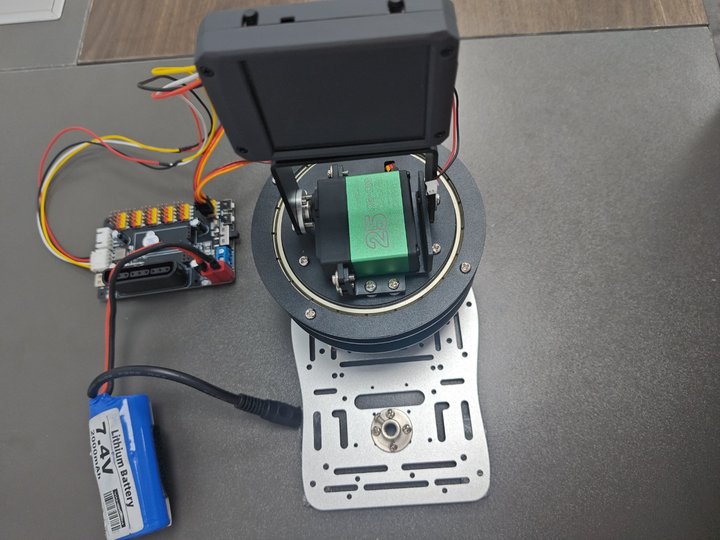
The placement is as shown in the figure. You can choose our aluminum base frame as the base plate to fix the k230 and the gimbal, or you can choose a fixed base plate. The chassis can be glued to prevent the gimbal from moving too much and causing deviation. The k230 is fixed on the two-dimensional gimbal. When using the battery, if the gimbal rotates too much, you can moderately reduce the pid parameter.
4. Experimental preparation
First, build the 2D gimbal according to the 2D gimbal installation tutorial
Hardware wiring:

| 2D gimbal | 24-way servo driver board |
|---|---|
| X-axis servo | S1 |
| Y-axis servo | S2 |
| K230 vision module | 24-way motor driver board |
|---|---|
| 5V | 5V |
| GND | GND |
| TX | RX3 |
| RX | TX3 |
Note: When plugging in the servo cable, be sure to align the yellow cable with the yellow GPIO port of the 24-way servo driver board, and the brown cable with the black GPIO port of the 24-way servo driver board.
5. K230 key code analysis
Code explanation
This is a finger-guessing game program based on gesture recognition. It mainly includes the following parts:
Hand detection class (HandDetApp) and gesture key point classification class (HandKPClassApp)
These two classes implement the functions of palm detection and gesture key point recognition respectively, providing underlying support for finger-guessing games.
They encapsulate operations such as image preprocessing, model inference and post-processing, and provide a unified interface for upper-level logic.
Finger-guessing game class (FingerGuess)
This class is responsible for the execution logic of the entire finger-guessing game.
It will first call the palm detection and key point classification models to obtain the user's current gesture.
Then, according to different game modes (must win, must lose, multiple games), the corresponding computer punches are generated and the winner is determined.
Finally, the game process and results are drawn to the screen for display.
Game execution function (exce_demo)
This function is responsible for initializing the game-related environment and resources and entering the main loop of the game.
In the main loop, it continuously obtains the current frame image, calls the run method of the FingerGuess class to process the image, and finally displays the game screen.
The execution flow of the entire game is:
Initialize the game environment and resources
Enter the main game loop
In each frame:
Get the current image
Detect the palm and recognize the gesture
Generate a computer punch according to the game logic and judge the winner
Draw the game screen and display it
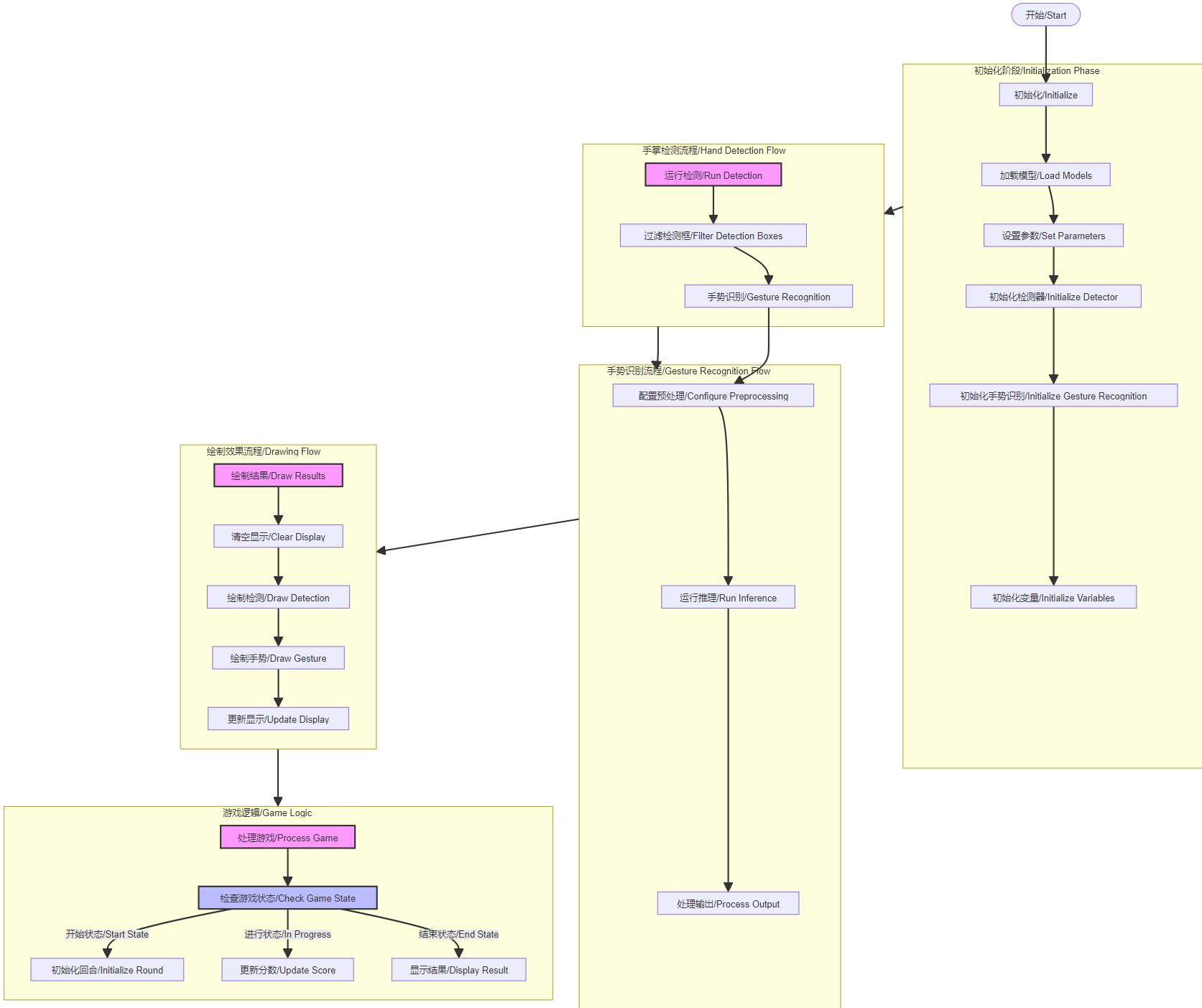
Code Detailed Structure
Initialization Phase:
Load detection and recognition models
Set various parameters
Initialize detector and gesture recognition
Initialize game-related variables
Hand Detection Flow:
Run hand detection
Filter detection boxes
Pass to gesture recognition
Gesture Recognition Flow:
Configure preprocessing
Run model inference
Process output
Drawing Flow:
Clear display
Draw detection
Draw gesture recognition
Update display
Game Logic:
Process game logic
Check game state
Initialize new round
Update player and AI scores
Display final result
Key code
x
# 猜拳游戏任务类 / Rock-paper-scissors game task classclass FingerGuess: def __init__(self, hand_det_kmodel, hand_kp_kmodel, det_input_size, kp_input_size, labels, anchors, confidence_threshold=0.25, nms_threshold=0.3, nms_option=False, strides=[8, 16, 32], guess_mode=3, rgb888p_size=[1280, 720], display_size=[1920, 1080], debug_mode=0): # 手掌检测模型路径 / Hand detection model path self.hand_det_kmodel = hand_det_kmodel # 手掌关键点模型路径 / Hand keypoint model path self.hand_kp_kmodel = hand_kp_kmodel # 手掌检测模型输入分辨率 / Hand detection model input resolution self.det_input_size = det_input_size # 手掌关键点模型输入分辨率 / Hand keypoint model input resolution self.kp_input_size = kp_input_size self.labels = labels # anchors / Anchor boxes self.anchors = anchors # 置信度阈值 / Confidence threshold self.confidence_threshold = confidence_threshold # nms阈值 / Non-Maximum Suppression threshold self.nms_threshold = nms_threshold # nms选项 / NMS option self.nms_option = nms_option # 特征图针对输入的下采样倍数 / Feature map downsampling multipliers relative to input self.strides = strides # sensor给到AI的图像分辨率,宽16字节对齐 / Image resolution from sensor to AI, width aligned to 16 bytes self.rgb888p_size = [ALIGN_UP(rgb888p_size[0], 16), rgb888p_size[1]] # 视频输出VO分辨率,宽16字节对齐 / Video output VO resolution, width aligned to 16 bytes self.display_size = [ALIGN_UP(display_size[0], 16), display_size[1]] # debug_mode模式 / Debug mode self.debug_mode = debug_mode self.guess_mode = guess_mode # 石头剪刀布的贴图array / Rock-paper-scissors image arrays self.five_image = self.read_file("/sdcard/utils/five.bin") self.fist_image = self.read_file("/sdcard/utils/fist.bin") self.shear_image = self.read_file("/sdcard/utils/shear.bin") self.counts_guess = -1 # 猜拳次数 计数 / Count of rock-paper-scissors rounds self.player_win = 0 # 玩家 赢次计数 / Player win count self.k230_win = 0 # k230 赢次计数 / K230 win count self.sleep_end = False # 是否 停顿 / Whether to pause self.set_stop_id = True # 是否 暂停猜拳 / Whether to suspend the game self.LIBRARY = ["fist", "yeah", "five"] # 猜拳 石头剪刀布 三种方案的dict / Dictionary of three rock-paper-scissors options self.hand_det = HandDetApp(self.hand_det_kmodel, self.labels, model_input_size=self.det_input_size, anchors=self.anchors, confidence_threshold=self.confidence_threshold, nms_threshold=self.nms_threshold, nms_option=self.nms_option, strides=self.strides, rgb888p_size=self.rgb888p_size, display_size=self.display_size, debug_mode=0) self.hand_kp = HandKPClassApp(self.hand_kp_kmodel, model_input_size=self.kp_input_size, rgb888p_size=self.rgb888p_size, display_size=self.display_size) self.hand_det.config_preprocess() # run函数 / Run function def run(self, input_np): # 先进行手掌检测 / First perform hand detection det_boxes = self.hand_det.run(input_np) boxes = [] gesture_res = [] for det_box in det_boxes: # 对检测的手做手势识别 / Perform gesture recognition on detected hands x1, y1, x2, y2 = det_box[2], det_box[3], det_box[4], det_box[5] w, h = int(x2 - x1), int(y2 - y1) if (h < (0.1 * self.rgb888p_size[1])): continue if (w < (0.25 * self.rgb888p_size[0]) and ((x1 < (0.03 * self.rgb888p_size[0])) or (x2 > (0.97 * self.rgb888p_size[0])))): continue if (w < (0.15 * self.rgb888p_size[0]) and ((x1 < (0.01 * self.rgb888p_size[0])) or (x2 > (0.99 * self.rgb888p_size[0])))): continue self.hand_kp.config_preprocess(det_box) results_show, gesture = self.hand_kp.run(input_np) boxes.append(det_box) gesture_res.append(gesture) return boxes, gesture_res• # 绘制效果 / Draw results def draw_result(self, pl, dets, gesture_res): pl.osd_img.clear() # 手掌的手势分类得到用户的出拳,根据不同模式给出开发板的出拳,并将对应的贴图放到屏幕上显示 # Get user's gesture from hand gesture classification, determine the board's gesture based on different modes, and display corresponding images on screen if (len(dets) >= 2): pl.osd_img.draw_string_advanced(self.display_size[0] // 2 - 50, self.display_size[1] // 2 - 50, 30, "请保证只有一只手入镜 Make sure only one hand on the screen", color=(255, 255, 0, 0)) elif (self.guess_mode == 0): draw_img_np = np.zeros((self.display_size[1], self.display_size[0], 4), dtype=np.uint8) draw_img = image.Image(self.display_size[0], self.display_size[1], image.ARGB8888, alloc=image.ALLOC_REF, data=draw_img_np) if (gesture_res[0] == "fist"): draw_img_np[:400, :400, :] = self.shear_image elif (gesture_res[0] == "five"): draw_img_np[:400, :400, :] = self.fist_image elif (gesture_res[0] == "yeah"): draw_img_np[:400, :400, :] = self.five_image pl.osd_img.copy_from(draw_img) elif (self.guess_mode == 1): draw_img_np = np.zeros((self.display_size[1], self.display_size[0], 4), dtype=np.uint8) draw_img = image.Image(self.display_size[0], self.display_size[1], image.ARGB8888, alloc=image.ALLOC_REF, data=draw_img_np) if (gesture_res[0] == "fist"): draw_img_np[:400, :400, :] = self.five_image elif (gesture_res[0] == "five"): draw_img_np[:400, :400, :] = self.shear_image elif (gesture_res[0] == "yeah"): draw_img_np[:400, :400, :] = self.fist_image pl.osd_img.copy_from(draw_img) else: draw_img_np = np.zeros((self.display_size[1], self.display_size[0], 4), dtype=np.uint8) draw_img = image.Image(self.display_size[0], self.display_size[1], image.ARGB8888, alloc=image.ALLOC_REF, data=draw_img_np) if (self.sleep_end): time.sleep_ms(2000) self.sleep_end = False if (len(dets) == 0): self.set_stop_id = True return if (self.counts_guess == -1 and gesture_res[0] != "fist" and gesture_res[0] != "yeah" and gesture_res[0] != "five"): draw_img.draw_string_advanced(self.display_size[0] // 2 - 50, self.display_size[1] // 2 - 50, 30, "游戏开始 GAME START", color=(255, 255, 0, 0)) time.sleep_ms(500) elif (self.counts_guess == self.guess_mode): draw_img.clear() if (self.k230_win > self.player_win): draw_img.draw_string_advanced(self.display_size[0] // 2 - 50, self.display_size[1] // 2 - 50, 30, "你输了 You lose", color=(255, 255, 0, 0)) uart.write(bytearray([0x55, 0xaa, 0xff, 0xfa])) elif (self.k230_win < self.player_win): draw_img.draw_string_advanced(self.display_size[0] // 2 - 50, self.display_size[1] // 2 - 50, 30, "你赢了 You win", color=(255, 255, 0, 0)) uart.write(bytearray([0x55, 0xaa, 0x00, 0xfa])) else: draw_img.draw_string_advanced(self.display_size[0] // 2 - 50, self.display_size[1] // 2 - 50, 30, "平局 | tie", color=(255, 255, 0, 0)) self.counts_guess = -1 self.player_win = 0 self.k230_win = 0 self.sleep_end = True else: if (self.set_stop_id): if (self.counts_guess == -1 and (gesture_res[0] == "fist" or gesture_res[0] == "yeah" or gesture_res[0] == "five")): self.counts_guess = 0 if (self.counts_guess != -1 and (gesture_res[0] == "fist" or gesture_res[0] == "yeah" or gesture_res[0] == "five")): k230_guess = randint(1, 10000) % 3 if (gesture_res[0] == "fist" and self.LIBRARY[k230_guess] == "yeah"): self.player_win += 1 elif (gesture_res[0] == "fist" and self.LIBRARY[k230_guess] == "five"): self.k230_win += 1 if (gesture_res[0] == "yeah" and self.LIBRARY[k230_guess] == "fist"): self.k230_win += 1 elif (gesture_res[0] == "yeah" and self.LIBRARY[k230_guess] == "five"): self.player_win += 1 if (gesture_res[0] == "five" and self.LIBRARY[k230_guess] == "fist"): self.player_win += 1 elif (gesture_res[0] == "five" and self.LIBRARY[k230_guess] == "yeah"): self.k230_win += 1 if (self.LIBRARY[k230_guess] == "fist"): draw_img_np[:400, :400, :] = self.fist_image elif (self.LIBRARY[k230_guess] == "five"): draw_img_np[:400, :400, :] = self.five_image elif (self.LIBRARY[k230_guess] == "yeah"): draw_img_np[:400, :400, :] = self.shear_image self.counts_guess += 1 draw_img.draw_string_advanced(self.display_size[0] // 2 - 50, self.display_size[1] // 2 - 50, 30, "第" + str(self.counts_guess) + "回合 | Round " + str(self.counts_guess), color=(255, 255, 0, 0)) self.set_stop_id = False self.sleep_end = True else: draw_img.draw_string_advanced(self.display_size[0] // 2 - 50, self.display_size[1] // 2 - 50, 30, "第" + str(self.counts_guess + 1) + "回合 | Round " + str(self.counts_guess), color=(255, 255, 0, 0)) pl.osd_img.copy_from(draw_img)• # 读取石头剪刀布的bin文件方法 / Method to read rock-paper-scissors bin files def read_file(self, file_name): image_arr = np.fromfile(file_name, dtype=np.uint8) image_arr = image_arr.reshape((400, 400, 4)) return image_arr
6. stm32 key code analysis
control.c
xxxxxxxxxxuint8_t get_point2_p() //Coordinate processing function{uint8_t lable, load_1, load_2 ,load_3 ,ret=0;if(DataDecode1(&Uart3_RingBuff,&lable, &load_1, &load_2,&load_3) == 0){if(lable == 0x00){rec_step_p[0][0] = load_1 + load_2 + load_3 ;// ret=1;
} else if(lable == 0xff){
rec_step_p[0][1] = load_1 + load_2 + load_3 ;// ret=1;
}
return ret;}}
This code adds together the three frames of data transmitted by k230. As mentioned earlier, the coordinate data of k230 is split into three frames and then sent separately. Here, the data is added together to form the correct coordinates and assign the coordinates to the two-dimensional array.
xxxxxxxxxxvoid mode_1pro(){
USART_Cmd(USART3, ENABLE); get_active();
if(mode_flag==0&&rec_step_p[0][1]==1){ go_to(0, 0, 200, 0); go_to(200, 0, 0, 0); go_to_point(0, 50, 200, 50); go_to_point(200, 50, 0, 50); USART_Cmd(USART3, DISABLE); rec_step_p[0][0]=0;
mode_flag+=1;
}else if(mode_flag==0&&rec_step_p[0][0]==1){ USART_Cmd(USART3, DISABLE); go_to(0, 0, 0, 240);go_to(0, 240, 0, 0);go_to_point(0, 0, 0, 240);go_to_point(0, 240, 0, 0);mode_flag+=1;rec_step_p[0][1]=0;
}
}
This code is to make movements according to the results of rock-paper-scissors obtained above.
xxxxxxxxxxvoid go_to_point(uint16_t now_x, uint16_t now_y, uint16_t targ_x, uint16_t targ_y){ uint16_t i; float step_num = 200;/* 1000 steps*/ float step_x, step_y; /* step value */ float going_x = now_x, going_y = now_y; /* Current target value*/
step_x = (targ_x - now_x) / step_num; step_y = (targ_y - now_y) / step_num;
for(i = 0; i < step_num; i++){
kfp_x.source = step_x; kfp_y.source = step_y; kfp_x.out = KalmanFilter(&kfp_x, kfp_x.source);kfp_y.out = KalmanFilter(&kfp_y, kfp_y.source);going_x += kfp_x.out;going_y += kfp_y.out;
set_target(going_x, going_y);}}
This code subdivides the coordinates of the two points obtained, thereby dividing the two points of the rectangle into many points, and then performing pid operations between many points to make the servo movement more accurate.
xxxxxxxxxxvoid go_to(uint16_t now_x, uint16_t now_y, uint16_t targ_x, uint16_t targ_y){uint16_t i;float step_num = 100;/* 250²½ */float step_x, step_y; /* ²½½øÖµ */float going_x = now_x, going_y = now_y; /* µ±Ç°Ä¿ ±êÖµ*/
step_x = (targ_x - now_x) / step_num; step_y = (targ_y - now_y) / step_num;
for(i = 0; i < step_num;i++){

kfp_x.source = step_x; kfp_y.source = step_y; kfp_x.out = KalmanFilter(&kfp_x, kfp_x.source); kfp_y.out = KalmanFilter(&kfp_y, kfp_y.source);

going_x += kfp_x.out; going_y += kfp_y.out;
set_target(-going_x, -going_y); }}
This code is to subdivide the coordinates of the two points obtained, so as to divide the two points of the rectangle into many points, and then do pid calculations between many points to make the servo movement more accurate.
bsp_servo.c
xxxxxxxxxxServTypdef Xserv = {.pwm = 1600,.MAXPWM = 2400,.MINPWM = 500,.MIDPWM = 1400};
ServTypdef Yserv = {.pwm = 1600,.MAXPWM = 2500,.MINPWM = 300,.MIDPWM = 1400};
This code is to set the starting position of the servo, so it is necessary to modify this to fit the vertex of the gimbal movement. I set the initial position of the gimbal to the middle point, and change the starting position of the servo through this.
xxxxxxxxxxvoid servo_ctr(ServTypdef *servo, int PidInput){uint16_t CompSet = servo->MIDPWM + PidInput;
if( CompSet > servo->MAXPWM ){CompSet = servo->MAXPWM;} else if ( CompSet < servo->MINPWM ){CompSet = servo->MINPWM;}if(servo->pwm == CompSet){/*Avoid repeated changes in comparison value*/
return;}
if( servo == &Xserv ){
GPIO_SetBits(Servo_J1_PORT, Servo_J1_PIN ); //Set the servo level highdelay_us(CompSet); //Delay pulse value in microseconds
GPIO_ResetBits(Servo_J1_PORT, Servo_J1_PIN ); //Set the servo level lowdelay_ms(20 - CompSet/1000);}else if( servo == &Yserv ){
GPIO_SetBits(Servo_J2_PORT, Servo_J2_PIN ); //Set the servo level highdelay_us(CompSet); //Delay pulse value in microseconds
GPIO_ResetBits(Servo_J2_PORT, Servo_J2_PIN ); //Set the servo level lowdelay_ms(20 - CompSet/1000);}}
This code outputs the pid to the pwm, connects the pid to the pwm, and limits the pwm. It is also the core code for the servo movement. It controls the rotation of the servo through the delay and the change of the pwm, and connects the servo movement with the pwm.
pid.c
xxxxxxxxxxfloat pid_calculate(PID_TypeDef *PID, float CurrentValue){ PID->Err = PID->Target - CurrentValue; PID->Integral += PID->Err; if(PID->Integral > 7000){ PID->Integral = 7000; } if(PID->Integral < -7000){ PID->Integral = -7000; } //Points limit PID->PID_out = PID->Kp * PID->Err /*proportion*/ + PID->Ki * PID->Integral /*Points*/ + PID->Kd * (PID->Err - PID->LastErr); /*Derivative*/
PID->LastErr = PID->Err; return PID->PID_out;}
This code is the configuration of the position PID operation, including integral limiting. The position PID is calculated by the current deviation value (difference between target value and actual value), integral value (sum of past errors) and differential value (error change rate), and then the weighted addition of these three parts is used to obtain the PID output. If you want to fine-tune the code to achieve better results, you can fine-tune the PID parameters of the main function.
bsp_usart.c
xxxxxxxxxxuint8_t DataDecode1(RingBuff_t *ringbuff, uint8_t *data1, uint8_t *data2, uint8_t *data3,uint8_t *data4){ static uint8_t uart_dec_count; static uint8_t uart_rec_data[6]; uint8_t ret = 1;
if(Read_RingBuff(ringbuff, &uart_rec_data[uart_dec_count]) == RINGBUFF_ERR){ return 1;
} if((uart_dec_count == 0)&&(uart_rec_data[uart_dec_count] != 0x55)) { //Frame header 0x55 uart_rec_data[uart_dec_count] = 0; } else if((uart_dec_count == 1)&&(uart_rec_data[uart_dec_count] != 0xaa)){ //Second frame 0xaa uart_rec_data[uart_dec_count] = 0; uart_rec_data[uart_dec_count-1] = 0; uart_dec_count = 0; }else if((uart_dec_count == 6)&&(uart_rec_data[uart_dec_count] != 0xfa)){ //Frame end 0xfa uart_rec_data[uart_dec_count] = 0; uart_rec_data[uart_dec_count-1] = 0; uart_rec_data[uart_dec_count-2] = 0; uart_rec_data[uart_dec_count-3] = 0; uart_rec_data[uart_dec_count-4] = 0; uart_rec_data[uart_dec_count-5] = 0; uart_dec_count = 0; } else{ if(uart_dec_count == 6)//Successfully received one frame of data { *data1 = uart_rec_data[2]; *data2 = uart_rec_data[3]; *data3 = uart_rec_data[4]; *data4 = uart_rec_data[5]; ret = 0;
} uart_dec_count++; if(uart_dec_count == 7) { uart_dec_count = 0; }
} return ret;
}
This code is for receiving k230 data. It receives data only when the frame header is 0x55, the second data is 0xaa, and the frame tail is 0xfa. It locates a frame of data through three data. Since the coordinates of the four vertices transmitted from k230 are split into three groups of data for each vertex, the transmitted data is very large. In order to ensure that the transmitted data is accurate, three data are used to confirm a frame of data.
7. Effect description
k230 runs the rock-paper-scissors program. When you play rock-paper-scissors with k230, you win 2 out of 3 games. When you win, k230 sends information to make the gimbal move up and down, indicating nodding and recognition of you. When you lose, k230 sends information to make the gimbal move left and right, indicating shaking its head and contempt for you.