yahboom
HomeLearn
Solution
Blog
Online Store
About Us
EN/中文
USB Industrial Grade AI Vision Camera📖
01.Basic course
  • 1.Camera parameters
  • 2.Camera detect
  • 3.Camera preview screen
02.Docker
  • 1.Docker overview and docker installation
  • 2.Common commands for docker image containers
  • 3.Docker images deeply understand and publish images
  • 4.Docker hardware interaction and data processing
  • 5.Enter the bot's docker container
  • 6.Robot development environment construction in Docker
  • 7.How customers can update docker images in the future
03.ROS vision course
  • 0.Camera preview screen
  • 1.QR code
  • 2.Human pose estimation
  • 3.Target Detection
  • 4.AR vision
  • 5.ROS+Opencv basics
  • 6.Face recognition
  • 7.harris corner detection
  • 8.Target tracking algorithm
  • 9.Contour moment
  • 10.Polygon outline
  • 11.Discrete fourier transform algorithm
  • 12.Edge detection algorithm
  • 13.Face detection algorithm
  • 14.Optical flow detection algorithm
  • 15.Contour detection
  • 16.General contour detection
  • 17.Feature point tracking
  • 18.HLS color filtering
  • 19.Hough circle detection
  • 20.Hough linear detection
  • 21.HSV color filtering
  • 22.LK optical flow algorithm
  • 23.Detection algorithm
  • 24.Phase dependent displacement detection
  • 25.Image pyramid sampling algorithm
  • 26.RGB color filtering
  • 27.Clear background detection algorithm
  • 28.Simplified optical flow algorithm
  • 29.Simple filter
  • 30.Threshold image processing
  • 31.Watershed segmentation algorithm
04.Mediapipe course
  • 1.Hand detection
  • 2.Attitude detection
  • 3.Overall inspection
  • 4.Face detection
  • 5.Face recognition
  • 6.Face effects
  • 7.3D object recognition
  • 8.Brush
  • 9.Finger control
  • 10.Gesture recognition
05.Robot Vision course
  • Tracking color line
06.Camera preview and frame rate test
  • Camera preview and frame rate test
Download
  • Docker Image
  • PC_Software
Download ZIP

Welcome to USB Industrial Grade AI Vision Camera repository

17.Feature point tracking

Feature point tracking

1. Use

Code path:~/yahboomcar_ws/src/opencv_apps/launch

  • Start the camera
roslaunch yahboomcar_visual opencv_apps.launch img_flip:=false
  • img_flip parameter: whether the image needs to be flipped horizontally, the default is false.

[usb_cam-test.launch] file opens the [web_video_server] node by default, and you can directly use the [IP:8080] web page to view images in real time.

  • Start the corner detection function of Opencv_apps
roslaunch opencv_apps goodfeature_track.launch            # Feature point tracking

The debug_view for some functions is disabled, and there is no screen appearing. You can view the effect in the following two ways.

x
The reason for closing debug_view is that it will generate errors on the terminal, but the actual effect has not been affected!
  • Local view image

Enter the following command and select the corresponding topic to see the effect:

xxxxxxxxxx
rqt_image_view
  • LAN view image

(Same as under LAN) Enter IP+port in the browser, for example:

x
192.168.2.150:8080 # IP is the IP of the host computer

2. Effect display

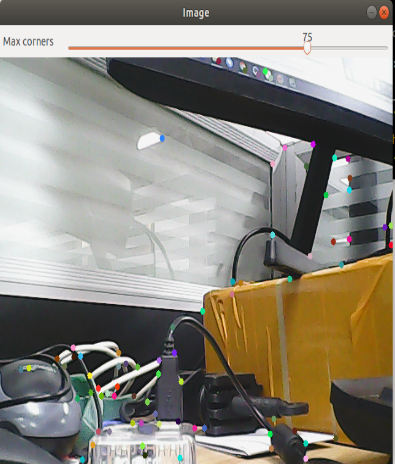
You can see an adjustable window appearing on the screen, and object feature points appearing at the same time.
General contour detection
HLS color filtering

COMPANY

  • About us
  • Team Style
  • Blog

LEARNING & EXPLORATION

  • Tutorials
  • Edge AI hardware
  • Educational robots
  • Embedded intelligent hardware

WHERE TO BUY

  • Yahboom Online Store
  • Amazon
  • Alibaba
  • AliExpress
  • Mercado

TECHNOLOGY SUPPORT

  • Email: support@yahboom.com

BE A DISTRIBUTOR

  • Email: sales@yahboom.com
QR Code

Copyright © 2017-2026 Yahboom. All Rights Reserved.

EN/中文