Welcome to STM32F103RCT6 Core board repository
3.Detect external Flash
Detect external flash
Detect external flash1.Brief introduction to external flash2.Principle of external flash3.Important code analysis for detecting external flash4.Experimental result
1.Brief introduction to external flash
The board is equipped with an 8M external flash, model W25Q64, which is controlled by SPI. This flash is 8M, that is to say, the consumption is divided into 128 blocks, each block size is 64K, and each block is divided into 16 sectors, each sector is 4K. Each time the flash is erased, it needs to take one sector as the minimum unit. A total of 2048 sectors on board can be obtained from 128 blocks.
2.Principle of external flash
According to the hardware data manual and schematic diagram of external flash
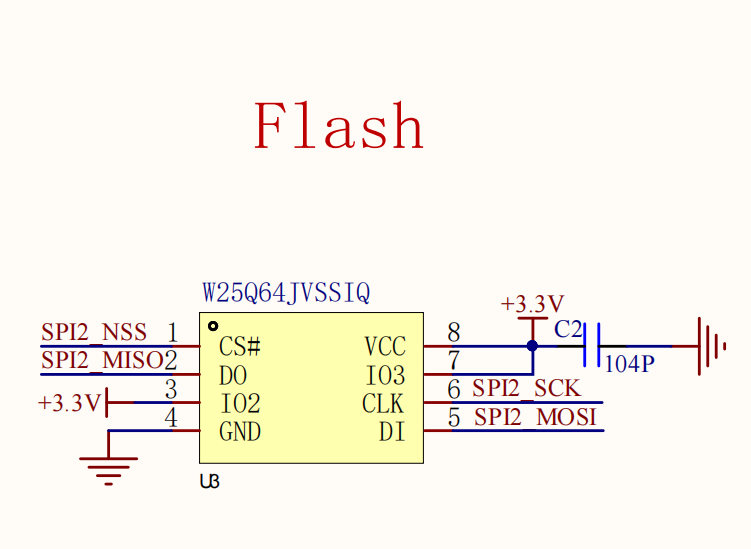
The following results can be obtained:
- The SPI communication mode is used for control. In this experiment, the SPI mode of hardware is used for control.
- Each time W25Q64 is erased, it needs to take 1 sector as the unit, and the erasing time of each sector needs at least 150ms
- The maximum number of bytes per sector is 4096
- The ID number of w25Q64 is 0XEF16
- W25Q64 is an independent device. It will work automatically when powered on, so it does not need to be configured
3.Important code analysis for detecting external flash
xvoid show_flash(void){ char flash_buf[]="This is test"; u8 flash_flag = 0; //flash Test flash_flag = detcet_flash(); if(flash_flag == 0) { //find flash sprintf(flash_buf,"W25Q64 normal!"); LCD_ShowString(10,15,(u8*)flash_buf,BLACK,WHITE,16,0); //Read and write normally flash_test(); } else { sprintf(flash_buf,"W25Q64 fail....!"); LCD_ShowString(10,15,(u8*)flash_buf,BLACK,WHITE,16,0); }
}- detcet_flash():This function reads the ID number of the external flash to determine whether the external flash is online.
- flash_test():This function is used to read and write external flash, provided that the external flash is online.
If you want to understand the read and write operation of flash, please study this experimental project by yourself
4.Experimental result
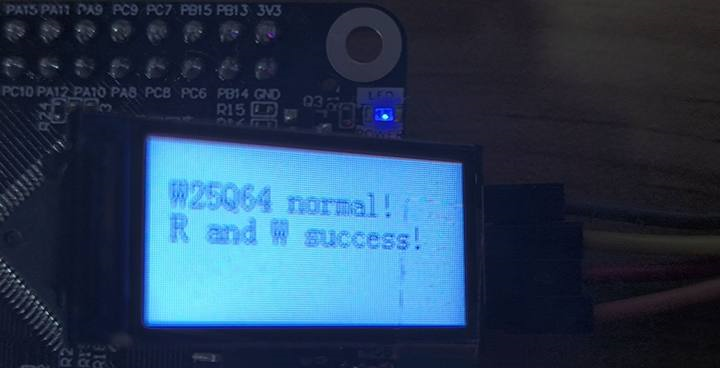
When the external flash is detected to be online and the read/write operation is successful, the on-board LED will flash continuously and display the following effects