Welcome to TinyF Laser Ranging Module repository
RDK
TinyF and RDK serial communication
TinyF and RDK serial communication0. Introduction to TinyF1. Experimental Preparation2. Experimental wiring3. Main code explanation4. Experimental Phenomena5.Some important parameters of TinyF
Note: This course takes RDK X3 as an example, and RDK X5 development board is also applicable.
0. Introduction to TinyF
- The TinyF laser ranging module is based on a D-TOF single-point laser sensor, an onboard MCU, and a housing. It features built-in sunlight rejection and anti-cover contamination algorithms, enabling accurate and rapid distance measurement. Even in extremely bright ambient light (100-190K Lux), it can accurately measure even the smallest objects, unaffected by variations in reflectivity, achieving precise ranging of 2m to 4m.
1. Experimental Preparation
- TinyF Laser Distance Measurement Module
- RDK Series This tutorial uses the RDK X3.
2. Experimental wiring
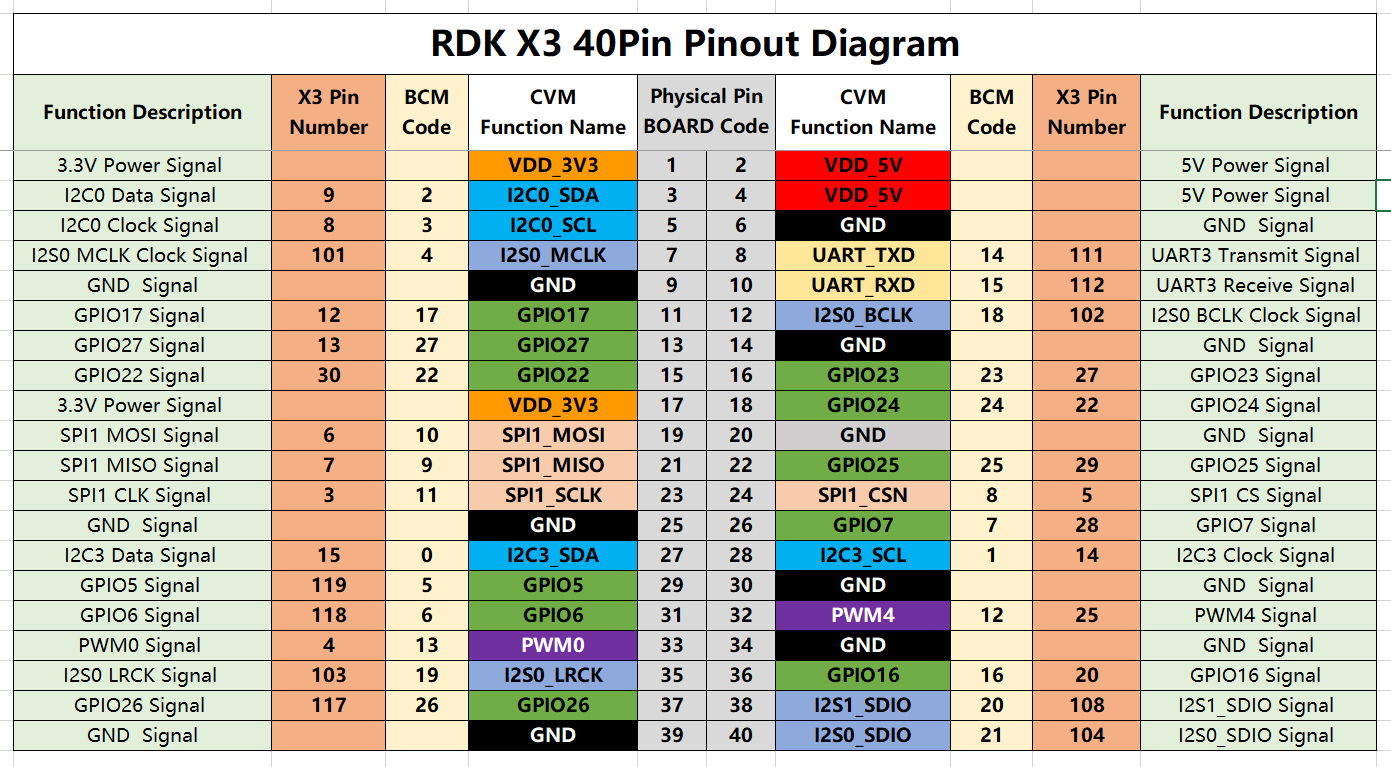
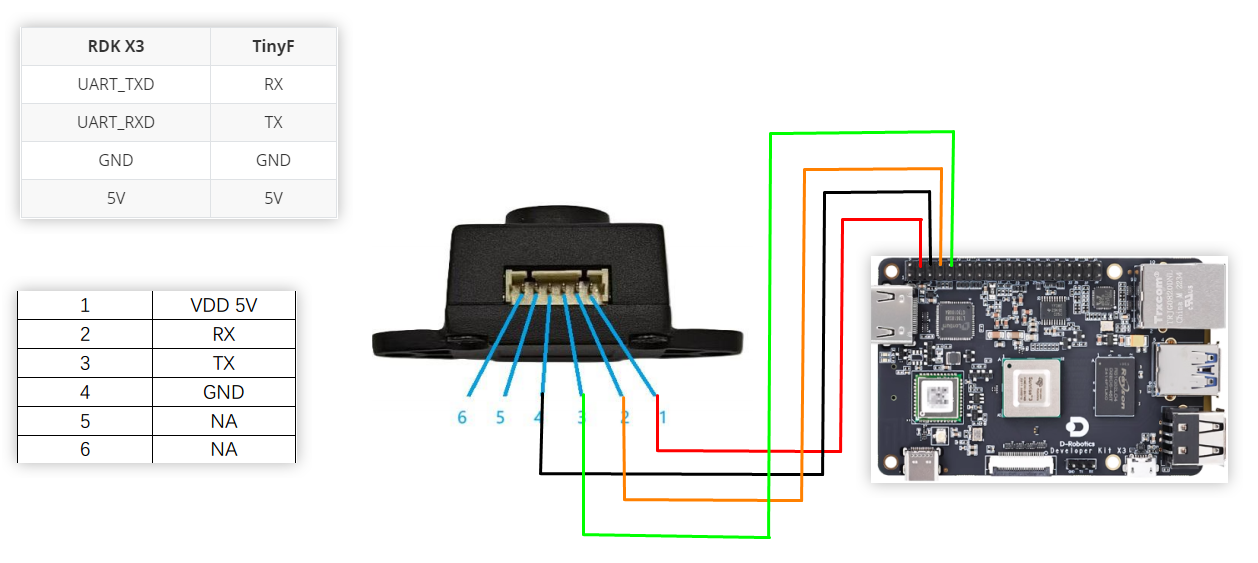
| RDK X3 | TinyF |
|---|---|
| UART_TXD | RX |
| UART_RXD | TX |
| GND | GND |
| 5V | 5V |
Wiring diagram
3. Main code explanation
xdef parse_data_format(self, data_bytes): try: # 查找逗号分隔符的位置 (0x2C) Find the position of the comma separator (0x2C) comma_index = -1 for i, b in enumerate(data_bytes): if b == 0x2C: comma_index = i break if comma_index == -1: return None, None # 提取距离部分 (逗号前的数据) Extract the distance part (the data before the comma) # 跳过开头的空格(0x20) Skip the initial space (0x20) start_index = 0 while start_index < comma_index and data_bytes[start_index] == 0x20: start_index += 1 # 距离数据长度 (2-5字节) Distance data length (2-5 bytes) : distance_bytes = data_bytes[start_index:comma_index] # 提取置信度部分 (逗号后的数据) Extract the confidence part (the data after the comma) # 跳过逗号后的空格(0x20) The space after the comma (0x20) confidence_start = comma_index + 1 while confidence_start < len(data_bytes) and data_bytes[confidence_start] == 0x20: confidence_start += 1 # 置信度数据应为1-2字节:原始数据 The confidence data should be 1-2 bytes: raw data confidence_bytes = data_bytes[confidence_start:len(data_bytes)-1] # 转换距离数据 Convert distance data distance_str = distance_bytes.decode('ascii') distance = int(distance_str) if distance >4000: return 0,0 # 转换置信度数据 Convert the confidence level data confidence_str = confidence_bytes.decode('ascii') confidence = int(confidence_str) return distance, confidence except Exception as e: print(f"parse_error: {e}") return None, None .... if __name__ == "__main__": # 根据设备实际串口号进行替换 Replace according to the actual serial port number of the device SERIAL_PORT = "/dev/ttyS3" BAUD_RATE = 115200 parser = DistanceDataParser(serial_port=SERIAL_PORT, baud_rate=BAUD_RATE) parser.start_processing()
The above program is used to parse data from the TinyF laser ranging module. Only when the protocol is met can the data be correctly parsed.
4. Experimental Phenomena
- With the power off, connect the cables according to the wiring diagram.
- If the serial port driver library is not installed in Python 3, run the following command to install it.
xxxxxxxxxxpip3 install pyserial
- You need to upload the uart_test.py program to RDK X3 in advance, and then enter the following command in the terminal
xxxxxxxxxxpython3 uart_test.py
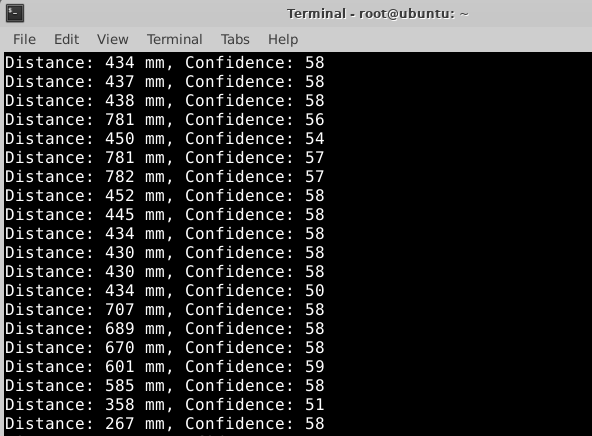
- After running the command, the terminal will print the ranging information
5.Some important parameters of TinyF
Related parameter description
| name | value |
|---|---|
| Baud rate | 115200 |
| Effective minimum distance (theoretical value) | 20,unit:mm |
| Effective maximum distance (theoretical value) | 4000,unit:mm |
| Confidence | 0~62,The larger the value, the higher the distance reliability. |
Data format
Data frame structure: 
Example: 
| Field | Number of bytes | Example(Hex) | ASCII characters |
|---|---|---|---|
| Frame header (fixed value) | 1 | 20 | space |
| Distance value(distance) | 1~5 | 33 32 37 | 327 |
| Delimiter (fixed value) | 2 | 2C 20 | ,space |
| Confidence(confidence) | 1~2 | 36 31 | 61 |
| Frame tail (fixed value) | 1 | 0A | \n |