Welcome to GPS Module repository
Parses location information
GPS module parses location information
1. Learning Objectives
In this course, we mainly learn to use Raspberry Pi and GPS module to read and parse location information.
2. Preparation before class
The GPS module adopts UART communication or USB communication. Here we take USB communication as an example.
Use the type-c cable to connect the Raspberry Pi and the GPS module, run the command ls /dev | grep 'ttyUSB' , you can see that the voice module is recognized as USB0

3. Code
For the program of this course, please refer to: GPS.py
Initialize USB:

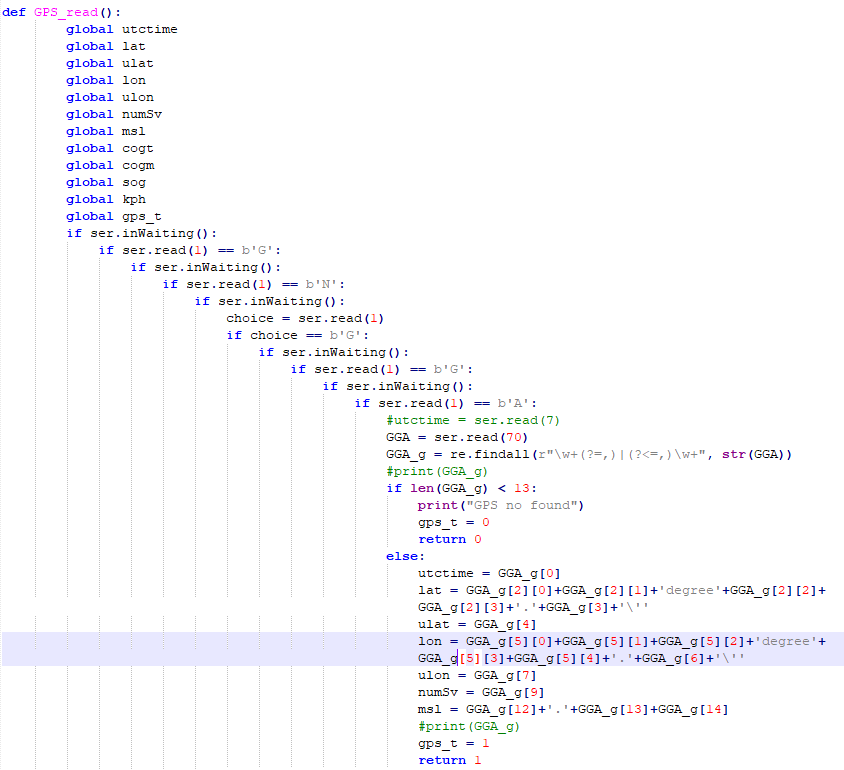
Location information acquisition and parsing function. In the following figure, the location information at the beginning of GNGGA is filtered out in the location information, and then the data is parsed and stored in each global variable.
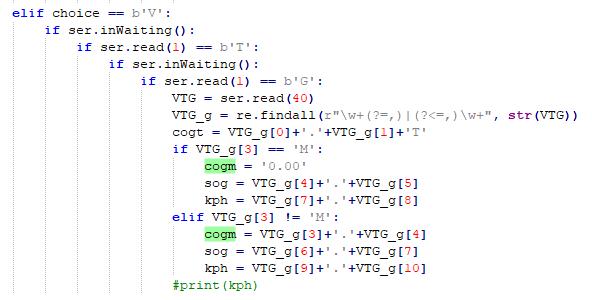
In the same way, the heading information of GNVTG is obtained and parsed.
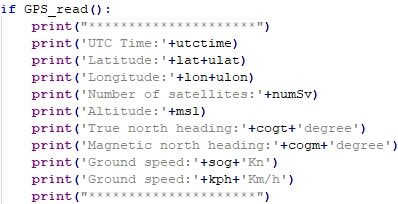
The parsed data is printed in a loop
4.Run code
Enter sudo python3 GPS.py in the terminal to run the program.
5. Experimental phenomenon
After the module is powered on, it takes about 32s to start, and then the serial port print status light on the module will continue to flash, and data can be received normally at this time.
After the program runs, it starts to initialize the USB. If the initialization is successful, it will display "GPS Serial Opened! Baudrate=9600", otherwise it will display "GPS Serial Open Failed!". If there is an error, you need to check the wiring or USB port, and then print the position and heading information cyclically.
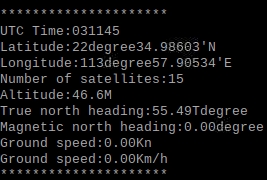
Press Ctrl+C to exit information reading.
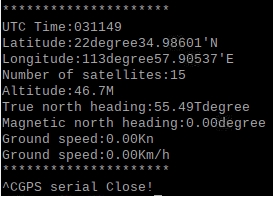
Note that the module antenna needs to be outdoors, otherwise the GPS signal may not be searched, and "GPS no found" will be printed when no signal is found.