yahboom
HomeTutorialsProduct
Solution
Blog
Online Store
About Us
EN/中文
Store
4G Remote Communication Module📖
1. 4G Module Guide
  • 1. 4G Module Introduction
  • 2.Installation Steps
  • 3.USB Device Connection
  • 4.Indicator Light Status
  • 5.Common AT Commands
2.Win System Tutorial
  • Win System Tutorial
3.Linux System Tutorial
  • Linux System Tutorial
4.Network Image Transmission Tutorial
  • Network Image Transmission Tutorial
Download
  • Chip_DataSheet
  • AT Command Manual
  • Tools
Download ZIP

Welcome to 4G Remote Communication Module repository

4.Indicator Light Status

Indicator Light Status Interpretation

Indicator Light Status Interpretation

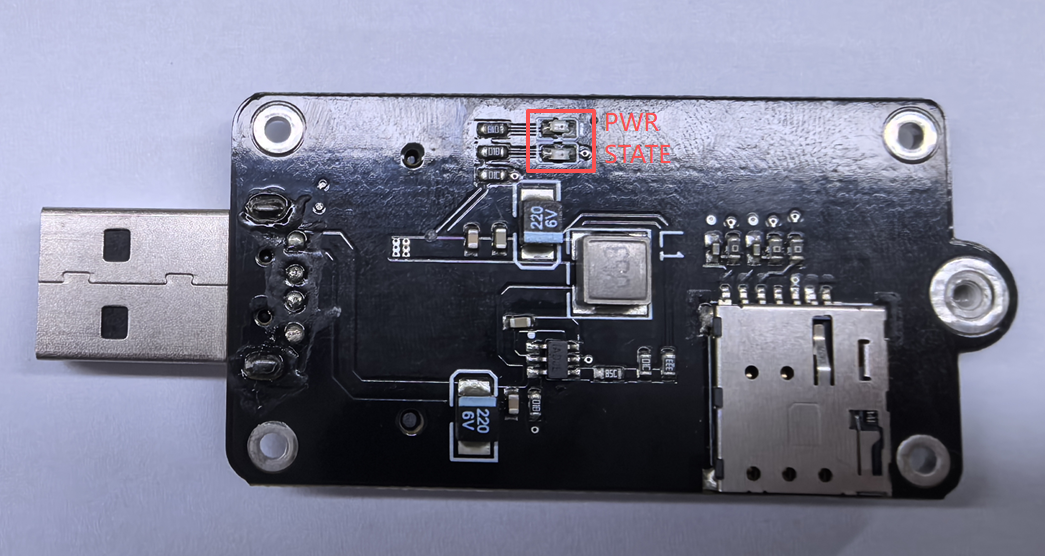
The USB expansion board has two indicator lights. The one closer to the outside is the PWR indicator light, and the one closer to the inside is the STATE indicator light.

PWR Indicator Light: Lights up when powered, indicating power status.

STATE Indicator Light:

STATE Indicator StatusFunction
OffDetecting module
Steady OnConnecting signal
BlinkingSignal connection successful

image-20260601121600390


USB Device Connection
Common AT Commands

COMPANY

  • About us
  • Team Style
  • Blog

LEARNING & EXPLORATION

  • Tutorials
  • Edge AI hardware
  • Educational robots
  • Embedded intelligent hardware

WHERE TO BUY

  • Yahboom Online Store
  • Amazon
  • Alibaba
  • AliExpress
  • Mercado

TECHNOLOGY SUPPORT

  • Email: support@yahboom.com

BE A DISTRIBUTOR

  • Email: sales@yahboom.com
QR Code

Copyright © 2017-2026 Yahboom. All Rights Reserved.

EN/中文