Welcome to Voice interaction module repository
2、Voice control of car movement
2、Voice control of car movement
Take our company's product Rosmaster-X3 as an example to illustrate how to call Speech in the program_ The Lib library performs speech recognition to control the motion of the car/robot. This course needs to be combined with the hardware of the Rosmaster-X3 car, and only code analysis will be done here. Firstly, let's take a look at the built-in voice commands,
| functional word | Speech recognition results | Voice broadcast content |
|---|---|---|
| Stop | 2 | OK , I'm stop |
| Go ahead | 4 | OK , let's go. |
| Back | 5 | OK , I‘m back. |
| Turn left | 6 | OK , I‘m turning left. |
| Turn right | 7 | OK , I‘m turning right. |
| Close light | 10 | OK, light is closed. |
| Red light up | 11 | OK, red light is on |
| Green light up | 12 | OK, green light is on. |
| Blue light up | 13 | OK, blue light is on. |
| Yellow light up | 14 | OK, yellow light is on. |
| light A | 15 | OK, light A is on. |
| lightB | 16 | OK, light B is on. |
| light C | 17 | OK, light C is on. |
| display power | 18 | OK, battery value has been display . |
1、Start program
Terminal input,
roslaunch yahboomcar_voice_ctrl voice_ctrl_yahboomcar.launch
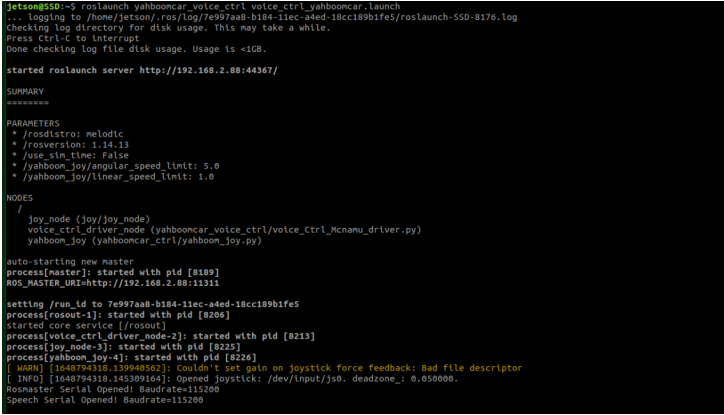
2、Core code
code path:~/driver_ws/src/yahboomcar_voice_ctrl/scripts/voice_Ctrl_Mcnamu_driver.py
xxxxxxxxxx#Import a library for speech recognitionfrom Speech_Lib import Speechfrom Rosmaster_Lib import Rosmaster#Creating objects and driving control objects for speech recognitionspe = Speech()car = Rosmaster()#Reading the content of speech recognitionspeech_r = spe.speech_read()#Send voice broadcast contentspe.void_write(speech_r)