yahboom
HomeLearn
Solution
Blog
Online Store
About Us
EN/中文
DOFBOT SE📖
1.First Trial
  • 1.First Trial
  • 2.Analysis of common problems
  • 3.Calibration offset
  • 4.Precautions for DIY Robotic Arm
  • 5.Robotic arm gripping anomaly solutions
2.Assembly Course
  • 1.Installation video
  • 2.Calibrate the Robotic Arm
  • 3.Install the map
3.Remote Control Course
  • 1.Mobile APP control
  • 2.USB handle control
  • 3.PC software control
4.Preparation
  • 1.Manage APP control service
  • 2.Manage JupyterLab service
  • 3.Write STM32 firmware
  • 4.Introduction to expansion board
5.Basic Control Course
  • 1.Control RGB light
  • 2.Control buzzer
  • 3.Control single servo
  • 4.Read servo angle
  • 5.Control all servo
  • 6.DOFBOT up down left right
  • 7.DOFBOT dancing
  • 8.DOFBOT memory action
  • 9.DOFBOT grab block
  • 10.Porter
  • 11.Stack block
  • 12.USB camera display
  • 13.Synchronous action
6.AI Vision Basic Course
  • 1.Gesture Recognition
  • 2.Color threshold adjustment Color calibration
  • 3.Color recognition
  • 4.Face recognition
  • 5.Garbage recognition
  • 6.Yolo object recognition
  • 7.Real-time web view
7.2D Visual Tracking Course
  • 1.PID algorithm basics
  • 2.Color block positioning
  • 3.Color block tracking
  • 4.Face positioning
  • 5.Face tracking
  • 6.Gesture recognition fixed action
8.2D Visual Grasping Course
  • 0.Visual positioning
  • 1.Gesture recognition stack blocks
  • 2.Color recognition grab blocks
  • 3.Catch game
  • 4.Color sorting and stacking
  • 5.Garbage sorting
  • 6.Color interaction
9.2D Mediapipe Course
  • 1.Hand detection
  • 2.Posture detection
  • 3.Overall inspection
  • 4.Face detection
  • 5.Face recognition
  • 6.Face effects
  • 7.3D object recognition
  • 8.Paintbrush
  • 9.Finger control
  • 10.Gesture recognition
  • 11.Gesture control robotic arm action group
  • 12.Arm posture control robotic arm
  • 13.Palm Targeting
  • 14.Robotic arm tracks the palm
  • 15.Fingertip trajectory recognition
  • 16.Fingertip trajectory control robotic arm
  • 17.Gesture Grasp and Release Objects
  • 18.Finger Control Robot Arm
10.AI Large Model Voice Module (Must Read)
  • 1. Introduction to AI Large Model Voice Module
  • 2. Flash the firmware (Must read)
  • 3. Modify the wake-up word and command word
11.2D Voice Control Course
  • 1.Simple Voice Control
  • 2.Smart Voice Control
  • 3.Voice Action Control
  • 4.Memory Learning Mode
  • 5.Color Recognition with Voice Broadcast
  • 6.Color Recognition and Grasping with Voice Broadcast
  • 7.Color Recognition and Sorting with Voice Broadcast
  • 8.Voice Recognition Target Tracking
  • 9.Voice Control Stacking
  • 10.Voice Control Color Sorting
  • 11.Garbage Recognition with Voice Broadcast
  • 12.Garbage Sorting with Voice Broadcast
12.Robotic Arm Control and Inverse Kinematics
  • 1. Robotic arm ROS control
  • 2. Inverse solution
13.3D Sorting and Grasping Course
  • 1.AprilTag ID sorting
  • 2.MediaPipe Gesture-AprilTag ID sorting
  • 3.MediaPipe Gesture-AprilTag distance sorting
  • 4.Block color sorting
  • 5.Block different shape sorting
  • 6.Yolov11 garbage sorting
14.3D Tracking Course
  • 1.AprilTag Tracking
  • 2.Color Block Tracking
  • 3.KCF Object Tracking
15.3D Voice Control for Sorting & Tracking Course
  • 1.Voice Control AprilTag ID Sorting
  • 2.Voice Control Color Block Sorting
  • 3.Voice Control Yolov11 Garbage Recognition Sorting
  • 4.Voice Control AprilTag Tracking
  • 5.Voice Control Color Block Tracking
  • 6.Voice Control Object Tracking
16.AI Model Basics
  • 1.AI large model types and principles
  • 2.RAG retrieval enhancement and model training samples
  • 3.Embodied intelligent robot system architecture
  • 4.Embodied intelligent functions core source code
17.AI Model Development
  • 1. Register a model service provider account
  • 2. Configure API-KEY
  • 3. Introduction to Dify
  • 4. Basic Dify Features
  • 5. AI Large Model Development - chatbot
  • 6. Deploy the RAG knowledge base
  • 7. RAG knowledge base + chatbot
  • 8. AI agent workflow
18.AI Model – Text Version
  • 1.Semantic understand instruction following
  • 2.Multimodal visual understand
  • 3.Text Large Model + robotic arm control
  • 4.Multimodal Large Model+video understanding
  • 5.Multimodal Large Model+robotic arm gripping
  • 6.Multimodal Large Model+robotic arm tracking
  • 7.Multimodal Large Model+robotic arm sorting
  • 8.Multimodal Large Model+robotic arm handling
  • 9.Multimodal Large Model+Color Blocks Back In Place
  • 10.Multimodal Large Model + Intent Prediction + Robotic Arm Gripping
  • 11.Text Large Model + YOLOv11 + Intelligent Garbage Classification
19.AI Model – Voice Version
  • 1.Semantic understand instruction following
  • 2.Multimodal visual understand
  • 3.Text Large Model + robotic arm control
  • 4.Multimodal Large Model+video understanding
  • 5.Multimodal Large Model+robotic arm gripping
  • 6.Multimodal Large Model+robotic arm tracking
  • 7.Multimodal Large Model+robotic arm sorting
  • 8.Multimodal Large Model+robotic arm handling
  • 9.Multimodal Large Model+Color Blocks Back In Place
  • 10.Multimodal Large Model + Intent Prediction + Robotic Arm Gripping
  • 11.Text Large Model + YOLOv11 + Intelligent Garbage Classification
20.AI Model – Fun Applications
  • 1.AI Butler-Intent Inference
  • 2.AI Encyclopedia-Arithmetic Master
  • 3.AI Encyclopedia-You asked I Pointed
  • 4.AI Encyclopedia-Nutritional Analysis
  • 5.AI Encyclopedia-Problem Solving Expert
  • 6.AI Encyclopedia-English Spelling
  • 7.AI Butler-Garbage Sorting
  • 8.AI Top Chef
21.MoveIt2 Course
  • 1. MoveIt Configuration
  • 2. MoveIt Usage
  • 3. MoveIt Drive Real Robot
  • 4. MoveIt Random Movement
  • 5. MoveIt Forward Kinematics Design
  • 6. MoveIt Inverse Kinematics Design
  • 7. MoveIt Cartesian Path
  • 8. MoveIt Scene Design
  • 9. MoveIt Trajectory Planning
  • 10. MoveIt Collision Detection
22.YOLOv11 Development Course
  • 1. YOLO Environment Setup
  • 2. CLI Usage
  • 3. Object Detection
  • 4. Instance Segmentation
  • 5. Pose Estimation
  • 6. Image Classification
  • 7. Oriented Bounding Boxes Object Detection
  • 8. Model Conversion
  • 9. Model Prediction
23. Linux Operating System
  • 1.Introduction to Linux system
  • 2.Ubuntu file system
  • 3.Ubuntu common commands
  • 4.Ubuntu common editors
  • 5.Ubuntu software operation commands
  • 6.Virtual machine installation
  • 7.SSH remote control
  • 8.VNC remote control
  • 9.Transfer files remotely
  • 10.Driver library and communication
  • 11.Static IP and hotspot mode
  • 12.Bind device ID
  • 13.Capacity expansion and resource allocation
  • 14.Update system software sources
  • 15.Set root user password
  • 16.sudo free password
  • 17.Connect to WiFi network
  • 18.View system version
  • 19.Customized service management
  • 20.Back up system image
24.OpenCV Course
  • 1.Introduction to Open Source CV
  • 2.Image reading and display
  • 3.Picture writing
  • 4.Image Quality
  • 5.Pixel operations
  • 6.Image zoom
  • 7.Picture cut
  • 8.Picture pan
  • 9.Picture mirroring
  • 10.Affine transformation
  • 11.Picture rotation
  • 12.perspective transformation
  • 13.Grayscale processing
  • 14.Binary image
  • 15.Edge green detection
  • 16.Line segment drawing
  • 17.Rectangular circle drawing
  • 18.Text and picture drawing
25.Advanced Visuals Course
  • 1. QR Code
  • 2. Human Pose Estimation
  • 3. Object Detection
  • 4. AR Vision
  • 5. ROS + OpenCV Basics
26.ROS2 Basic Course
  • 1.Introduction to ROS2
  • 2.ROS2 install Humble
  • 3.ROS2 development environment
  • 4.ROS2 workspace
  • 5.ROS2 function package
  • 6.ROS2 node
  • 7.ROS2 topic communication
  • 8.ROS2 service communication
  • 9.ROS2 action communication
  • 10.ROS2 custom interface message
  • 11.ROS2 parameter service case
  • 12.ROS2 meta-function package
  • 13.ROS2 distributed communication
  • 14.ROS2 DDS
  • 15.ROS2 time related API
  • 16.ROS2 common command tools
  • 17.ROS2 rviz2 use
  • 18.ROS2 rqt toolbox
  • 19.ROS2 Launch startup file configuration
  • 20.ROS2 recording and playback tool
  • 21.ROS2 URDF model
  • 22.ROS2 Gazebo simulation platform
  • 23.ROS2 TF2 coordinate transformation
27.Jupyter Lab Usage Course
  • 0.Read the document before operation
  • 1.Jupyter Lab environment construction
  • 2.Basic use of Jupyter Widgets
  • 3.Launch JupyterLab
  • 4.How to Use JupyterLab
Download
  • APP(iOS/Android)
  • VM File
  • Instruction manual
  • Hardware_3DModelFile
  • PC_Software
  • Code
  • Communication Protocol-Python Library
  • Tools
Download ZIP

Welcome to DOFBOT SE repository

5.Garbage recognition

6.yolo garbage identification

Test according to the trained model, and the trained object name can be recognized.

1. Main code

Code path:/home/yahboom/Dofbot/6.AI_Visuall/7.Garbage identification.ipynb

The following code content needs to be executed according to the actual step. It cannot be run all at once. Running the last unit will directly exit the thread. The specific code can be viewed in the code path.

Import various libraries and model files

​x
#!/usr/bin/env python3
# coding: utf-8
import time
import torch
import rospy
import Arm_Lib
import cv2 as cv
import numpy as np
from time import sleep
from numpy import random

from utils.torch_utils import select_device

from models.experimental import attempt_load

from utils.general import non_max_suppression, scale_coords, xyxy2xywh, plot_one_box

model_path = '/home/yahboom/Dofbot/6.AI_Visual/model0.pt'
# Initialize
device = select_device()
# Load model
model = attempt_load(model_path, map_location=device)

Junk identification function

xxxxxxxxxx
def single_garbage_run(self, image):
        '''
        Execute the garbage identification function
        Execute garbage recognition function
        :param image: original image The original image
        :return: Recognized image, recognition information(name, pos) Recognized image, identification information (name, pos)
        '''
        while 1:
            self.frame = cv.resize(image, (640, 480))
            try: self.garbage_getName()
            except Exception: print("sqaure_pos empty")
            return self.frame

List of junk names:

xxxxxxxxxx
 def garbage_getName(self):
        name = "None"
        if self.status == 'waiting':
            self.frame, msg = self.garbage_identify.garbage_run(self.frame)
            for key, pos in msg.items(): name = key
            if name == "Zip_top_can":              (self.garbage_num, self.garbage_class) = ('00', '01')
            if name == "Old_school_bag":           (self.garbage_num, self.garbage_class) = ('01', '01')
            if name == "Newspaper":                (self.garbage_num, self.garbage_class) = ('02', '01')
            if name == "Book":                     (self.garbage_num, self.garbage_class) = ('03', '01')
            if name == "Toilet_paper":             (self.garbage_num, self.garbage_class) = ('04', '02')
            if name == "Peach_pit":                (self.garbage_num, self.garbage_class) = ('05', '02')
            if name == "Cigarette_butts":          (self.garbage_num, self.garbage_class) = ('06', '02')
            if name == "Disposable_chopsticks":    (self.garbage_num, self.garbage_class) = ('07', '02')
            if name == "Egg_shell":                (self.garbage_num, self.garbage_class) = ('08', '03')
            if name == "Apple_core":               (self.garbage_num, self.garbage_class) = ('09', '03')
            if name == "Watermelon_rind":          (self.garbage_num, self.garbage_class) = ('10', '03')
            if name == "Fish_bone":                (self.garbage_num, self.garbage_class) = ('11', '03')
            if name == "Expired_tablets":          (self.garbage_num, self.garbage_class) = ('12', '04')
            if name == "Expired_cosmetics":        (self.garbage_num, self.garbage_class) = ('13', '04')
            if name == "Used_batteries":           (self.garbage_num, self.garbage_class) = ('14', '04')
            if name == "Syringe":                  (self.garbage_num, self.garbage_class) = ('15', '04')
            if name == "None":                     (self.garbage_num, self.garbage_class) = ('None', 'None')

Main thread:

xxxxxxxxxx
def camera():
    # 打开摄像头 Open camera
    capture = cv.VideoCapture(0)
    # 当摄像头正常打开的情况下循环执行
    while capture.isOpened():
        try:
            _, img = capture.read()
            img = cv.resize(img, (640, 480))
            img = single_garbage.single_garbage_run(img)
            if model == 'Exit':
                cv.destroyAllWindows()
                capture.release()
                break
            imgbox.value = cv.imencode('.jpg', img)[1].tobytes()
        except KeyboardInterrupt:capture.release()

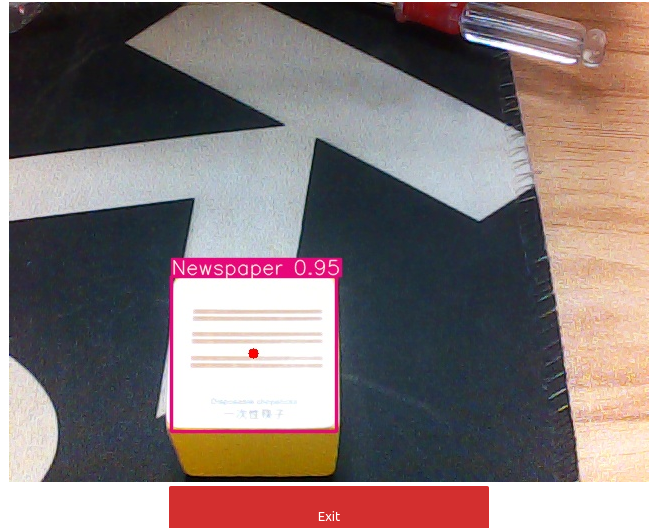
After the program block is run, you can see the following interface to identify the corresponding garbage.


Face recognition
Yolo object recognition

COMPANY

  • About us
  • Team Style
  • Blog

LEARNING & EXPLORATION

  • Tutorials
  • Edge AI hardware
  • Educational robots
  • Embedded intelligent hardware

WHERE TO BUY

  • Yahboom Online Store
  • Amazon
  • Alibaba
  • AliExpress
  • Mercado

TECHNOLOGY SUPPORT

  • Email: support@yahboom.com

BE A DISTRIBUTOR

  • Email: sales@yahboom.com
QR Code

Copyright © 2017-2026 Yahboom. All Rights Reserved.

EN/中文