Welcome to World of Module Sensor Kit repository
7.9 Smart wiper
1. Learning target
In this course, we will earn how to use Micro:bit, Temperature humidity module and digital tube module to read the current ambient temperature and humidity.
2. Preparation
Connect the module to Micro:bit board by expansion board, as shown below.
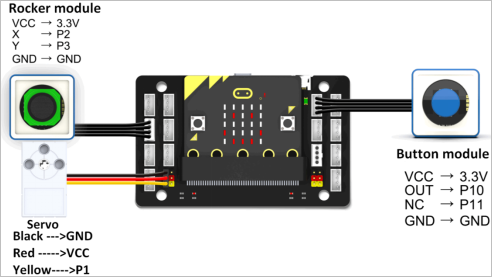
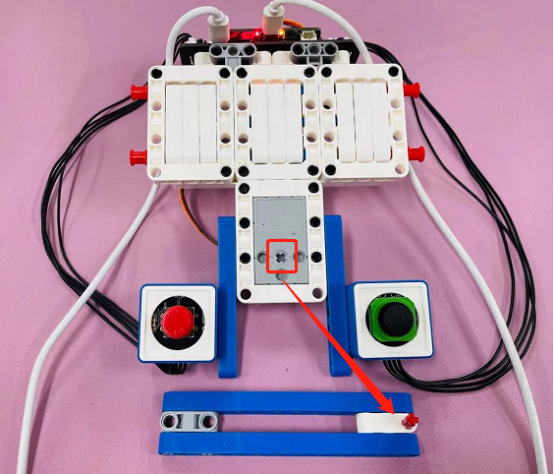
Note: Please make sure that the servo is installed correctly, as shown below.
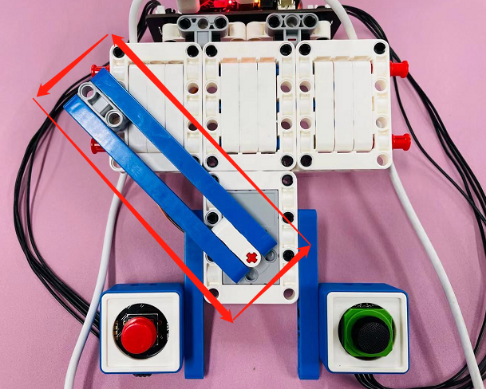
Please make sure that the wiper shaft is installed correctly, as shown below.
3. About code
# -*- coding: utf-8-*-# Encoding cookie added by Mu Editor
from microbit import *
import WOM_Sensor_Kit

display.off()
x = 230

while True:
    WOM_Sensor_Kit.WOM_servo360(pin1, x)
    if WOM_Sensor_Kit.WOM_rocker(pin2, pin3, WOM_Sensor_Kit.WOM_up):
        x = x - 4
    if WOM_Sensor_Kit.WOM_rocker(pin2, pin3, WOM_Sensor_Kit.WOM_down):
        x = x + 4
    if WOM_Sensor_Kit.WOM_rocker(pin2, pin3, WOM_Sensor_Kit.WOM_left):
        x = x - 4
    if WOM_Sensor_Kit.WOM_rocker(pin2, pin3, WOM_Sensor_Kit.WOM_right):
        x = x + 4
    if x < 130:
        x = 130
    if x > 230:
        x = 230
    if WOM_Sensor_Kit.WOM_button(pin0) == 1:
        sleep(500)
        if WOM_Sensor_Kit.WOM_button(pin0) == 1:
            WOM_Sensor_Kit.WOM_servo360(pin1, 130)
            sleep(500)
            WOM_Sensor_Kit.WOM_servo360(pin1, 230)
            sleep(500)
            WOM_Sensor_Kit.WOM_servo360(pin1, 130)
            sleep(500)
            WOM_Sensor_Kit.WOM_servo360(pin1, 230)
            sleep(500)
        else:
            WOM_Sensor_Kit.WOM_servo360(pin1, 130)
            sleep(300)
            WOM_Sensor_Kit.WOM_servo360(pin1, 230)
            sleep(300)
            WOM_Sensor_Kit.WOM_servo360(pin1, 130)
            sleep(300)
            WOM_Sensor_Kit.WOM_servo360(pin1, 230)
            sleep(300)
4.Writing and download code
4.1 You should open the Mu software, and enter the code in the edit window, , as shown below.
Note! All English and symbols should be entered in English, use the Tab key (tab key) to indent and the last line must be a space.
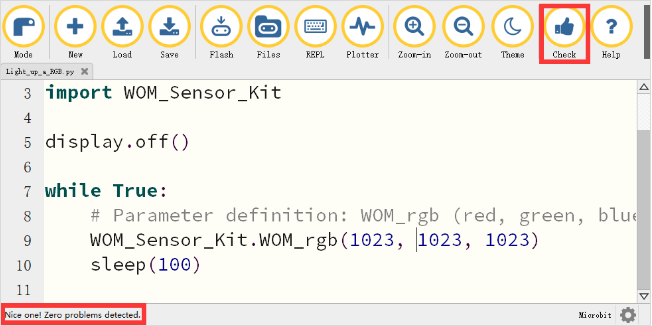
4.2 You can click the “Check” button to check if our code has an error.
If a cursor or underline appears on a line, it indicates a syntax error, please check and modify. If there is no error in the program, the bottom left of the interface will prompt that there is no problem in detection.
4.3 Click the ‘REPL’ button to check whether the WOM_Sensor_Kit Python library has been downloaded.
If not, please refer to [Preparation before class] --> [Python Programming Guide] .
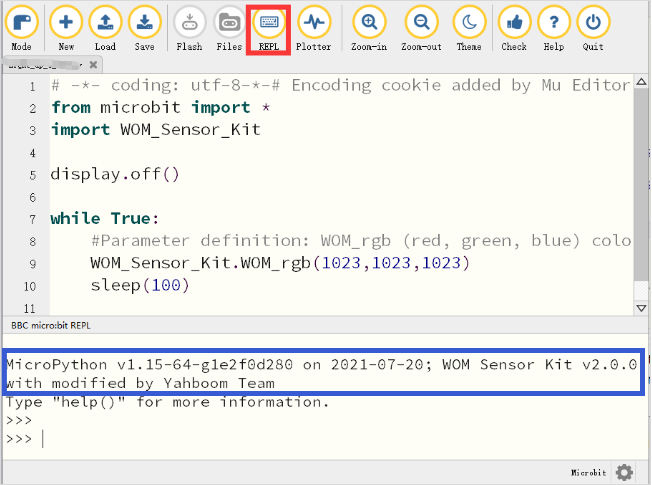
4.4 After the program is written, use a micro USB cable to connect the computer and the micro:bit board. Please click the ‘Flash’ button to download the program to the micro:bit motherboard (You need to click the ‘REPL’ button again to close the function of importing library files before you download the program).
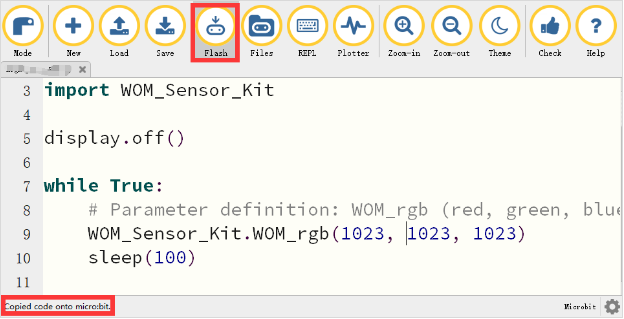
4.5 If the download failed, please confirm whether the micro:bit is connected to the computer through the micro USB data cable, and confirm whether the WOM_Sensor_Kit Python library has been imported.
5. Phenomenon
After the program is downloaded successfully. We can turn the joystick to control the rotation of the servo to simulate the effect of the wiper on the car.
We can also press the button to make the wiper work automatically. Long press the button and the servo wiper rotates slowly, and press it quickly. Release the button and the wiper of the servo rotates quickly.