yahboom
HomeTutorialsProduct
Solution
Blog
Online Store
About Us
EN/中文
Store
Building:bit Superkit📖
0.First Trial Video
  • First Trial Video
1.Assembly Course
  • 1.1Mobile shooter
  • 1.2Pretty car
  • 1.3Clip robot
  • 1.4Proficient carrier
  • 1.5Skip car
  • 1.6Freestyle
  • 1.7Spider
  • 1.8Lifting platform
  • 1.9Biped robot
  • 1.10Changing Face
  • 1.11Carousel
  • 1.12Oscillating fan
  • 1.13Airplane
  • 1.14Unicycle
  • 1.15Auto-door
  • 1.16Dragon knight
  • 1.17Ultrasonic handheld rangefinder
  • 1.18Small flying car obstacle avoidance
  • 1.19Changing face
  • 1.20Adjustable RGB light
  • 1.21Adjustable fan
  • 1.22Photosensitive emergency light
  • 1.23Smart alarm clock
  • 1.24Light-controlled bipedal robot
  • 1.25Swimming robot avoid objects
  • 1.26Fleeing spider
  • 1.27Temperature humidity reminder
  • 1.28Temperature-controlled fan
  • 1.29Color recognition machine
  • 1.30Color-recognizing automatic door
  • 1.31Rokcer color changing light
  • 1.32Rokcer transporter
2.Preparation before class
  • 2.1 About BBC microbit
  • 2.2 Super:bit expansion board
  • 2.3 MakeCode Graphical Programming Guide
  • 2.4 MakeCode graphical API
  • 2.5 Python Programming Guide
  • 2.6 Superbit MicroPython API
  • 2.7 Notes on charging and battery use
3.Basic modeling MakeCode course
0.Basic course
  • 1.Buzzer play music
  • 2.Control RGB color
  • 3.Control all RGB lights
  • 4.Drive 270°building block servo
  • 5.Drive 180° servo
  • 6.Drive motor
A.Mobile shooter
  • 1.Cannonball shooting
  • 2.Music fortress
  • 3.APP control
  • 4.Micro:bit handle control
  • 5.WiFi camera control
B.Pretty car
  • 1.Dancer
  • 2.APP control
  • 3.Micro:bit handle control
  • 4.WiFi camera control
C.Clip robot
  • 1.Dancing and singing
  • 2.Button control clip
  • 3.APP control
  • 4.Micro:bit handle control
  • 5.WiFi camera control
D.Proficient carrier
  • 1.Dancing
  • 2.Button control shovel
  • 3.Transportation
  • 4.APP control
  • 5.Micro:bit handle control
  • 6.WiFi camera control
E.Skip car
  • 1.Dance battle
  • 2.Button control skip car
  • 3.Powerful carrier
  • 4.APP control
  • 5.Micro:bit handle control
  • 6.WiFi camera control
F.Freestyle
  • 1.Dancing and singing
  • 2.Freestyle advance
  • 3.APP control
  • 4.Micro:bit handle control
G.Spider
  • 1.Spider advance
  • 2.The dancing spider
  • 3.APP control
  • 4.Micro:bit handle control
  • 5.WiFi camera control
H.Lifting platform
  • 1.Automatic Lift
  • 2.Button control platform
  • 3.APP control
  • 4.Micro:bit handle control
I.Biped robot
  • 1.Walking
  • 2.Dancing and singing
  • 3.APP control
  • 4.Micro:bit handle control
J.Changing Face
  • 1.Changing face
  • 2.Bite the hand crocodile
  • 3.APP control
  • 4.Micro:bit handle control
K.Carousel
  • 1.Music carousel
  • 2.APP control
  • 3.Micro:bit handle control
L.Oscillating fan
  • 1.Colorful windmill
  • 2.Summer cooling artifact
  • 3.APP control
  • 4.Micro:bit handle control
M.Airplane
  • 1.Sailing Prelude
  • 2.APP control
  • 3.Micro:bit handle control
N.Unicycle
  • 1.Clumsy reptile
  • 2.APP control
  • 3.Micro:bit handle control
O.Auto-door
  • 1.Soldiers on duty
  • 2.Music door
  • 3.APP control
  • 4.Micro:bit handle control
P.Dragon knight
  • 1.Waving wings
  • 2.APP control
  • 3.Microbit handle control
4.Basic modeling Python course
0.Basic course
  • 1.Buzzer play music
  • 2.Control RGB color
  • 3.Control all RGB lights
  • 4.Drive 270° building block servo
  • 5.Drive 180° servo
  • 6.Drive motor
  • 7.Drive stepper motor
A.Mobile shooter
  • 1.Cannonball shooting
  • 2.Music fortress
  • 3.Micro:bit handle control
B.Pretty car
  • 1.Dancer
  • 2.Micro:bit handle control
C.Clip robot
  • 1.Dancing and singing
  • 2.Button control clip
  • 3.Micro:bit handle control
D.Proficient carrier
  • 1.Dancing
  • 2.Button control shovel
  • 3.Transportation
  • 4.Micro:bit handle control
E.Skip car
  • 1.Dance battle
  • 2.Button control skip car
  • 3.Powerful carrier
  • 4.Microbit handle control
F.Freestyle
  • 1.Dancing and singing
  • 2.Freestyle advance
  • 3.Micro:bit handle control
G.Spider
  • 1.Spider advance
  • 2.The dancing spider
  • 3.Micro:bit handle control
H.Lifting platform
  • 1.Automatic Lift
  • 2.Button control platform
  • 3.Micro:bit handle control
I.Biped robot
  • 1.Walking
  • 2.Dancing and singing
  • 3.Micro:bit handle control
J.Changing Face
  • 1.Changing face
  • 2.Bite the hand crocodile
  • 3.Micro:bit handle control
K.Carousel
  • 1.Music carousel
  • 2.Micro:bit handle control
L.Oscillating fan
  • 1.Colorful windmill
  • 2.Summer cooling artifact
  • 3.Micro:bit handle control
M.Airplane
  • 1.Sailing Prelude
  • 2.Micro:bit handle control
N.Unicycle
  • 1.Clumsy reptile
  • 2.Micro:bit handle control
O.Auto-door
  • 1.Soldiers on duty
  • 2.Music door
  • 3.Microbit handle control
P.Dragon knight
  • 1.Waving wings
  • 2.Micro:bit handle control
5.Sensor Advanced MakeCode coursenew
1.Sensor principle
  • 1.1 About ultrasonic sensors
  • 1.2 Ultrasonic ranging
  • 1.3 About potentiometers
  • 1.4 Adjust potentiometer
  • 1.5 About photosensitive sensors
  • 1.6 Read the light intensity
  • 1.7 About infrared modules
  • 1.8 Obstacle detection
  • 1.9 Introduction of module
  • 1.10 Human body detection
  • 1.11 About temperature-humidity modules
  • 1.12 Read temperature humidity
  • 1.13 About color recognition sensors
  • 1.14 Color recognition
  • 1.15 About rocker module
  • 1.16 Control rocker
2.Sensor basic course
  • 2.1 Hand-held range finder
  • 2.2 Adjustable RGB light
  • 2.3 Emergency light
  • 2.4 Vibrating alarm clock
  • 2.5 Infrared detection broadcast
  • 2.6Human body infrared detection broadcast
  • 2.7 Temperature and humidity broadcaster
  • 2.8 Color recognition machine
  • 2.9 Rocker control light
3.Sensor expansion course
  • 3.1 Avoiding car
  • 3.2 Changing Face
  • 3.3 Adjustable fan
  • 3.4 Photosensitive robot
  • 3.5 Swimming robot
  • 3.6 Spiders sense human body
  • 3.7 Temperature control fan
  • 3.8 Automatic safety door
  • 3.9 Rocker carrier car
6.Sensor Advanced Python coursenew
1.Sensor principle
  • 1.1 About ultrasonic sensorsnew
  • 1.2 Ultrasonic rangingnew
  • 1.3 About potentiometersnew
  • 1.4 Adjust potentiometernew
  • 1.5 About photosensitive sensorsnew
  • 1.6 Read the light intensitynew
  • 1.7 About infrared modulesnew
  • 1.8 Obstacle detectionnew
  • 1.9 About human infrared sensing modulesnew
  • 1.10 Human body detectionnew
  • 1.11 About temperature-humidity modulesnew
  • 1.12 Read temperature humiditynew
  • 1.13 About color recognition sensorsnew
  • 1.14 Color recognitionnew
  • 1.15 About rocker modulenew
  • 1.16 Control rockernew
2.Sensor basic course
  • 2.1 Hand-held range findernew
  • 2.2 Adjustable RGB lightnew
  • 2.3 Emergency lightnew
  • 2.4 Vibrating alarm clocknew
  • 2.5 Infrared detection broadcastnew
  • 2.6 Human body infrared detection broadcastnew
  • 2.7 Temperature and humidity broadcasternew
  • 2.8 Color recognition machinenew
  • 2.9 Rocker control lightnew
3.Sensor expansion course
  • 3.1 Avoiding carnew
  • 3.2 Changing Facenew
  • 3.3 Adjustable fannew
  • 3.4 Photosensitive robotnew
  • 3.5 Swimming robotnew
  • 3.6 Spiders sense human bodynew
  • 3.7 Temperature control fannew
  • 3.8 Automatic safety doornew
  • 3.9 Rocker carriernew
Download
  • APP(iOS_Android)
  • Code_PythonLibrary
  • Hardware manual
  • Bluetooth communication protocol
  • Assembly Instructions Manual
  • Makecode offline software
Download ZIP

Welcome to Building:bit Superkit repository

2.1 About BBC microbit

About BBC microbit

About BBC microbit1. What is Micro:bit?2. Functional distribution3. Pin distribution4. New and old comparison5. Programming environment

1. What is Micro:bit?

Micro:bit is a microcomputer for programming tutorials for teenagers launched by the British BBC. In November 2020, BBC released the new micro:bitV2. Although it is small in size, it is rich in functions. The motherboard, which is only half the size of a credit card, integrates a three-in-one (accelerometer, magnetometer, gyroscope) sensor chip, two programmable buttons, 25 monochrome LED lights to form a 5*5 dot matrix screen and nRF52833 chip supporting Bluetooth 5.0. It also comes with a microUSB power supply interface, which can be powered by an external battery box. There are also multiple gold finger connectors at the bottom, which can be used to control external devices.

2. Functional distribution
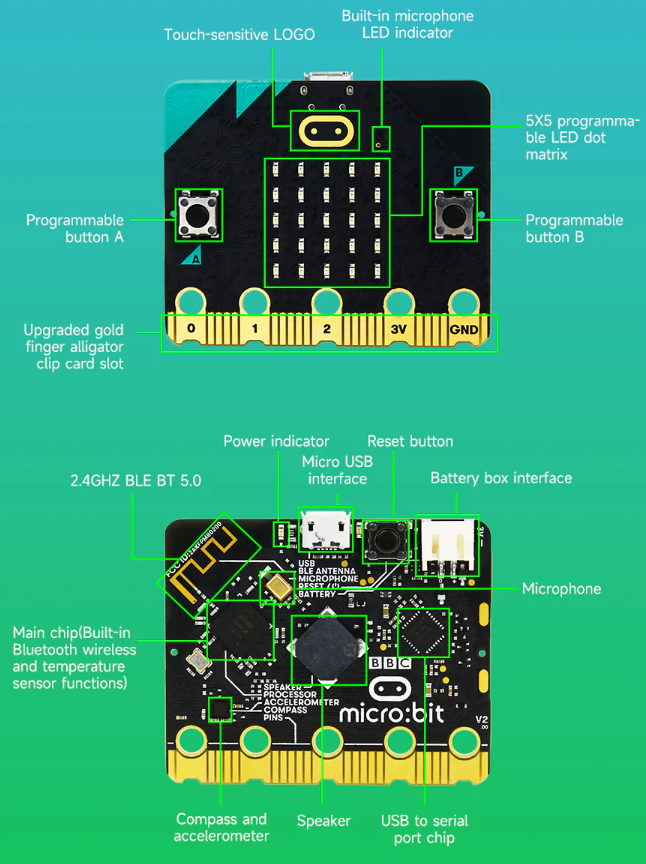
image-20250607105305533

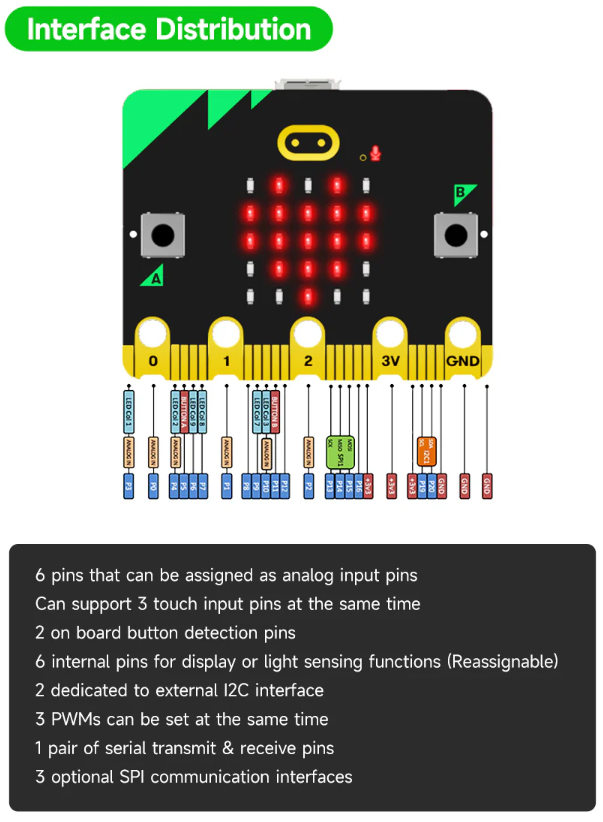
3. Pin distribution

image-20250607113334816

4. New and old comparison

Compared with the old version of micro:bitV1, V2 has added a programmable touch logo, a microphone and a buzzer, and the CPU performance has been improved by nearly four times. It also has a built-in sleep/shutdown mode and a discrete regulator, which can provide up to 200mA of current for external devices, and the newly upgraded serrated GPIO gold finger can better fix the alligator clip. The following is a comparison between micro:bitV1 and V2.
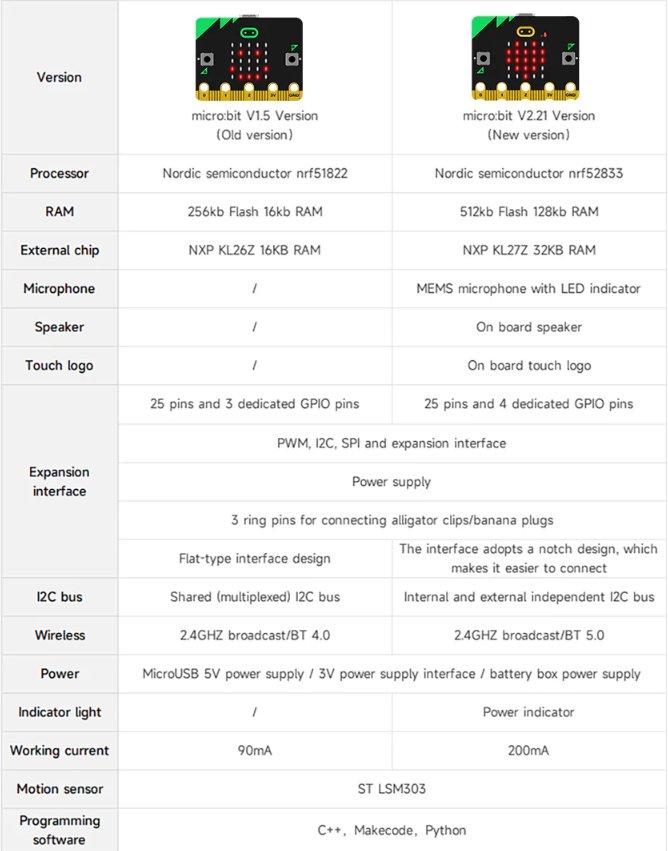
image-20250607113552769

5. Programming environment

Regarding the programming environment, BBC provides an online programming website (https://microbit.org/code/), which includes the easy-to-use graphical programmer MakeCode,
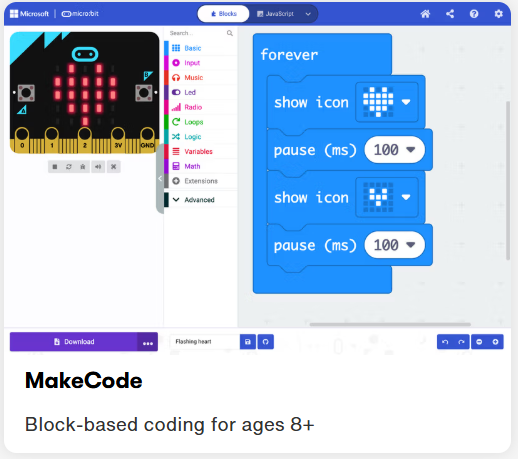
image-20250607114413487

There is also the MU editor that supports the popular language Python, which allows you to experience the learning process from easy to difficult, from shallow to deep
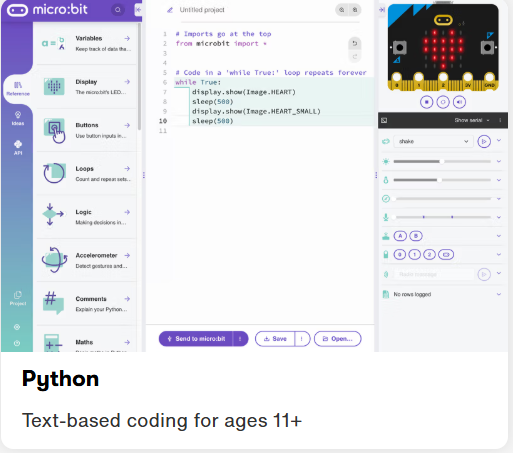
image-20250607114428288

32Rokcer transporter
Super:bit expansion board

COMPANY

  • About us
  • Team Style
  • Blog

LEARNING & EXPLORATION

  • Tutorials
  • Edge AI hardware
  • Educational robots
  • Embedded intelligent hardware

WHERE TO BUY

  • Yahboom Online Store
  • Amazon
  • Alibaba
  • AliExpress
  • Mercado

TECHNOLOGY SUPPORT

  • Email: support@yahboom.com

BE A DISTRIBUTOR

  • Email: sales@yahboom.com
QR Code

Copyright © 2017-2026 Yahboom. All Rights Reserved.

EN/中文