yahboom
HomeLearn
Solution
Blog
Online Store
About Us
EN/中文
IMX 415 Camera Module📖
1. Jetson Orin Nano‑NX Usage Course
  • 1. Camera Driver Course
  • 2.1 Advanced AI Vision-Traffic Detection—DeepStream environment
  • 2.2 Advanced AI Vision-Traffic Detection—Four types of detection(traffic)
  • 3. YOLO11 Object Detection
  • 4. YOLO26 Object Detection
  • 5. Mediapipe Environment
  • 6. Mediapipe Hand Detection
  • 7. MediaPipe Face Detection
  • 8. MediaPipe Face Effects
  • 9. MediaPipe 3D Object Recognition
  • 10. MediaPipe Virtual Brush
  • 11. MediaPipe Gesture Recognition
  • 12. MediaPipe Finger Control
  • 13. MediaPipe Posture Estimation
  • 14. MediaPipe Face Mask
  • 15. MediaPipe Overall Detection
  • 16. MediaPipe Green Scene Rremoval(Human)
  • 17. QR code recognition
2. Raspberry Pi 5 Usage Course
  • 1. Camera Driver Course
  • 2. Advanced AI Vision-Human Pose Estimation
  • 3. Target Detection
  • 4. QR Code
  • 5. Face Detection
  • 6. Color Recognition
  • 7. YOLO11 Object Detection
  • 8. YOLO26 Object Detection
  • 9. MediaPipe Face Effects
  • 10. MediaPipe Face Detection
  • 11. MediaPipe 3D Object Recognition
  • 12. MediaPipe Virtual Brush
  • 13. MediaPipe Finger Control
  • 14. MediaPipe Gesture Recognition
3. RDK X5 Usage Course
  • 1. Camera Driver Course
  • 2. Target Detection Algorithm-FCOS
  • 3. Target Detection Algorithm-YOLOv5s
  • 4. YOLO26 Object Detection
4. Camera Bracket Installation (Optional Video)
  • Installation Video
Download
  • Code
  • SystemFile
  • 3D_Model_File
  • Hardware_Info
Download ZIP

Welcome to IMX 415 Camera Module repository

12. MediaPipe Virtual Brush

Virtual Brush

Virtual BrushIntroductionVirtual Brush1. USB Camera2. CSI Camera

Introduction

MediaPipe is an open-source, data-stream processing machine learning application development framework developed and open-sourced by Google. It is a graph-based data processing pipeline used to build applications that consume multiple forms of data sources, such as video, audio, sensor data, and any time-series data. MediaPipe is cross-platform and can run on embedded platforms (such as Raspberry Pi), mobile devices (iOS and Android), workstations, and servers, and it supports mobile GPU acceleration. MediaPipe provides cross-platform, customizable ML solutions for real-time and streaming media.

The core framework of MediaPipe is implemented in C++, with support for languages such as Java and Objective C. The main concepts of MediaPipe include Packet, Stream, Calculator, Graph, and Subgraph.

Features of MediaPipe:

  • End-to-end acceleration: Built-in fast ML inference and processing can accelerate even on ordinary hardware.
  • Build once, deploy anywhere: Unified solutions work on Android, iOS, desktop/cloud, web, and IoT.
  • Ready-to-use solutions: Cutting-edge ML solutions that showcase the full functionality of the framework.
  • Free and open source: Framework and solutions under Apache 2.0, fully extensible and customizable.

Virtual Brush

Source code location: /home/pi/yahboomcar_ws/src/yahboomcar_mediapipe/scripts

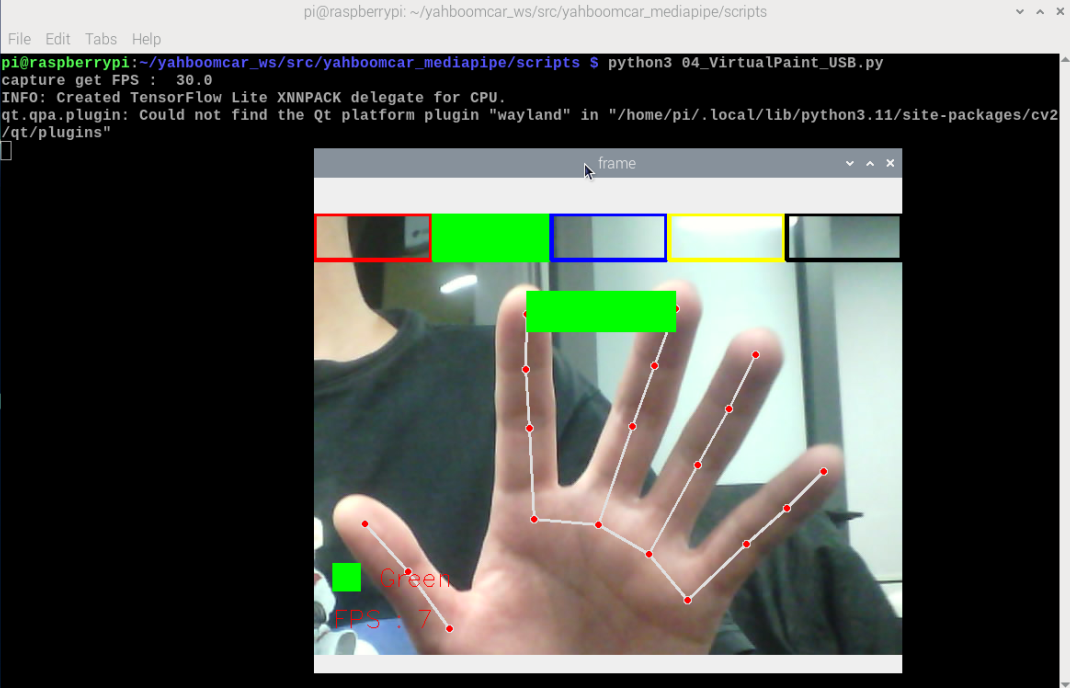
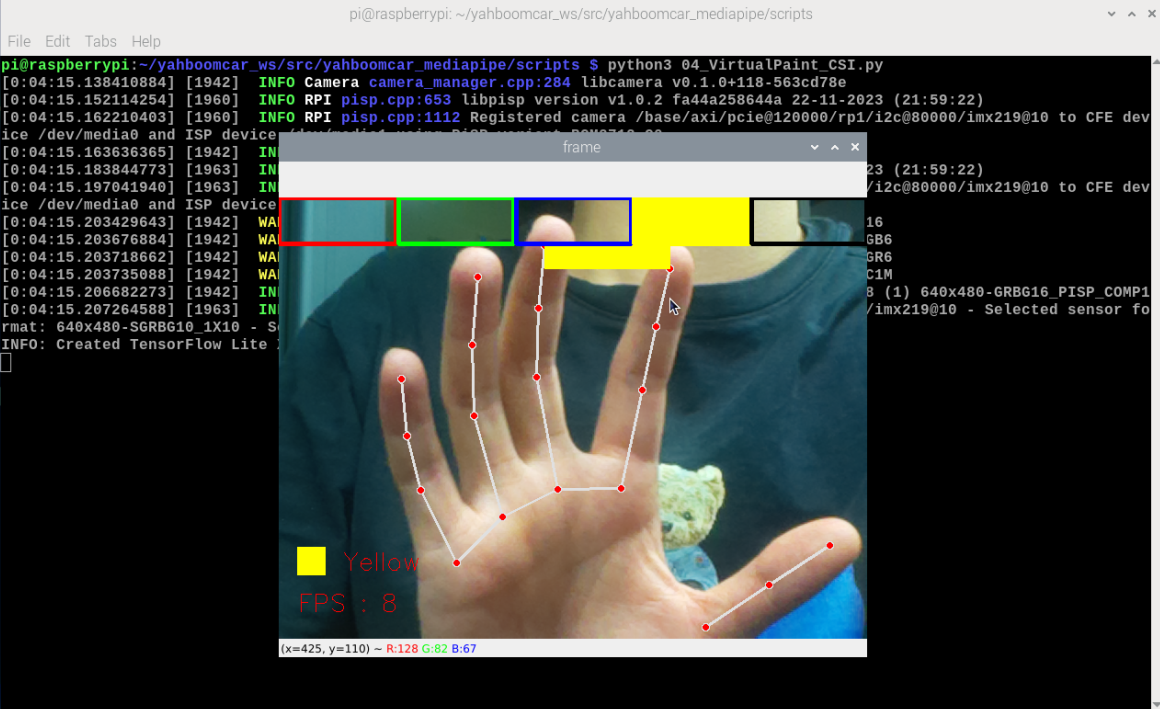
When the index finger and middle finger of the right hand come together, it is the selection state, and a color selection box pops up at the same time. When the two fingertips move to the corresponding color position, that color is selected (black is the eraser); when the index finger and middle finger are separated, it is the drawing state, and you can draw freely on the canvas.
If you want to exit the program, you can press q in the preview window or press Ctrl+C in the terminal to terminate the program!

1. USB Camera

xxxxxxxxxx
cd /home/pi/yahboomcar_ws/src/yahboomcar_mediapipe/scripts
python3 04_VirtualPaint_USB.py

image-20240103202223138

2. CSI Camera

xxxxxxxxxx
cd /home/pi/yahboomcar_ws/src/yahboomcar_mediapipe/scripts
python3 04_VirtualPaint_CSI.py

image-20240103203819022

MediaPipe 3D Object Recognition
MediaPipe Finger Control

COMPANY

  • About us
  • Team Style
  • Blog

LEARNING & EXPLORATION

  • Tutorials
  • Edge AI hardware
  • Educational robots
  • Embedded intelligent hardware

WHERE TO BUY

  • Yahboom Online Store
  • Amazon
  • Alibaba
  • AliExpress
  • Mercado

TECHNOLOGY SUPPORT

  • Email: support@yahboom.com

BE A DISTRIBUTOR

  • Email: sales@yahboom.com
QR Code
QR Code

Copyright © 2017-2026 Yahboom. All Rights Reserved.

EN/中文