Welcome to WLR722 LiDAR repository
4.ROS2 workspace
4. ROS2 Workspace
1. Workspace Introduction
In ROS robot development, when developing specific robot functions, various code, parameters, scripts, and other files need to be stored and managed in a folder. This folder is called a workspace in the ROS system. A workspace is a folder that stores project-related files and serves as the central repository for all data during the development process.
2. Create a Workspace
- Create a folder to store the project files. yahboomcar_ws is the folder name; you can name it anything.
xxxxxxxxxxmkdir -p yahboomcar_ws/src- Switch to the workspace folder
xxxxxxxxxxcd ~/yahboomcar_ws
3. Compile the Workspace
xxxxxxxxxxcolcon buildAfter the build is complete, you should see the build, install, and log directories:
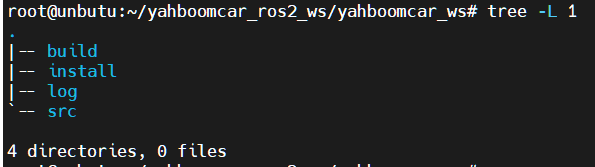
A typical workspace structure in the ROS system is shown above. yahboomcar_ws is the root directory of the workspace, which contains four subdirectories, or subspaces.
- src, the code space, where all future code and scripts will need to be placed manually;
- build, the compilation space, stores intermediate files generated during the compilation process;
- install, the installation space, stores compiled executable files and scripts;
- log, the log space, stores various warnings, errors, and information logs during the compilation and execution process.
Generally speaking, the vast majority of operations within these four workspaces are performed in the src folder. After a successful compilation, the results in the install folder are executed. The build and log folders are rarely used.
It's also important to emphasize that you can define your own workspace names**, and the number of workspaces is not unique. For example:
xxxxxxxxxxWorkspace 1: ros2_ws_a, for robot A developmentWorkspace 1: ros2_ws_b, for robot B developmentWorkspace 1: ros2_ws_c, for robot C developmentThe above scenarios are completely permitted, just like creating multiple new projects in an integrated development environment; they all exist in parallel.
4. Setting Environment Variables
After successfully compiling, we need to set environment variables to ensure the system can find our package and executable files:
xxxxxxxxxx# Valid only in the current terminalsource install/setup.bash# Valid in all terminalsecho "source ~/yahboomcar_ws/install/setup.bash" >> ~/.bashrcThis completes the creation, compilation, and configuration of the workspace.