yahboom
HomeTutorialsProduct
Solution
Blog
Online Store
About Us
EN/中文
Store
WLR722 LiDAR📖
1. Lidar Usage
  • 1. PC Software View Lidar
  • 2. Ros Driver Lidar
2. Cartographer Algorithm
  • 1. Cartographer 2D Mapping
  • 2. Cartographer 3D Mapping
3. Lego Loam Algorithm
  • 1. Compile Lego Loam Algorithm
  • 2. Lego Loam Algorithm Mapping
4. Lio Sam Algorithm
  • 1. Compile Lio Sam Algorithm
  • 2. Lio Sam Algorithm Mapping
5. Autoware Algorithm
  • 1. Compile Autoware Algorithm
  • 2. Autoware Navigation Lidar Adaptation
6. ROS2 Basic Course
  • 1.Introduction to ROS2
  • 2.ROS2 install Humble
  • 3.ROS2 development environment
  • 4.ROS2 workspace
  • 5.ROS2 function package
  • 6.ROS2 node
  • 7.ROS2 topic communication
  • 8.ROS2 service communication
  • 9.ROS2 action communication
  • 10.ROS2 custom interface message
  • 11.ROS2 parameter service case
  • 12.ROS2 meta-function package
  • 13.ROS2 distributed communication
  • 14.ROS2 DDS
  • 15.ROS2 time related API
  • 16.ROS2 common command tools
  • 17.ROS2 rviz2 use
  • 18.ROS2 rqt toolbox
  • 19.ROS2 Launch startup file configuration
  • 20.ROS2 recording and playback tool
  • 21.ROS2 URDF model
  • 22.ROS2 Gazebo simulation platform
  • 23.ROS2 TF2 coordinate transformation
Download
  • 3D_Model_File
  • Source Code
  • PC Software
  • Data Manual
Download ZIP

Welcome to WLR722 LiDAR repository

2. Ros Driver Lidar

Ros Driver Lidar

We provide the lidar ROS driver package, which has been successfully compiled and can drive the lidar on the Orin-Nano motherboard. Orin-Nano motherboard system environment: Ubuntu22.04+ROS2-Humble.

Installing Dependencies

Enter the following command in the terminal to install the necessary dependency files,

xxxxxxxxxx
sudo apt-get update
sudo apt-get install -y libyaml-cpp-dev libpcap-dev

Transplanting the Package and Compiling

Copy the contents of [ROS_SDK] from the Attachments folder to your workspace directory, then go back to the workspace and enter the following command to compile,

xxxxxxxxxx
colco build

Wait for the compilation to pass.

Lidar Connection

Connect the lidar to the lidar adapter cable, making sure to align the raised and recessed parts of the interface to avoid inserting it backwards and damaging the interface. Then power the lidar adapter cable's power port, and connect the Ethernet port to the motherboard's Ethernet port.

Driving the Lidar

Open a terminal and enter the lidar startup command,

xxxxxxxxxx
ros2 launch vanjee_lidar_sdk start.py

After running, an rviz will open, which will display the 32-line lidar point cloud,
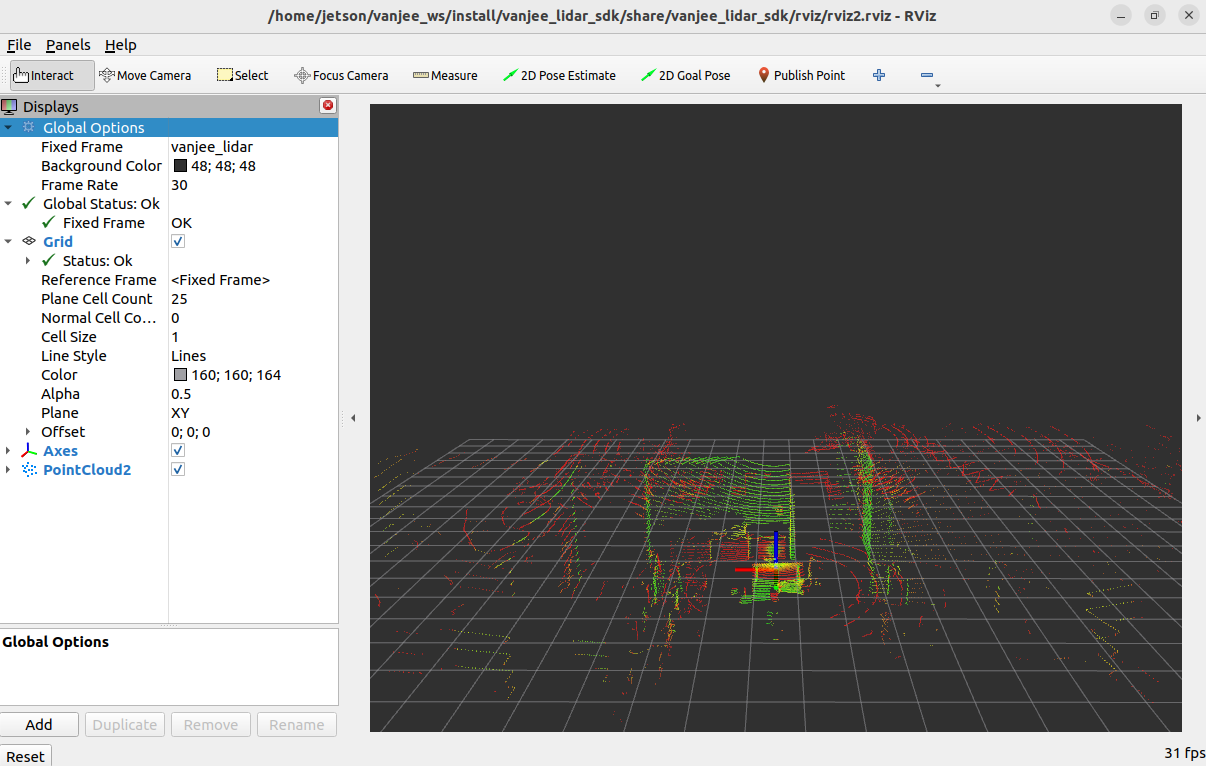
image-20260424212909698

Viewing Topics

To view the lidar point cloud topic, enter in the terminal,

xxxxxxxxxx
ros2 topic echo /rslidar_points

To view the imu topic, enter in the terminal,

ros2 topic echo /vanjee_lidar_imu_packets
PC Software View Lidar
Cartographer 2D Mapping

COMPANY

  • About us
  • Team Style
  • Blog

LEARNING & EXPLORATION

  • Tutorials
  • Edge AI hardware
  • Educational robots
  • Embedded intelligent hardware

WHERE TO BUY

  • Yahboom Online Store
  • Amazon
  • Alibaba
  • AliExpress
  • Mercado

TECHNOLOGY SUPPORT

  • Email: support@yahboom.com

BE A DISTRIBUTOR

  • Email: sales@yahboom.com
QR Code

Copyright © 2017-2026 Yahboom. All Rights Reserved.

EN/中文